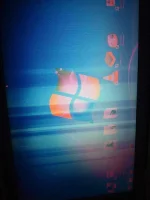
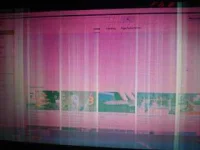
🔒 Closed Patulong po bigla nalang nagkaganito laptop ko

Status
Not open for further replies.

joshuapogi055

Journeyman
12991099_1121062234613014_7792718537906464747_n.jpg
Habang nanonood po ako ng video sa fb bigla nalang syang nagkaganyan....Yung kulay po nya di ko na maipaliwanag basta may pagka reddish sya at habang ginagamit ko po lalong syang lumalabo at dumadami yung guhit guhit
 

Attachments

  • 12993410_1121047501281154_3551509088190004529_n.webp
    12993410_1121047501281154_3551509088190004529_n.webp
    83.4 KB · Views: 23
  • 12932803_1121062931279611_3287807028826928921_n.webp
    12932803_1121062931279611_3287807028826928921_n.webp
    3.9 KB · Views: 23
  • 12991099_1121062234613014_7792718537906464747_n.webp
    12991099_1121062234613014_7792718537906464747_n.webp
    7 KB · Views: 19
There are several causes which leads to ;this' problem.

1) Check the display cable which runs mostly along the hinges of laptop screen. It is it damaged then replace it.

2) The actual screen is problem. Check it and replace if problem persists.

3) The 'converter / inverter' module of LCD becoming weak or faulty.

4) The 'built-in' graphic card/chip on laptop's motherboard is faulty due to overheating, clogging, dust, or any other reason.

PLEASE CHECK THESE DETAILS WITH PROFESSIONAL HARDWARE ENGINEER, as you alone cannot diagnose or identify the problem.

Source: You do not have permission to view the full content of this post. Log in or register now.
 
There are several causes which leads to ;this' problem.

1) Check the display cable which runs mostly along the hinges of laptop screen. It is it damaged then replace it.

2) The actual screen is problem. Check it and replace if problem persists.

3) The 'converter / inverter' module of LCD becoming weak or faulty.

4) The 'built-in' graphic card/chip on laptop's motherboard is faulty due to overheating, clogging, dust, or any other reason.

PLEASE CHECK THESE DETAILS WITH PROFESSIONAL HARDWARE ENGINEER, as you alone cannot diagnose or identify the problem.

Source: You do not have permission to view the full content of this post. Log in or register now.
Salamat boss. Kala ko sa windows lang ang problema kelangan na palang dalin sa shop. Salamat po ulet
 
base sa experience ko kapag puti all over screen malapit lapit sa gabok sa cable, pwde din nagloose
kapag may linya linya yan sa screen eh yun inverter ang problema tustado na...
kapag perma linya sa screen at malaking white or ibang kulay na sumasakop sa ibang area ng screen eh LCD replacement..
 
Status
Not open for further replies.

About this Thread

  • 4
    Replies
  • 735
    Views
  • 4
    Participants
Last reply from:
kyoshiro151

Trending Topics

Online now

Members online
301
Guests online
922
Total visitors
1,223

Forum statistics

Threads
2,275,524
Posts
28,963,847
Members
1,232,833
Latest member
mohdsad
Back
Top