 PH
PHsigmanians1962 Our download links are working. I believe you had intermittent downloading. Can you uninstall the old file and download a fresh one?Saklap. Broken file sya.
-
Welcome to PHCorner Forums! Sign up for free to unlock full access and exclusive privileges, including:
- Asking questions about computer and mobile issues
- Discovering internet tips for your mobile network and computer
You are using an out of date browser. It may not display this or other websites correctly.
You should upgrade or use an alternative browser.
You should upgrade or use an alternative browser.
🔒 Closed Queencee vpn ( tnt, globe, tm, sun )
- Thread starter queencee
- Start date
- Status
- Not open for further replies.
Kc po connecting lng po sken tska pag nag sset po ako ng new apn walang globe telecom na nklgay d tulad sa image po na nka post bago po mkgawa my globe telecom pa po ee ung sken po wala un lng po sana ma help nyo ko thanks
 Gawa nalang po kayo new apn
pRoKz28 The apn for TNT is "Default"Maam queencee, goodevening po. Talkntext user po ako, ano po ang APN na gagamitin? And nag cacaping po yung akin 12.5 mbps
On the first page there is a list of Proxy Servers and Real Proxy Servers. Mix match them until you get a good connection. There will be a right combination for your location as for bypassing the speed is concerned, you will do it on your area, and yes location will always be an issue but you can beat that. Patience is required. Goodluck.
Ganito po kasi yung default apn ko. Di ko ginagalaw kasi baguhan lang ako sorry po.pRoKz28 The apn for TNT is "Default"
On the first page there is a list of Proxy Servers and Real Proxy Servers. Mix match them until you get a good connection. There will be a right combination for your location as for bypassing the speed is concerned, you will do it on your area, and yes location will always be an issue but you can beat that. Patience is required. Goodluck.
Apn name : SMART INTERNET
Apn : internet
Apn type : default
Tama na po ba ito?
more thanks dito boss

Let us take a look inside QueenCee VPN...
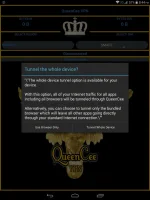
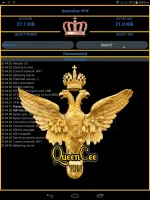
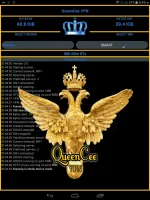
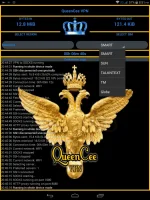
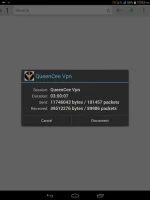
Here's a bonus for everyone!
Talk n Text Settings
Remove Port : Check
Proxy Type : Real Host
Proxy Server : Choose one below
click.ph
carmudi.com.ph
clubzed.ph
m.talkntext.com.ph
go.talkntext.com.ph
clickhere.ph
vshop.mdc.gameloft.com
203.174.14.199
Real Proxy Type : Default
Real Proxy Server : Choose one below
115.85.26.8
110.3.114.243
220.83.91.45
183.111.169.202
221.131.112.123
10.102.61.46
14.3.167.193
127.69.79.119
210.165.245.132
104.131.28.28
Real Proxy Port : 80/8080
DOWNLOAD LINKS :
You do not have permission to view the full content of this post. Log in or register now.
You do not have permission to view the full content of this post. Log in or register now.
End of Post #1
And now for our new VPN intended for Globe & TM...
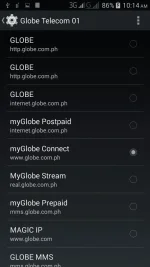
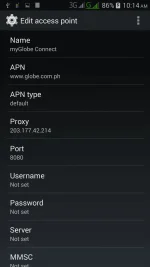
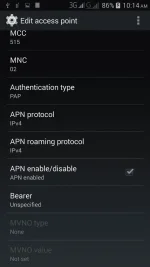
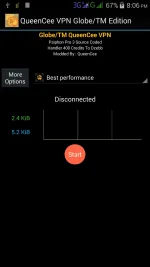
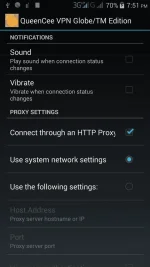
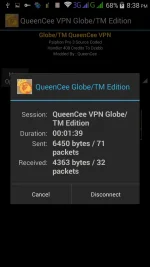
QueenCeen VPN Globe/TM Injected Edition
Procedure :
1st - Create APN MGC on your phone.
To those who have no idea on how to do it
on an Android phone, you may follow these steps...
1. Settings
2. More
3. Mobile Network
4. Access Point Name
5. Choose Globe Telecom
6. Choose myGlobe Connect
7. Name: my Globe connect
8. APN: You do not have permission to view the full content of this post. Log in or register now.
9. PROXY 203.177.42.214
10. PORT 8080
2nd - Install the QueenCeen VPN
Also, before you Connect...
A. Click More Options
B. Check the Connect Through http proxy
C. Check the Use System Network Setting
D. Then Connect
Note : If at first you did not succeed and were unable to connect, don't worry just do a "CDC" ;
By turning the Data Off
and clicking the Stop button on the VPN.
Then turn the Data On
and finally Connect again on the VPN.
Good Luck!
DOWNLOAD LINKS:
You do not have permission to view the full content of this post. Log in or register now.
You do not have permission to view the full content of this post. Log in or register now.
pRoKz28Ganito po kasi yung default apn ko. Di ko ginagalaw kasi baguhan lang ako sorry po.
Apn name : SMART INTERNET
Apn : internet
Apn type : default
Tama na po ba ito?
On page 1 there are screenshots you can use and incase you want to use Smart sim as the network in use,
May I direct you to my other thread, it is good for all Networks and it has Smart Handler Settings in specific.
https://phcorner.org/t/queencee-vpn-v3-all-networks.136157/
risk You are most welcome.more thanks dito boss
sweetypinkyTagal ma install..
Our download links are working. Also there is difference between App won't install and installation is taking too long.I believe you had an intermittent downloading. Can you delete the old file and open a fresh page. Download the link and install again. Goodluck.
dangkoy You are most welcome and yes it surely does work with zero load.Try q this one kpg wla nq load.hope it works for me..hehehe!.thanks!
redzkie You are most welcome and thank you for the positive feedback sir.Thanks for sharing ma'm... Bilis ng net..
Sa 1st step wala po akong number 5 ung choose globe telecom yan lng po ang kulang ko sa settings
 Yung no.5 po ang sim ninyo kung single sim at globe po gamit ninyo ayan po yun me dual sim kasi na phone
 Frayce You are most welcome.Thanks sa pagshare
JoyCis You are most welcome and goodluck.Pa try po boss btw thanks sa pagshare
boss bkit po ayaw gumana nasundan ko nmn yung instructionsigmanians1962 Our download links are working. I believe you had intermittent downloading. Can you uninstall the old file and download a fresh one?
riskboss bkit po ayaw gumana nasundan ko nmn yung instruction
Guide To QueenCee VPN
Let me direct you first to Page 1 because this is where you will get all the information you need.
https://phcorner.org/t/queencee-vpn-tnt-globe-tm.130070/
There are things to consider before choosing a VPN that suits you.
1.What is your sim in use?
2.On this thread, the first shared - QueenCee VPN and it is working very well for TNT users.
3.The second shared - QueenCee VPN Globe / TM Edition and it is intended for Globe /TM users.
4.The thread has the instructions and screenshots you can use.The settings and proceedures are important so don't miss a single detail.
5.Download links are provided for you to dl QueenCee VPN. Remember to choose the correct VPN by considering what sim you use. Good luck.
ask lng po bkit lumilpat sa original apn pag seneset ko sa new apn ?
drake_ekard808
Honorary Poster
pa'nu po ba ma enabled yung apn mam queen ayaw ma check kasi sa akin. tnx
- Status
- Not open for further replies.
About this Thread
-
2KReplies
-
186KViews
-
556Participants
Last reply from:
reyann macandog
reyann macandog
New Topics
-
HELP, Block ibang websites except google.com pag walang voucher.
- Started by Trudissliit
- Replies: 0
- 🚀 Freenet & Tunneling
-
Globe ovpn for unlitiktok
- Started by dark0112
- Replies: 0
- 🚀 Freenet & Tunneling
-
Free Residential Proxy
- Started by Noztrebor
- Replies: 2
- 🚀 Freenet & Tunneling
-
Need vpn free internet
- Started by Bon26
- Replies: 0
- 🚀 Freenet & Tunneling
-
LPB PISO WIFI HELP
- Started by -shutdown-
- Replies: 5
- 🚀 Freenet & Tunneling
-
DNS LOOPING IN LINUX V2RAY TUN
- Started by Hidedeath
- Replies: 2
- 🚀 Freenet & Tunneling
-
MGa BOSS FREE VPN NA MAY PH SERVER PARA DITO SA AFRICA?
- Started by Junbiel 26
- Replies: 1
- 🚀 Freenet & Tunneling
-
PISOWIFI NO HULOG | (26-09-30) | NPV TUNNEL
- Started by Calcifeer
- Replies: 8
- 🚀 Freenet & Tunneling
-
[NOW WORKING] Youtube No Ads & Other Sites! via DNS
- Started by Lerps
- Replies: 41
- 🚀 Freenet & Tunneling
Trending Topics
-
Oct. 19, 2026 - GTM NoLoad | STS NoLoad | AllNet and AllCountry NoLoad | OpenCFG
- Noahclanman
Replies: 16 -
-
-
-
-
-
Online now
- Members online
- 578
- Guests online
- 9,314
- Total visitors
- 9,892