 PH
PHMake sure your phone is rooted, Without Root you can’t able to install the Google Apps on your MIUI 12.5 China ROom
NOTE:- If you have installed any Google apps previously, first you will have to uninstall it. After that follow the below mention guide to install Google Services on Your MIUI 12.5 phone.
Step 1.
Open the Magisk Manager root App on your phone and Go to the module section.
Step 2.
From the module section, tap on the “Install from Storage” Button.
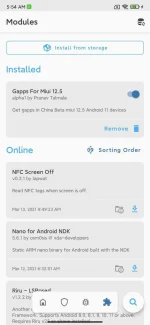
Step 3.
Now for the File Explorer, select the Gapps Zip file, Now the flashing process will start on your phone.
Step 4.
Once the Flashing process is completed, Reboot your phone.
Step 5.
After Reboot, install the Google Play Store apk file on your phone, And you are done.
NOTE:- If you have installed any Google apps previously, first you will have to uninstall it. After that follow the below mention guide to install Google Services on Your MIUI 12.5 phone.
Step 1.
Open the Magisk Manager root App on your phone and Go to the module section.
Step 2.
From the module section, tap on the “Install from Storage” Button.
Step 3.
Now for the File Explorer, select the Gapps Zip file, Now the flashing process will start on your phone.
Step 4.
Once the Flashing process is completed, Reboot your phone.
Step 5.
After Reboot, install the Google Play Store apk file on your phone, And you are done.