 PH
PH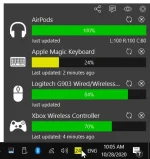
Overview:
Bluetooth Battery Monitor (BattMon) is a very practical Bluetooth device battery power monitoring software for Windows. It can accurately monitor and display the battery status of various Bluetooth devices currently connected to your computer in real time, thus helping you avoid the damage of battery life due to low power. In addition, it allows users to set certain thresholds and automatically receive a warning when the Bluetooth device’s power is below a certain value.
Requirements:
Windows 10 x64Bit (ver. 1709 or later) or Windows 7 SP1 x64Bit
ps. Check windows version by using WinKey + Pause|Break Key
Features:
Wide range of device support
Bluetooth headphones, keyboards, mice, digitizer pens, game controllers ... If your device reports its battery level, Bluetooth Battery Monitor can show it. †Many devices that uses vendor-specific protocols are also supported. This includes but not limited to:
- AirPods (1st gen, 2nd gen, pro)
- Apple Magic Mouse/Keyboard/Trackpad
- Logitech Bluetooth/Unifying/Nano/Loghtspeed Mouse/Keyboard
- Selected game controllers
Alert when your device needs charging
Bluetooth Battery Monitor will call your attention with notification message know when one of your devices needs charging.Don't worry if you missed the notification message. System tray icon shows you the level of the lowest battery of all your Bluetooth devices by its color.

Installation:
Windows 7:
* Run BattMonSetup-1.16.1.1 setup and copy contents of folder Unlocked to Installation directory.
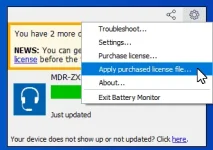
* Run program and click the system tray icon, and apply license (.lic) file from folder License.
Windows 10:
* Run BattMonSetup-2.0.1.1 setup and copy contents of folder Unlocked to Installation directory.
Download:
You do not have permission to view the full content of this post. Log in or register now.