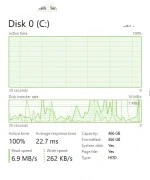
Need maintenance sa HDD
Observer mu rin kung anong app mataas gumamit ng disk maliban sa
SYSTEM
1. Try mu mag
check disk(chhsdk) para mkita kung may bad sectors
You do not have permission to view the full content of this post.
Log in or register now.
2. Pwedeng marami files...try to free up space.
click start menu and search
Disk Cleanup and run as administrator
then mag scan nayan tpos makikita mo pwedeng burahin....
ok din ung 3rd party app na
Ccleaner try mo.
3. Maraming files need i
defrag ....medyo matagal to magtrabaho since magaarange sya ng files.
Defragmenting is beneficial for HDDs because it brings files together instead of scattering them so that the device's read-write head doesn't have to move around as much when accessing files. ... Defragmenting improves load times by reducing how frequently the hard drive has to seek data.
im using 3rd party app
smart defrag or
defraggler kase may features sya na wla sa default defrag app ng Win 10
4. bka pwedeng may virus/malware or may corrupted na files sa OS mo
mag scan ka using Antivirus
update windows 10 to latest version
pwede ka rin mag repair ng System files using SFC or DISM tool
You do not have permission to view the full content of this post.
Log in or register now.
pwede rin reinstall OS or CLEAN format
5. Last option mo is Upgrade to
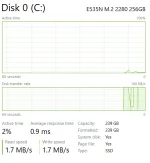
SSD....layo ng agwat nya sa
HDD in terms of
SPEED PH
PH