 PH
PH-
Welcome to PHCorner Forums! Sign up for free to unlock full access and exclusive privileges, including:
- Asking questions about computer and mobile issues
- Discovering internet tips for your mobile network and computer
You are using an out of date browser. It may not display this or other websites correctly.
You should upgrade or use an alternative browser.
You should upgrade or use an alternative browser.
🔒 Closed PC PROBLEM, MOZILLA NOT OPENING
- Thread starter XsanX
- Start date
- Status
- Not open for further replies.
Solution
Download ka ng browser(example: Chrome) for pc gamit phone mo, tapos transfer mo nalang sa PC para mainstallan(need pa ng internet during installation)Boss, paano kaya mag download ng browser na walang ginagamit na browser? E delete ko nalang siguro tung firefox ko d kase ma open kahit anong gagawin ko
Guyss, paano mag download ng browser nito sa pc ko? Newbie pa kase ako nito
Ito try mo:
To check if the profile folder has the proper permissions:
Source: Firefox
End Firefox processes
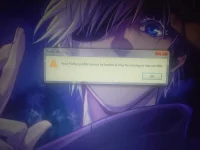
If Firefox did not shut down normally when you last used it, Firefox might still be running in the background, even though it is not visible. If you try to open it while it's running, an error message will appear with the option to click Close Firefox. If that doesn't solve the problem, restart your computer or try the following options.Use the Windows Task Manager to close the existing Firefox process
- Right-click on an empty spot in the Windows task bar and select Task Manager (or press Ctrl+Shift+Esc).
- When the Windows Task Manager opens, select the Processes tab.
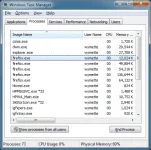
- Select the entry for firefox.exe (press F on the keyboard to find it) and click End Process.
- Click Yes in the "Task Manager Warning" dialog that appears.
- Repeat the above steps to end all additional firefox.exe processes, then exit the Windows Task Manager.
- Start Firefox normally.
Remove the profile lock file
Firefox may have shut down abnormally, leaving the lock file in place. To fix this, open the profile folder (see You do not have permission to view the full content of this post. Log in or register now.) and delete the parent.lock file.Remove the -no-remote startup option
If you start Firefox with th-e -no-remote You do not have permission to view the full content of this post. Log in or register now., try removing this option.Initialize the connection to a file share
If you store the profile on a file share, try accessing the file share beforehand using Windows Explorer.Check access rights
Firefox must also have the right to create files in the profile folder. The error can occur if you try to use a profile from a file system mounted with read-only permission (e.g. a remote Windows share which doesn't have "Allow network users to change my files" checked).To check if the profile folder has the proper permissions:
- Find your Firefox profile folder - see You do not have permission to view the full content of this post.
Log in or register now..
- If you only have one profile, its folder would have "default" in the name.
- Right-click on your profile folder and select Properties.
- Click on the General tab.
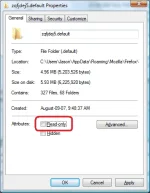
- Make sure Read-only is not checked marked.
Restore data from a locked profile
If you are unable to unlock the profile using the above methods, You do not have permission to view the full content of this post. Log in or register now. to create a new profile and migrate your data from the locked profile to the new profile. For information on how to do this, see You do not have permission to view the full content of this post. Log in or register now..Source: Firefox
Boss, paano kaya mag download ng browser na walang ginagamit na browser? E delete ko nalang siguro tung firefox ko d kase ma open kahit anong gagawin koIto try mo:
End Firefox processes
If Firefox did not shut down normally when you last used it, Firefox might still be running in the background, even though it is not visible. If you try to open it while it's running, an error message will appear with the option to click Close Firefox. If that doesn't solve the problem, restart your computer or try the following options.
Use the Windows Task Manager to close the existing Firefox process
- Right-click on an empty spot in the Windows task bar and select Task Manager (or press Ctrl+Shift+Esc).
- When the Windows Task Manager opens, select the Processes tab.View attachment 1815986
- Select the entry for firefox.exe (press F on the keyboard to find it) and click End Process.
- Click Yes in the "Task Manager Warning" dialog that appears.
- Repeat the above steps to end all additional firefox.exe processes, then exit the Windows Task Manager.
- Start Firefox normally.
Remove the profile lock file
Firefox may have shut down abnormally, leaving the lock file in place. To fix this, open the profile folder (see You do not have permission to view the full content of this post. Log in or register now.) and delete the parent.lock file.
Remove the -no-remote startup option
If you start Firefox with th-e -no-remote You do not have permission to view the full content of this post. Log in or register now., try removing this option.
Initialize the connection to a file share
If you store the profile on a file share, try accessing the file share beforehand using Windows Explorer.
Check access rights
Firefox must also have the right to create files in the profile folder. The error can occur if you try to use a profile from a file system mounted with read-only permission (e.g. a remote Windows share which doesn't have "Allow network users to change my files" checked).
To check if the profile folder has the proper permissions:
- Find your Firefox profile folder - see You do not have permission to view the full content of this post. Log in or register now..
- If you only have one profile, its folder would have "default" in the name.
- Right-click on your profile folder and select Properties.
- Click on the General tab.View attachment 1815987
- Make sure Read-only is not checked marked.
Restore data from a locked profile
If you are unable to unlock the profile using the above methods, You do not have permission to view the full content of this post. Log in or register now. to create a new profile and migrate your data from the locked profile to the new profile. For information on how to do this, see You do not have permission to view the full content of this post. Log in or register now..
Source: Firefox
Guyss, paano mag download ng browser nito sa pc ko? Newbie pa kase ako nito
Download ka ng browser(example: Chrome) for pc gamit phone mo, tapos transfer mo nalang sa PC para mainstallan(need pa ng internet during installation)Boss, paano kaya mag download ng browser na walang ginagamit na browser? E delete ko nalang siguro tung firefox ko d kase ma open kahit anong gagawin ko
Guyss, paano mag download ng browser nito sa pc ko? Newbie pa kase ako nito
Thank u boss, lightweight po ba yung opera mini kaysa Firefox?Download ka ng browser(example: Chrome) for pc gamit phone mo, tapos transfer mo nalang sa PC para mainstallan(need pa ng internet during installation)
Hindi ako sigurado, yung experience ko mas lightweight si Firefox kaysa Opera, doon ako nagbase sa kinakain ng RAM.Thank u boss, lightweight po ba yung opera mini kaysa Firefox?
So si firefox lang maliit kumakain ng RAM boss?Hindi ako sigurado, yung experience ko mas lightweight si Firefox kaysa Opera, doon ako nagbase sa kinakain ng RAM.
Para sa akin, Oo.So si firefox lang maliit kumakain ng RAM boss?
- Status
- Not open for further replies.
Similar threads
-
❓ Help PC PROBLEM. AYAW MMAG POWER ON
- Started by Raikenji Elizilinet
- Replies: 2
-
-
About this Thread
-
7Replies
-
440Views
-
2Participants
Last reply from:
1neWay
1neWay
New Topics
-
Lock profile or browser?
- Started by heyhey
- Replies: 7
- ❓ Computer Discussion & Support
-
Light/Gaming OS for 4 year old laptop
- Started by Genesis Storm
- Replies: 2
- ❓ Computer Discussion & Support
-
HWID SPOOFER HELP!
- Started by Balisain
- Replies: 0
- ❓ Computer Discussion & Support
-
LIGHTROOM APP PC
- Started by WHOOISDIYAAM
- Replies: 1
- ❓ Computer Discussion & Support
-
Active Directory tutorial
- Started by Allergies
- Replies: 1
- ❓ Computer Discussion & Support
-
Hide Yuzu or any emulator
- Started by izanagi07
- Replies: 1
- ❓ Computer Discussion & Support
-
Phc error in Desktop
- Started by dicode100
- Replies: 3
- ❓ Computer Discussion & Support
-
Microsfot 365 activation tool or key need lang boss asap
- Started by zzaj zzaj
- Replies: 2
- ❓ Computer Discussion & Support
-
Di makaacess sa TGT ngayon umaga using pldt ip.
- Started by Dvin
- Replies: 1
- ❓ Computer Discussion & Support
-
Guys pa help naman for mobile nitflex cookie
- Started by Darknel_SQL
- Replies: 1
- ❓ Computer Discussion & Support
Trending Topics
Online now
- Members online
- 596
- Guests online
- 2,004
- Total visitors
- 2,600