 PH
PHStep 1.Download Android/Samsung Data Recovery in Pc,
Launch Program and Connect Samsung phone to the Computer
Install and run the Samsung Data Recovery program on the computer,click”Android Data Recovery” option in the home page of program.Then connect your Samsung A10/A20 phone to the computer with a USB cable.
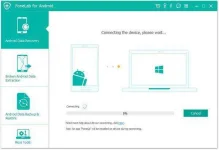
Step 2.
Allow Program Connect Samsung phone to the Computer
Then,click “OK” on the Samsung A10/A20 to allow the program detect your phone on the computer.
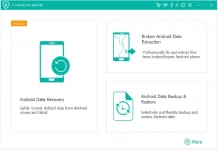
Step 3.
Select the Files to Recover from Samsung phone
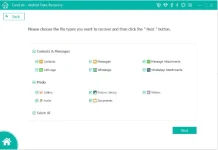
After allowing program detect your phone on computer, you’ll see this page with different types of files can be chosen and then scanned by program. Please select the files contain the data you want and then click “Next” to go on.
Note: You can click “Select all” to have all your Samsung data scanned.
Step 4.Allow Scanning and Analyzing Data on Samsung phone
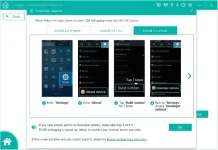
You’ll get a window as follow on your phone.Please click “Allow” on your phone to enable the program to scan your device for deleted data.
Note: Please make sure that your phone battery is more than 20% charged and keep the connection between your phone and the computer.
Step 5.
.Scan Samsung phone for Deleted Data
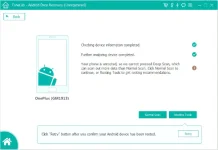
Now the program will begin to scan data on your phone with only some minutes, please be patient.
Step 6.
Recover Photos from Samsung phone
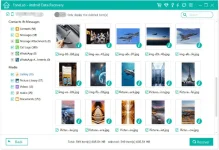
Once the scan is over, you can preview all the data found on this page, including contacts,SMS,photos,videos,etc. Please select the data you want to recover, and then click the "Recover" button to save them to your computer
source:recoveryandroid/iphone
Launch Program and Connect Samsung phone to the Computer
Install and run the Samsung Data Recovery program on the computer,click”Android Data Recovery” option in the home page of program.Then connect your Samsung A10/A20 phone to the computer with a USB cable.
Step 2.
Allow Program Connect Samsung phone to the Computer
Then,click “OK” on the Samsung A10/A20 to allow the program detect your phone on the computer.
Step 3.
Select the Files to Recover from Samsung phone
After allowing program detect your phone on computer, you’ll see this page with different types of files can be chosen and then scanned by program. Please select the files contain the data you want and then click “Next” to go on.
Note: You can click “Select all” to have all your Samsung data scanned.
Step 4.Allow Scanning and Analyzing Data on Samsung phone
You’ll get a window as follow on your phone.Please click “Allow” on your phone to enable the program to scan your device for deleted data.
Note: Please make sure that your phone battery is more than 20% charged and keep the connection between your phone and the computer.
Step 5.
.Scan Samsung phone for Deleted Data
Now the program will begin to scan data on your phone with only some minutes, please be patient.
Step 6.
Recover Photos from Samsung phone
Once the scan is over, you can preview all the data found on this page, including contacts,SMS,photos,videos,etc. Please select the data you want to recover, and then click the "Recover" button to save them to your computer
source:recoveryandroid/iphone
 pati ba naman dito may hugot ka pa din hahaha,umayos ka nga,welcome anyways haha
 DEJK baka magalit ka na
 hehe kulit mo din pala minsan