PH
PHPresets for Lightroom – Koloro opens up a world of great photo editing and video editing with the perfect color filters. You can use the QR code to scan the filter and save it to your own device as a private asset, and vice versa, quickly transfer your customized recipe as a QR code for all users to access. In addition, we have more than 1000 beautiful color filters available in all styles to meet all needs and fields of users.
More New Filters
Referring to Koloro, one cannot forget the filters that have changed an image, turning the ugliest things into classy masterpieces. Currently, with the introduction of the latest version, the application has launched many new filters. In particular, the most prominent is the Diamond package; it has exceptionally bright sparkling shades suitable for the landscape of the sky, clouds, flowers, and sea. The Melancholy package also allows intense emotions to be E×ρréššed by the contrast of cool and warm colors.
Convenience of Qr Code
Koloro’s most modern advancement is considered an exclusive breakthrough that is the form of QR code scanning. Now, you can easily own a photo-editing recipe from others with just one operation, which is extremely fast, efficient, time-saving, and has a higher success rate than the old formula—complicated access permissions. You can also share your fantastic recipe with any user by sending them a QR code.
Filters Treasure available
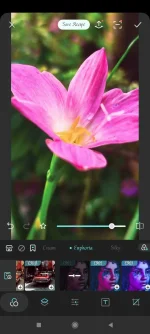
Besides you owning filters from others, Koloro has provided you with a massive collection of filters upon arrival. Specifically with more than 1000 premium filters that have been thoroughly researched in the lab, now wholly yours. For each image, you can choose the filter that best suits you. We give you the ability to preview the image when the filter is applied to decide whether to export it or not.
Those perfect filters are created by the most professional filmmakers and photographers worldwide; the quintessence of art is now in your hands. For example, LOMO, a classic filter in the 80s and 90s of the last century, or the color images in movies about food in cities turning orange-yellow are incredibly eye-catching and trendy. It even has warm wood tone filters suitable for happy weddings.
Editing easy parameter changes
After choosing a filter you like, you can directly export that image and use it, but each image will have its own parameters, so users are not really satisfied when applying the filter. Therefore, Koloro allows users to freely customize the masterpiece by adjusting brightness, gloss, balance, overlaying more particles, … In addition to the parameters of contrast, highlights, exposure is also suggested.
View attachment presets-for-lightroom-koloro-2.webp
View attachment presets-for-lightroom-koloro-3.webp
Download link:You do not have permission to view the full content of this post. Log in or register now.
More New Filters
Referring to Koloro, one cannot forget the filters that have changed an image, turning the ugliest things into classy masterpieces. Currently, with the introduction of the latest version, the application has launched many new filters. In particular, the most prominent is the Diamond package; it has exceptionally bright sparkling shades suitable for the landscape of the sky, clouds, flowers, and sea. The Melancholy package also allows intense emotions to be E×ρréššed by the contrast of cool and warm colors.
Convenience of Qr Code
Koloro’s most modern advancement is considered an exclusive breakthrough that is the form of QR code scanning. Now, you can easily own a photo-editing recipe from others with just one operation, which is extremely fast, efficient, time-saving, and has a higher success rate than the old formula—complicated access permissions. You can also share your fantastic recipe with any user by sending them a QR code.
Filters Treasure available
Besides you owning filters from others, Koloro has provided you with a massive collection of filters upon arrival. Specifically with more than 1000 premium filters that have been thoroughly researched in the lab, now wholly yours. For each image, you can choose the filter that best suits you. We give you the ability to preview the image when the filter is applied to decide whether to export it or not.
Those perfect filters are created by the most professional filmmakers and photographers worldwide; the quintessence of art is now in your hands. For example, LOMO, a classic filter in the 80s and 90s of the last century, or the color images in movies about food in cities turning orange-yellow are incredibly eye-catching and trendy. It even has warm wood tone filters suitable for happy weddings.
Editing easy parameter changes
After choosing a filter you like, you can directly export that image and use it, but each image will have its own parameters, so users are not really satisfied when applying the filter. Therefore, Koloro allows users to freely customize the masterpiece by adjusting brightness, gloss, balance, overlaying more particles, … In addition to the parameters of contrast, highlights, exposure is also suggested.
View attachment presets-for-lightroom-koloro-2.webp
View attachment presets-for-lightroom-koloro-3.webp
Download link:You do not have permission to view the full content of this post. Log in or register now.