🔒 Closed [GDrive] Acronis Cyber Protect Home Office (formerly Acronis True Image) Build 39703 Bootable Media (Linux-based)

Status
Not open for further replies.

whisker

Eternal Poster

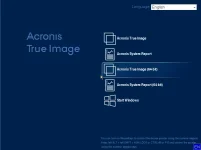
Acronis Cyber Protect Home Office Bootable Media​

1526_03.webp

Description​

If your computer does not boot or you have a new computer without any operating system installed on it, you can boot your computer with Acronis bootable media. The bootable media is a USB flash drive or a CD with Acronis software on it. This way, you can recover from a backup in case your computer does not boot anymore.

Acronis Bootable Media of any Acronis backup product is an exclusive recovery environment for restoring images. Additionally, it allows you to create images, clone hard disk drives, partition new hard disk drives without having to boot into Windows. It has the same graphical interface as when you run your copy of an Acronis backup product under Windows.

The bootable media is based on the Linux operating system and uses Linux drivers for getting access to all hardware devices.

The bootable media boots and runs successfully both on 32 bit and 64 bit machines.

You can run the bootable media of your copy of an Acronis backup product from a CD-R(W) disc, a DVD+R(W), DVD-R(W) a set of floppy diskettes, a USB flash card or a ZIP-diskette.

Backup archives created in Windows can be restored by Acronis Bootable Media and vice versa.

Types of Bootable Media​

  • Acronis Bootable Media (Linux-based)- This type is recommended for most users.
    • Linux-based media supports most hardware configurations available. If particular hardware is not supported, there are two possible causes for it:
      • necessary drivers have not been added to bootable media yet;
      • hardware vendor does not provide open-source drivers. In this case it is recommended to use Windows-based bootable media.
  • WinPE-based Media with the Acronis plug-in (Strongly Recommended)
    • Running Acronis True Image 2021 in the pre-installation environment may provide better compatibility with your computer’s hardware because the pre-installation environment uses Windows drivers.

      We recommend that you create this type of media, when Acronis bootable media did not help you boot your computer.
    • Note that 32-bit bootable media can work only on 32-bit computers, and 64-bit media is compatible with both 32-bit and 64-bit computers.

Checksum Information​

NameAcronisCyberProtectHomeOffice_39703.iso
Size723255296 bytes (689 MiB)
SHA10FB28A283E3345281F68766C9EBC2AFD08FD8821
SHA256E60F929DF35FC38BA74FAE6C7DB6F4A9CEB5773FCA82223789979C3B0048DC46
SHA512CCCAE2DF86313B38FE81E7E5F7D79CC1B20220C5B8F29F1980592B9B46A8A11E0ED2FDE464BC851A0DAD37DFE160D0CC96A82FC69B7B3701A4071DAEA2C5A6CF

⤓ Direct Download Link​

You do not have permission to view the full content of this post. Log in or register now.

Recommended Image Writer​

You do not have permission to view the full content of this post. Log in or register now.

For previous version of Bootable Media (Linux-based and WinPE-based), kindly visit this thread -
[Google Drive] Acronis True Image 2021 Build 39216 Bootable Media (Linux-based and WinPE-based)
 
Status
Not open for further replies.

About this Thread

  • 3
    Replies
  • 336
    Views
  • 3
    Participants
Last reply from:
Hunter_killer07

Online now

Members online
519
Guests online
870
Total visitors
1,389

Forum statistics

Threads
2,287,996
Posts
29,048,139
Members
1,215,856
Latest member
allan_35
Back
Top