🔒 Closed Free Internet OM 7.1 for PC

Status
Not open for further replies.

ahpaul11

Enthusiast
If you’re a Globe Prepaid user, and want to have free internet by using a mgc trick, the good news is you can use it in your laptop or desktop computers, if you running a windows system, just download a latest java here is the link: You do not have permission to view the full content of this post. Log in or register now. then follow the steps below:

- We are still be using a Opera Mini, I have lot of mgc trick here for android: You do not have permission to view the full content of this post. Log in or register now., Now Download here Opera Mini 7.1 You do not have permission to view the full content of this post. Log in or register now.

- Use this Apn Settings then Connect (Use Globe Prepaid Sim)

Access Point: You do not have permission to view the full content of this post. Log in or register now.
Dial Number: *99#

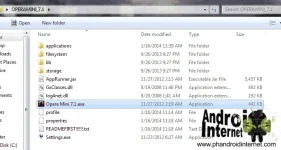
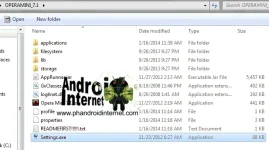
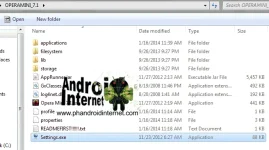
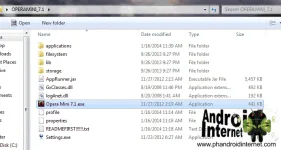
- Open the downloaded Opera Mini 7.1, then open Settings.exe
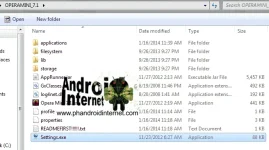
iRtU7-OrD2uyJ6Daal0gmVD0vVs-i7FgcRqEk=w656-h367-no.webp

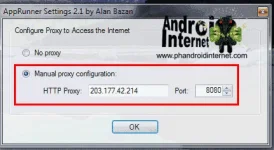
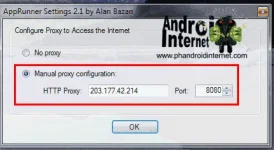
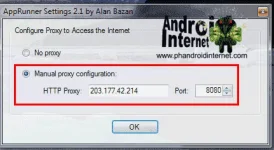
- Set and choose manual proxy configuration

HTTP Proxy: 203.177.42.214 PORT: 8080 THEN CLICK OK.
manual+proxy.webp

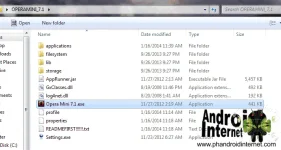
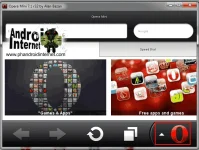
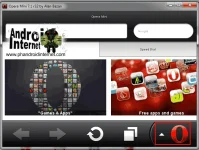
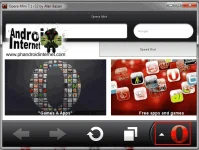
- Open Opera Mini 7.1.exe,

om7.1.webp

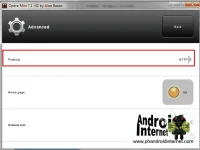
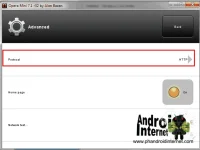
- then GOTO Settings> Advanced> Protocol> Choose HTTP
-oHZIup-Dy3X3v0CYx7ne2rlSxeXBbMgkrdZg=w667-h503-no.webp

protocol+http.webp

- Final Browse (Note: Use this Only for Browsing and Downloading, don’t log-in in Facebook and Important websites.

feedbacks kung working tnx
 
If you’re a Globe Prepaid user, and want to have free internet by using a mgc trick, the good news is you can use it in your laptop or desktop computers, if you running a windows system, just download a latest java here is the link: You do not have permission to view the full content of this post. Log in or register now. then follow the steps below:

- We are still be using a Opera Mini, I have lot of mgc trick here for android: You do not have permission to view the full content of this post. Log in or register now., Now Download here Opera Mini 7.1 You do not have permission to view the full content of this post. Log in or register now.

- Use this Apn Settings then Connect (Use Globe Prepaid Sim)

Access Point: You do not have permission to view the full content of this post. Log in or register now.
Dial Number: *99#

- Open the downloaded Opera Mini 7.1, then open Settings.exe

iRtU7-OrD2uyJ6Daal0gmVD0vVs-i7FgcRqEk=w656-h367-no.webp

- Set and choose manual proxy configuration

HTTP Proxy: 203.177.42.214 PORT: 8080 THEN CLICK OK.

manual+proxy.webp

- Open Opera Mini 7.1.exe,

om7.1.webp

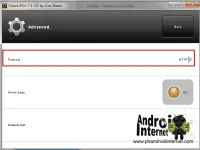
- then GOTO Settings> Advanced> Protocol> Choose HTTP
-oHZIup-Dy3X3v0CYx7ne2rlSxeXBbMgkrdZg=w667-h503-no.webp

protocol+http.webp

- Final Browse (Note: Use this Only for Browsing and Downloading, don’t log-in in Facebook and Important websites.

feedbacks kung working tnx
I am sorry to say ts...but it is old methods to use this in pc or loptops.....nowadays we use http injector in android, pc or loptops....or other injectors build in that can run any kind of browsers that is very compatible and any methods.....sorry i would to say to you to inform and upgrade..........but thanks for sharings...
 
If you’re a Globe Prepaid user, and want to have free internet by using a mgc trick, the good news is you can use it in your laptop or desktop computers, if you running a windows system, just download a latest java here is the link: You do not have permission to view the full content of this post. Log in or register now. then follow the steps below:

- We are still be using a Opera Mini, I have lot of mgc trick here for android: You do not have permission to view the full content of this post. Log in or register now., Now Download here Opera Mini 7.1 You do not have permission to view the full content of this post. Log in or register now.

- Use this Apn Settings then Connect (Use Globe Prepaid Sim)

Access Point: You do not have permission to view the full content of this post. Log in or register now.
Dial Number: *99#

- Open the downloaded Opera Mini 7.1, then open Settings.exe

iRtU7-OrD2uyJ6Daal0gmVD0vVs-i7FgcRqEk=w656-h367-no.webp

- Set and choose manual proxy configuration

HTTP Proxy: 203.177.42.214 PORT: 8080 THEN CLICK OK.

manual+proxy.webp

- Open Opera Mini 7.1.exe,

om7.1.webp

- then GOTO Settings> Advanced> Protocol> Choose HTTP

-oHZIup-Dy3X3v0CYx7ne2rlSxeXBbMgkrdZg=w667-h503-no.webp

protocol+http.webp

- Final Browse (Note: Use this Only for Browsing and Downloading, don’t log-in in Facebook and Important websites.

feedbacks kung working tnx
boss ano ba gamit dito? pwede pocket wifi? tapos naka default lang ang settings? thanks you.
 
Status
Not open for further replies.

About this Thread

  • 42
    Replies
  • 7K
    Views
  • 36
    Participants
Last reply from:
vladimer01

Online now

Members online
1,070
Guests online
833
Total visitors
1,903

Forum statistics

Threads
2,274,941
Posts
28,959,487
Members
1,233,488
Latest member
lea11sales
Back
Top