PH
PH Requirements:
Windows 10 (32-bit) / Windows 10 (64-bit)
Advanced English Dictionary is a comprehensive education, reference, and office tool that can help users both at home, school, and work to easily discover, reference, and integrate a You do not have permission to view the full content of this post. Log in or register now. directly into their workflow. Built from the ground up to enable users of all ages and knowledge levels to easily interact with the large dictionary database that has is home to more than 400 thousand entries, this clean and modern app is regarded by many as one of the most pleasing and easy dictionary apps on the modern market. While this app can be used for free without any restrictions on its functionality, it is important to note that the game features ads. Thankfully, users who appreciate the high standard of database entries, usability, and the streamlined interface can decide to pay for a single purchase option that is available in this app and remove all ads from it.
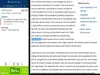
The app features a wide array of advanced features that can help anyone to discover the right dictionary term they are looking for. It has built-in support for monitoring clipboard text data, the ability to function in minimized mode straight from the snapped interface, clickable words in the definition, the easy discovery of related words, picture gallery, written and audio pronunciation help, and much more. To help offline users, Advanced English Dictionary can also be used without the internet connection. Its entire dictionary database is stored locally, right on your home desktop PC, laptop, or tablet.
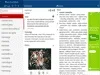
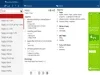
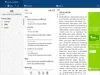
The user interface of the Advanced English Dictionary is streamlined for the fastest discovery of dictionary terms. The app features three main tabs where data is showcased – “Search” (which features easy to use tools for clipboard pasting, history of searches, and favorite searches), “Definition” (where each selected term is described in great detail), and “Relation” (that shows the connection of that term with other entries in the database). The entire app can be placed into a minimized snap mode where it can identify all the words in the current document you are browsing, and the You do not have permission to view the full content of this post. Log in or register now. can even be accessed directly via search charm integration with the main search bar of your Windows 10.
Advanced English Dictionary is a Windows 10 app that can be downloaded from the Windows Store. Because of its total focus on Win10 integration, it cannot be used on any other versions of You do not have permission to view the full content of this post. Log in or register now. Windows OS. To install it, simply visit the app’s Microsoft Store page and click on the “Get” button.
Download Link:You do not have permission to view the full content of this post. Log in or register now.