 PH
PHKingSemreh
Eternal Poster
-Tested in my hAP lite and hEX S Mikrotik Devices
Step -1:
Login to your Mikrotik (Let's assume that your Mikrotik is fully working with an internet connection.
Step -2:
Go to IP >Cloud, as you can see:
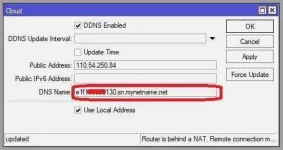
Hit Apply and Copy the DNS Name then Hit OK.
Almost Done...
Write Down the DNS Name in this format: d11a0dd0a2f5.sn.mynetname.net:8291
Step -3:
Go to IP then service to check if your Winbox port is 8291, if not, kindly change it.
Step -4:
Go to IP >Firewall >Filter Rule (create a Rule for Final and Complete config to make it work remotely)
as you can see:
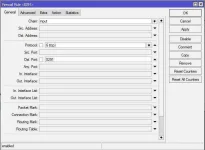
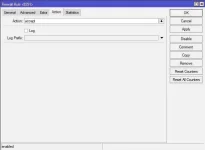
Then drag the rule to line no.3
as you can see:
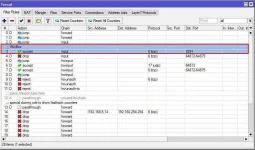
Done:
-----------------------------------------------------------------------------------------------------
To test: Disable your LAN network connected to Mikrotik or connect to modem directly or by WiFi.
-----------------------------------------------------------------------------------------------------
Connect to: DNS Name you generated
Login: your mikrotik login details
Password: your mikrotik password
Boom... Congratulation!
-----------------------------------------------------------------------------------------------------
Step -1:
Login to your Mikrotik (Let's assume that your Mikrotik is fully working with an internet connection.
Step -2:
Go to IP >Cloud, as you can see:
Hit Apply and Copy the DNS Name then Hit OK.
Almost Done...
Write Down the DNS Name in this format: d11a0dd0a2f5.sn.mynetname.net:8291
Step -3:
Go to IP then service to check if your Winbox port is 8291, if not, kindly change it.
Step -4:
Go to IP >Firewall >Filter Rule (create a Rule for Final and Complete config to make it work remotely)
as you can see:
Then drag the rule to line no.3
as you can see:
Done:
-----------------------------------------------------------------------------------------------------
To test: Disable your LAN network connected to Mikrotik or connect to modem directly or by WiFi.
-----------------------------------------------------------------------------------------------------
Connect to: DNS Name you generated
Login: your mikrotik login details
Password: your mikrotik password
Boom... Congratulation!
-----------------------------------------------------------------------------------------------------