🔒 Closed [Latest] CCleaner 5.15.5513 All Edition + Portable

Status
Not open for further replies.

EARZE

Contributor
CCleaner

Ns5MumT.webp


CCleaner Professional / Business / Technician Overview
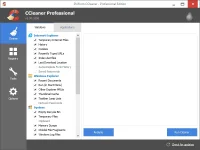
  • is the number-one tool for cleaning your Windows PC. It protects your privacy online and makes your computer faster and more secure. CCleaner is easy to use and a small, fast download and user interface has the modern look. CCleaner is a freeware system optimization and privacy tool. Removes unused files from your system – allowing Windows to run faster and freeing up valuable hard disk space. It also cleans traces of your online activities such as your Internet history. CCleaner can run from a USB thumbdrive and be installed/run on a computer without a complicated setup process. It is possible to specify files, folders and registry keys to ignore from the cleaning process. But the best part is that it’s fast (normally taking less than a second to run) and contains NO Spyware or Adware!
Features of CCleaner 5
  • CCleaner cleans the following:
  • Internet Explorer. Temporary files, history, cookies, super cookies, Autocomplete form history, index.dat files.
  • Firefox. Temporary files, history, cookies, super cookies, download history, form history.
  • Google Chrome. Temporary files, history, cookies, super cookies, download history, form history.
  • Opera. Temporary files, history, cookies, super cookies, download history.
  • Apple Safari. Temporary files, history, cookies, super cookies, form history.
  • Other Supported Browsers. K-Meleon, Rockmelt, Flock, Google Chrome Canary, Chromium, SeaMonkey, Chrome Plus, SRWare Iron, Pale Moon, Phoenix, Netscape Navigator, Avant and Maxthon.
  • Windows. Recycle Bin, Recent Documents, Temporary files, Log files, Clipboard, DNS Cache, Error Reporting, Memory Dumps, Jump Lists.
  • Registry Cleaner. Advanced features to remove unused and old entries, including File Extensions, ActiveX Controls, ClassIDs, ProgIDs, Uninstallers, Shared DLLs, Fonts, Help Files, Application Paths, Icons, Invalid Shortcuts and more…
  • Third-party applications. Removes temp files and recent file lists (MRUs) from many apps including Windows Media Player, eMule, Google Toolbar, Microsoft Office, Nero, Adobe Acrobat, WinRAR, WinAce, WinZip and many more…
What’s New in CCleaner 5.15.5513
  • Updated Google Chrome cleaning: Cache, Session and History
  • Improved Firefox Cookie detection
  • Added Disk Analyzer search feedback
  • Improved System and Browser Monitoring (Professional only)
  • Improved Media Player Classic cleaning
  • Improved localization and language support
  • Minor GUI improvements
  • Minor bug fixes
SCREENSHOT
CCleaner%2B5.08.5308.webp
g3WqINc.gif
 

Attachments

CCleaner

Ns5MumT.webp


CCleaner Professional / Business / Technician Overview

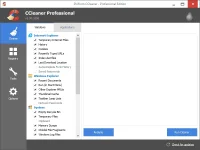
  • is the number-one tool for cleaning your Windows PC. It protects your privacy online and makes your computer faster and more secure. CCleaner is easy to use and a small, fast download and user interface has the modern look. CCleaner is a freeware system optimization and privacy tool. Removes unused files from your system – allowing Windows to run faster and freeing up valuable hard disk space. It also cleans traces of your online activities such as your Internet history. CCleaner can run from a USB thumbdrive and be installed/run on a computer without a complicated setup process. It is possible to specify files, folders and registry keys to ignore from the cleaning process. But the best part is that it’s fast (normally taking less than a second to run) and contains NO Spyware or Adware!
Features of CCleaner 5
  • CCleaner cleans the following:
  • Internet Explorer. Temporary files, history, cookies, super cookies, Autocomplete form history, index.dat files.
  • Firefox. Temporary files, history, cookies, super cookies, download history, form history.
  • Google Chrome. Temporary files, history, cookies, super cookies, download history, form history.
  • Opera. Temporary files, history, cookies, super cookies, download history.
  • Apple Safari. Temporary files, history, cookies, super cookies, form history.
  • Other Supported Browsers. K-Meleon, Rockmelt, Flock, Google Chrome Canary, Chromium, SeaMonkey, Chrome Plus, SRWare Iron, Pale Moon, Phoenix, Netscape Navigator, Avant and Maxthon.
  • Windows. Recycle Bin, Recent Documents, Temporary files, Log files, Clipboard, DNS Cache, Error Reporting, Memory Dumps, Jump Lists.
  • Registry Cleaner. Advanced features to remove unused and old entries, including File Extensions, ActiveX Controls, ClassIDs, ProgIDs, Uninstallers, Shared DLLs, Fonts, Help Files, Application Paths, Icons, Invalid Shortcuts and more…
  • Third-party applications. Removes temp files and recent file lists (MRUs) from many apps including Windows Media Player, eMule, Google Toolbar, Microsoft Office, Nero, Adobe Acrobat, WinRAR, WinAce, WinZip and many more…
What’s New in CCleaner 5.15.5513
  • Updated Google Chrome cleaning: Cache, Session and History
  • Improved Firefox Cookie detection
  • Added Disk Analyzer search feedback
  • Improved System and Browser Monitoring (Professional only)
  • Improved Media Player Classic cleaning
  • Improved localization and language support
  • Minor GUI improvements
  • Minor bug fixes
SCREENSHOT
CCleaner%2B5.08.5308.webp
g3WqINc.gif
thanks po dto pare!koi!
 
Status
Not open for further replies.

About this Thread

  • 12
    Replies
  • 200
    Views
  • 12
    Participants
Last reply from:
sAmSoon

Online now

Members online
712
Guests online
1,579
Total visitors
2,291

Forum statistics

Threads
2,290,087
Posts
29,062,367
Members
1,212,191
Latest member
Bakura591
Back
Top