PH
PHbloodtempt
Honorary Poster
directdownload:
You do not have permission to view the full content of this post. Log in or register now.
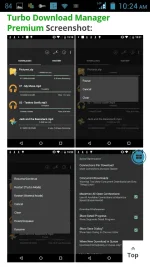
app Turbo Download Manager Premium v4.15 You do not have permission to view the full content of this post. Log in or register now. Apk latest is here
Increase the speed of your downloads by up to 5x times as reported! The First Download Accelerating app in the Android Market! Long Press on a link from your browser => choose “Share Link” => “Turbo Download Manager” and start your download in turbo speed! From the makers that first brought Download Acceleration to Mobile Devices.
How does it work?
TDM makes use of multiple connections to download files to your phone. The settings will help you optimize your speed even further. Not all Servers support multiple streams/connections, use “Connection per Download” = 1 or “Check Defensive Mode” in settings to reduce errors.
What does it NOT do?
TDM does NOT offer free files by itself. It works with Web Browsers and Web Sites that let you download files.
TDM does NOT work with YouTube.
TDM does NOT work with Web sites and File Sharing Sites that require login.
TDM works ONLY with direct URL links.
TDM will NOT increase your download speed beyond the maximum bandwith provided by your Internet Provider or the maximum speed provided by the server you’re downloading from.
App Features:
Download Acceleration!
Unlimited file size downloads!
Web Browser support (Dolphin, Firefox, etc)
Queue/Pause/Resume/Recover features
Notifications with Download Progress
Multiple Parallel downloads
Utilize Maximum number of open connections
Up to 10 Parallel Streams Per Download
Buffer size optimization
Configurable Download directory
Add Url links manually
Start/Pause Queue
Normal/Turbo Mode option
Work in the background (even when phone screen is off)
Auto-rename files
Notifications (Visual/Sound)
Thumbnails for Movies and Photos
Single/Multiple Notifications
Download history
MD5 Hash validation
Restart Download from history
Supported Browsers:
Android Stock Browser (Long Press and choose “Share Link”)
Dolphin HD (“Long press” => “Share Link”)
Firefox (“Long press” on a link => “Share Link”)
Skyfire (“Long press” on a link => “Share Link”)
Miren
UC Browser
Boat Browser (Choose “Open”)
For all other browsers that support sharing links try Long Press on a link and choose “Share Link”.
hit "like" lang mga boss thanks
You do not have permission to view the full content of this post. Log in or register now.
app Turbo Download Manager Premium v4.15 You do not have permission to view the full content of this post. Log in or register now. Apk latest is here
Increase the speed of your downloads by up to 5x times as reported! The First Download Accelerating app in the Android Market! Long Press on a link from your browser => choose “Share Link” => “Turbo Download Manager” and start your download in turbo speed! From the makers that first brought Download Acceleration to Mobile Devices.
How does it work?
TDM makes use of multiple connections to download files to your phone. The settings will help you optimize your speed even further. Not all Servers support multiple streams/connections, use “Connection per Download” = 1 or “Check Defensive Mode” in settings to reduce errors.
What does it NOT do?
TDM does NOT offer free files by itself. It works with Web Browsers and Web Sites that let you download files.
TDM does NOT work with YouTube.
TDM does NOT work with Web sites and File Sharing Sites that require login.
TDM works ONLY with direct URL links.
TDM will NOT increase your download speed beyond the maximum bandwith provided by your Internet Provider or the maximum speed provided by the server you’re downloading from.
App Features:
Download Acceleration!
Unlimited file size downloads!
Web Browser support (Dolphin, Firefox, etc)
Queue/Pause/Resume/Recover features
Notifications with Download Progress
Multiple Parallel downloads
Utilize Maximum number of open connections
Up to 10 Parallel Streams Per Download
Buffer size optimization
Configurable Download directory
Add Url links manually
Start/Pause Queue
Normal/Turbo Mode option
Work in the background (even when phone screen is off)
Auto-rename files
Notifications (Visual/Sound)
Thumbnails for Movies and Photos
Single/Multiple Notifications
Download history
MD5 Hash validation
Restart Download from history
Supported Browsers:
Android Stock Browser (Long Press and choose “Share Link”)
Dolphin HD (“Long press” => “Share Link”)
Firefox (“Long press” on a link => “Share Link”)
Skyfire (“Long press” on a link => “Share Link”)
Miren
UC Browser
Boat Browser (Choose “Open”)
For all other browsers that support sharing links try Long Press on a link and choose “Share Link”.
hit "like" lang mga boss thanks