PH
PHPower-User Premium 1.6.1218
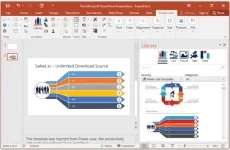
Power-user add-in: smart tools for PowerPoint, Excel and Word - Templates, Icons, Charts, Maps, Diagrams and more! Power-user provides you with a deep library of templates, icons, charts, maps, and diagrams for your spreadsheets and presentations. With Power-user for PowerPoint and Excel, you'll draw the attention of your audience with stunning graphics that are sure to impress. Create stunning documents to impress clients and managers with your skills on PowerPoint, Excel & Word
System Requirements:
Power-user is fully compatible with PowerPoint, Excel and Word 2007, 2010, 2013, 2016, 2019 and 365 (32 or 64 bits)
Installation:
*Extract the file and install
*I-copy yung content ng "Fix" folder and paste sa C:\Users\"username"\AppData\Local\Power-user
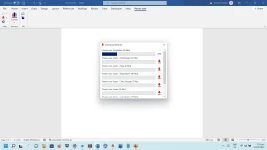
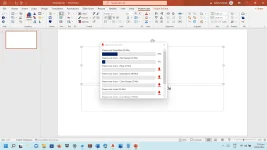
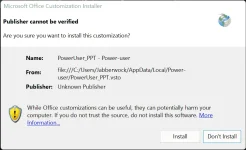
*Now open Powerpoint or Excel, click lang yung "install" button as seen below.
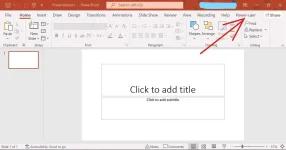
*Next, click lang yung Power User tab sa Powerpoint
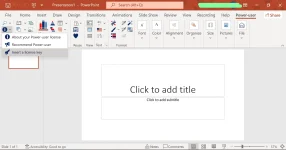
*then select yung insert license key
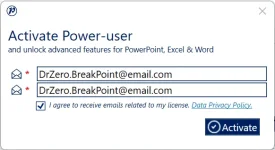
*Copy and Paste lang yung email address sa Notepad then click activate button.
FYI: need ng internet connection to activate
Google Drive Link
Password : iambrookthemusician

Power-user add-in: smart tools for PowerPoint, Excel and Word - Templates, Icons, Charts, Maps, Diagrams and more! Power-user provides you with a deep library of templates, icons, charts, maps, and diagrams for your spreadsheets and presentations. With Power-user for PowerPoint and Excel, you'll draw the attention of your audience with stunning graphics that are sure to impress. Create stunning documents to impress clients and managers with your skills on PowerPoint, Excel & Word
System Requirements:
Power-user is fully compatible with PowerPoint, Excel and Word 2007, 2010, 2013, 2016, 2019 and 365 (32 or 64 bits)
Installation:
*Extract the file and install
*I-copy yung content ng "Fix" folder and paste sa C:\Users\"username"\AppData\Local\Power-user
*Now open Powerpoint or Excel, click lang yung "install" button as seen below.
*Next, click lang yung Power User tab sa Powerpoint
*then select yung insert license key
*Copy and Paste lang yung email address sa Notepad then click activate button.
FYI: need ng internet connection to activate
Google Drive Link
Password : iambrookthemusician