 PH
PHmaxsalvatore
Leecher
Pahelp naman guys wala lang po ako makitang tutorial na print tutorial gamit ang listview mostly kase ang makikita sa youtubes is datagridview ang gamit, may nakikita namn pong listview kaso basic lang po yung sa kanila saken po my database. sana po matulugan nyo ako
Eto namn po yung code ko sa listview
Eto po yung code sa print ang gamit ko po is prindocument and printpreviewdialog po
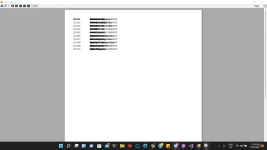
eto po yung output ng printpreview ko po sana mabigyan nyoko ng code hehe
Eto namn po yung code ko sa listview
    Sub fillsview()
        Try
            ListView1.Items.Clear()
            'Safe in SQL iNJECT'
            objcmd = New MySql.Data.MySqlClient.MySqlCommand("SELECT * FROM tbl_pcperipherals", objconn)
            'Unsafe Vulnerable in SQL INJECT'
            'strsql = "SELECT * FROM tbl_pcperipherals"'
            'objcmd = New MySql.Data.MySqlClient.MySqlCommand(strsql, objconn)'
            objdr = objcmd.ExecuteReader
            While (objdr.Read)
                With ListView1.Items.Add(objdr("ProductID"))
                    .SubItems.add(objdr("ProductName"))
                    .subitems.add(objdr("ProductBrand"))
                    .subitems.add(objdr("ProductCategory"))
                    .subitems.add(objdr("ProductQuantity"))
                    .subitems.add(objdr("ProductDescription"))
                    .subitems.add(objdr("ProductManufacturer"))
                    .subitems.add(objdr("Stock"))
                    .subitems.add(objdr("Supplier"))
                    .subitems.add(objdr("ContactNo"))
                End With
            End While
            objcmd.Dispose()
            objdr.Close()
        Catch ex As Exception
            MsgBox(ex.Message)
            Me.fillsview()
        End Try
    End Sub
Eto po yung code sa print ang gamit ko po is prindocument and printpreviewdialog po
Private Sub btnprint_Click(sender As Object, e As EventArgs) Handles btnprint.Click
        PrintPreviewDialog1.Document = PrintDocument1
        PrintPreviewDialog1.ShowDialog()
        With PrintDocument1
            .PrinterSettings.DefaultPageSettings.Landscape = True
            .Print()
        End With
    End Sub

    Private Sub PrintDocument1_PrintPage(sender As Object, e As Printing.PrintPageEventArgs) Handles PrintDocument1.PrintPage
        Dim H As Integer = 0
        H = 50
        e.Graphics.DrawString("PRINT", New Drawing.Font("Times New Roman", 10), Brushes.Black, 50, H)
        For Each Itm As ListViewItem In ListView1.Items
            e.Graphics.DrawString(Itm.Text, New Drawing.Font("Times New Roman", 10), Brushes.Black, 50, H)
            e.Graphics.DrawString(Itm.SubItems(0).Text, New Drawing.Font("Times New Roman", 10), Brushes.Black, 150, H)
            e.Graphics.DrawString(Itm.SubItems(1).Text, New Drawing.Font("Times New Roman", 10), Brushes.Black, 150, H)
            e.Graphics.DrawString(Itm.SubItems(2).Text, New Drawing.Font("Times New Roman", 10), Brushes.Black, 150, H)
            e.Graphics.DrawString(Itm.SubItems(3).Text, New Drawing.Font("Times New Roman", 10), Brushes.Black, 150, H)
            e.Graphics.DrawString(Itm.SubItems(4).Text, New Drawing.Font("Times New Roman", 10), Brushes.Black, 150, H)
            e.Graphics.DrawString(Itm.SubItems(5).Text, New Drawing.Font("Times New Roman", 10), Brushes.Black, 150, H)
            e.Graphics.DrawString(Itm.SubItems(6).Text, New Drawing.Font("Times New Roman", 10), Brushes.Black, 150, H)
            e.Graphics.DrawString(Itm.SubItems(7).Text, New Drawing.Font("Times New Roman", 10), Brushes.Black, 150, H)
            e.Graphics.DrawString(Itm.SubItems(8).Text, New Drawing.Font("Times New Roman", 10), Brushes.Black, 150, H)
            e.Graphics.DrawString(Itm.SubItems(9).Text, New Drawing.Font("Times New Roman", 10), Brushes.Black, 150, H)
            H += 20
        Next
    End Sub
eto po yung output ng printpreview ko po sana mabigyan nyoko ng code hehe