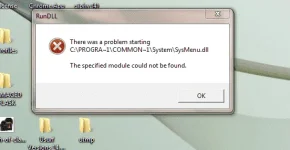
baka may na install kang may virus, baka lang poMga master pa help po hindi ko po alam kung anu nangyari dito sa laptop ko bakit po kaya may lumalabas na ganitong warning? May kailangan po ba akong einstall or anu po ibig sabihin nito mga boss? Maraming salamat po in advance sa mga master na makakatulong.
View attachment 38938
Mabuhay PHCorner![]()
may na install po yata akong files na may malware. kasi nagkaroon po ako madaming pop ups tapos sa takot ko nun na baka may virus gumamit po ako ng malware remover then nawala naman na yung mga nagpapop ups kaso nagkaroon po ng ganyang error simula po nun.May ni install/uninstall ka ba Boss or nag windows update ka ba before nagkaganyan?
paulit ulit ko na po pinapa scan ng antivirus ko pero lumalabas parin po yung error na yan sir.try mo rin mag scan ng antivirus
may na install po yata akong files na may malware. kasi nagkaroon po ako madaming pop ups tapos sa takot ko nun na baka may virus gumamit po ako ng malware remover then nawala naman na yung mga nagpapop ups kaso nagkaroon po ng ganyang error simula po nun.

Sige po boss try ko e sytem restore sana mawala na tong error na to. thanks po bosshahaha..si malware pala ang salarin...so posible pala dahil sa ginamit mo na malware remover may naapektohan or nadelete din na important file kung saan kumapit si malware, maybe sa registry ... try mo Boss mag system restore at piliin mo yung date kung saan hindi mo pa naiinstall yung file na may malware, then after restore mag full scan ka ng updated AV![]()

thanks sa info boss try ko din yan mamaya.You do not have permission to view the full content of this post. Log in or register now.
try mo panoorin boss or google marami po ganyan na error![]()


Big thanks po boss sana ito na ang solution...1st: Download Auto Runs.
Click Here:
You do not have permission to view the full content of this post. Log in or register now.
Link basis: You do not have permission to view the full content of this post. Log in or register now.
2nd: Find the yellow highlighted Image Paths that ends with sysmenu.dll. Usually you can locate those image paths from Scheduled Task.
3rd: Right click then delete.
4th: Try to find all yellow highlighted Image Paths that ends with sysmenu.dll from "Everything tabs, delete them.
NOTE: Carefully choose image paths that ends sysmenu.dll only, if you deleted paths that are not high lightened then it might cause some trouble booting your PC.
5th: Reboot Computer
6th: Wait at least 5 minutes to confirm that the issue has been resolved. (sysmenu.dll usually appears within a minute from rebooting the computer. )
Hope it helps![]()

Big thanks po boss sana ito na ang solution...![]()

Copy po master feedback ako agad. Salamat poupdate ka lang kung ano na! pag nawala na ang problema, download ka nlang ng software na nakakabura ng mga malwares atbp! goodluck![]()