 PH
PHquikSiLver
Honorary Poster
CareUEyes PRO Review at a Glance
The monitors constantly emit blue light with a short wavelength and high energy. CareUEyes PRO is eye protection software from blue light that puts an excessive strain on the eyes and causes excessive fatigue when working on computers.In extreme cases, retinal damage may also occur. The program automatically filters blue light to make the screen look more comfortable and helps prevent eye strain. It also automatically adjusts the brightness of the screen depending on the time of day.
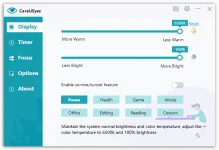
Display
There are many built-in presets, such as movie, custom, night, office, games, editing and reading, to help adjust the temperature and brightness of the screen and prevent eye strain. It can automatically control the screen brightness of any computer based on the tuning of the work environment (dark or lighter).
CareUEyes also adjusts the length of your work on the computer and reminds you of the need for a regular break depending on the set time interval. The Timer function will help you take a break at a certain time interval. This means that the tool reminds you to give your eyes rest of at least 20 seconds every 20 minutes. This feature can be customized so that it doesn’t disturb you or even speak to you.
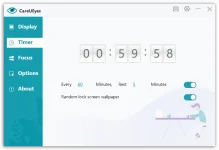
Timer
The program also includes a special function “Focus”, which dynamically displays only the reading area and darkens the rest of the screen. This helps you stay focused, increase your focus, and make text, spreadsheets, and tables easier to read. The function can be started with a keyboard shortcut.
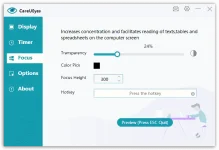
Focus
When the blue light filter is turned on, the screen will turn slightly yellow. For color-sensitive programs, you can set CareUEyes not to work in the specified eye protection mode. For example, you can set PhotoShop to work in unfiltered mode, or for your browser to work in black and white text reader mode. You can assign a different color profile to each installed application.
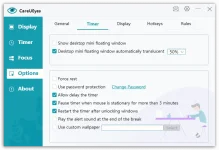
Options
For eye protection, the basic function of the blue light filter is also integrated into Windows 10/ 11. You can find it in Settings | Screen | Night lighting. Its triggering can be set automatically according to dimming, which is automatically set online according to your location and sunrise/sunset. In the detailed settings, you can specify the range of filter intensity and its start time.
Features
Key Features of CareUEyes PRO- General
- Visual setting
- Tech support
- Update
- Bugs fixes
- Display
- Brightness
- Color temperature
- Advanced Colour API
- Multiple Monitor support
- Fullscreen detect
- App exclude rules
- Hotkeys
- Timer
- Rest reminder
- Random lock screen wallpaper
- Alert sound
- Float window
- Force rest
- Focus
- Transparency
- Hotkeys
- Color pick
Requirements
To run #THE SOFTWARE with optimum reliability and performance, your system should match the following requirements:- Supports Win10/Win8/Win7/Vista/XP