PH
PHx_strckr_x
Journeyman
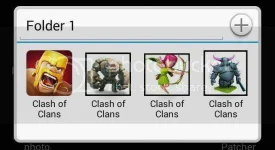
ROOT REQUIRED

HOW TO CLONE
STEPS:
1. Open your lucky patcher and clone coc....then install..I create 3 clone...para sa 4 accounts..

2. Open COC then login your 2nd account (yung ilalagay sa clone)...
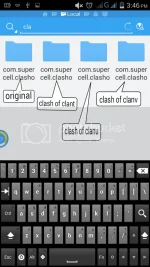
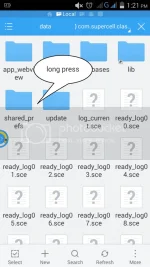
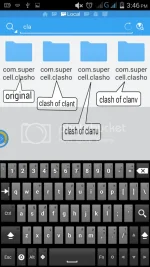
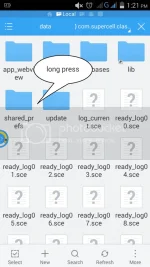
3. Then open file explorer (Es,Root ex..etc..) "I used Es" go to data/data/clash of clans folder then copy shared_prefs folder (yung 1st folder ang original na ika-copy). and paste inside your clone...
Kung mapapansin nyo yong last character lang ang difference...s / t / u / v....up to z see image..
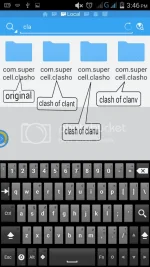
(ulitin lang ung step 2 if you have more than 2 accounts...)
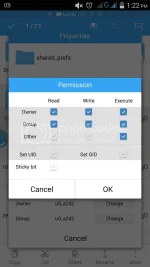
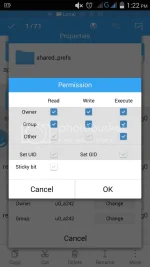
4.After pasting shared_prefs folder sa CLONE, long press shared_prefs folder, locate menu / click to properties / click change permission then tick like the image below...then press OK..
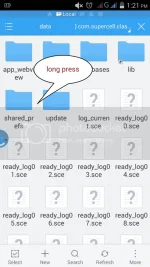
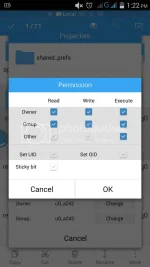
BOOM!! CLONE NA ANG COC MO...


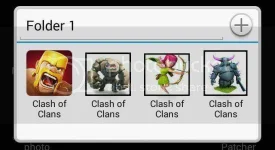
Pero mahirap piliin ung bubuksan account.:banghead: So palitan natin ng icon si CLONE..

HOW TO CHANGE ICON
STEPS:
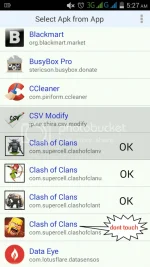
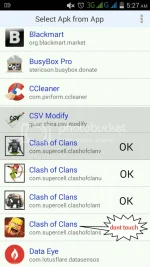
1.Open Apk Editor , Select Apk from App, click ung Clone / click Simple edit (wag gagalawin si original COC di kayo makaka login) yung t / u / v lang...see image.
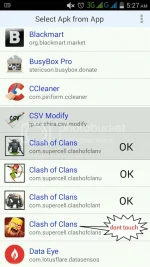
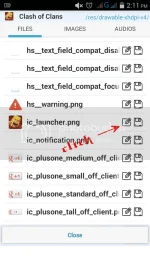
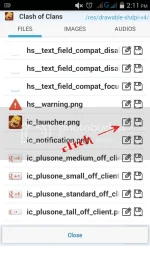
2.Select your CLONE COC then click res/drawable-xhdpi-v4 hanapin si ic_launcher.png (ung icon ni COC) and click the pencil..
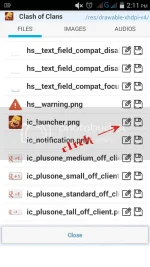
3.Locate your image.png for replacement..(any image will do kahit mukha mo just rename it to .png and locate..)
4.After ma-replaced SAVE then INSTALL....
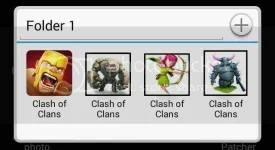
BOOM!!! iba na icon mo.....
:smuggrin:Feedback nalang for any question...and hit like
kung nakatulong ang PHC...:athumbsup: