PH
PHTwo ways to block ads while surfing on the internet.
Trick #1
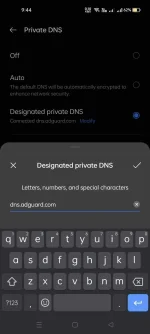
1. Go to settings and find private dns.
2. Type in the textbox " dns.adguard.com "
Trick #2 ( It will work only on google chrome browser)
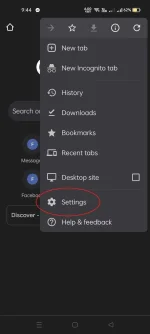
1. Go to the settings of google chrome.
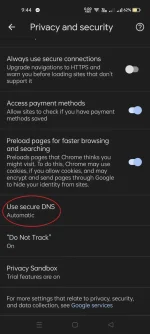
2. Go to the Privacy and security.
3. Go to the Use secure DNS.
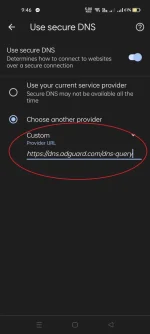
4. Tap the Choose another provider.
5. Type in the textbox " You do not have permission to view the full content of this post. Log in or register now. "
NOTE:
1. USING PRIVATE DNS IF YOU DONT HAVE LOAD (MOBILE DATA) IT WILL BLOCKED YOUR CONNECTION TO FREE BASICS (FREE.FACEBOOK.COM) OR FREE MESSENGER.
2. SOMETIMES ADGUARD DNS IS NOT WORKING IF YOU HAVE CONNECTION PROBLEM TURN OFF THE PRIVATE DNS.
Trick #1
1. Go to settings and find private dns.
2. Type in the textbox " dns.adguard.com "
Trick #2 ( It will work only on google chrome browser)
1. Go to the settings of google chrome.
2. Go to the Privacy and security.
3. Go to the Use secure DNS.
4. Tap the Choose another provider.
5. Type in the textbox " You do not have permission to view the full content of this post. Log in or register now. "
NOTE:
1. USING PRIVATE DNS IF YOU DONT HAVE LOAD (MOBILE DATA) IT WILL BLOCKED YOUR CONNECTION TO FREE BASICS (FREE.FACEBOOK.COM) OR FREE MESSENGER.
2. SOMETIMES ADGUARD DNS IS NOT WORKING IF YOU HAVE CONNECTION PROBLEM TURN OFF THE PRIVATE DNS.