 PH
PHFor those who want to host their own FTP/HTTP/Webdav/TCP server the easiest way, using their smartphones/tablet, here it is using Mixplorer.
Mixplorer is more than just a file manager. It is the Swiss Army knife of file managers for Android. You can do so much more with the app, but for now we will focus on creating your own FTP server.
Running Mixplorer and its servers doesn't require root. Here are the steps.
1. Download and install the app here You do not have permission to view the full content of this post. Log in or register now.
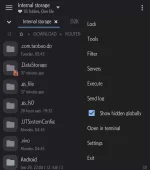
2. Open it, then click on the three dots at the top right, then click on Servers.
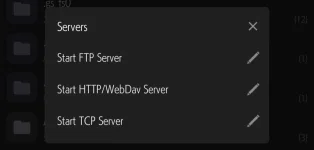
3. From here you can choose to run the servers that you want, but for our purposes we want to run the FTP server. So click on that. If you wish to edit some parameters before running then click on the pen beside it.
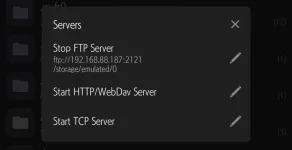
You can see the URL of the server that you can use to access it. By default, the server access is anonymous/not protected, using non-standard ports (8080 for http, 2121 for ftp), and the starting directory for the server is the root of your Internal Storage directory or the
You can also concurrently start other servers as well, just click on them. To stop them, just click on them again.
And that's how you can have your very own server that is fast, light, and right in the palm of your hand.
Like I said, Mixplorer is so much more than just a file manager. It can do A LOT, you just need to explore and experiment with it.
Mixplorer is more than just a file manager. It is the Swiss Army knife of file managers for Android. You can do so much more with the app, but for now we will focus on creating your own FTP server.
Running Mixplorer and its servers doesn't require root. Here are the steps.
1. Download and install the app here You do not have permission to view the full content of this post. Log in or register now.
2. Open it, then click on the three dots at the top right, then click on Servers.
3. From here you can choose to run the servers that you want, but for our purposes we want to run the FTP server. So click on that. If you wish to edit some parameters before running then click on the pen beside it.
You can see the URL of the server that you can use to access it. By default, the server access is anonymous/not protected, using non-standard ports (8080 for http, 2121 for ftp), and the starting directory for the server is the root of your Internal Storage directory or the
/sdcard/ or /storage/emulated/0/.You can also concurrently start other servers as well, just click on them. To stop them, just click on them again.
And that's how you can have your very own server that is fast, light, and right in the palm of your hand.
Like I said, Mixplorer is so much more than just a file manager. It can do A LOT, you just need to explore and experiment with it.
 ck patched
