 PH
PHjeremarfil24
Fanatic
Here's a Tutorial how to Withdraw your SLP from Binance to Coins PH
Step 1: Open Binance and go to Trade Tab (below in the Middle)
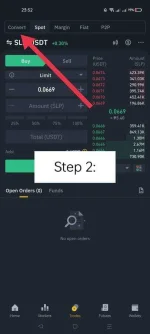
Step 2: Open the Convert Tab (Top Left on the screen)
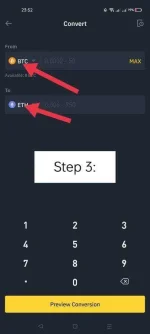
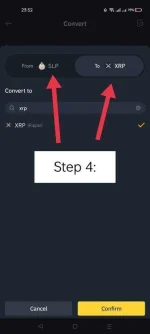
Step 3: Put From SLP to XRP Conversion
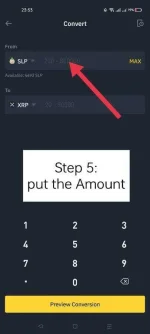
Step 4: Put the Amount of SLP that you want to Convert
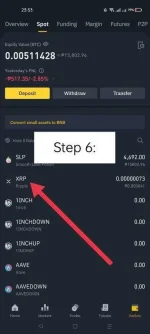
Step 5: Go back to Spot Wallet on your Binance and Click XRP
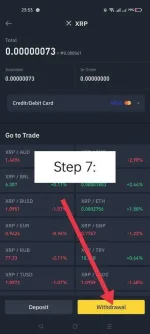
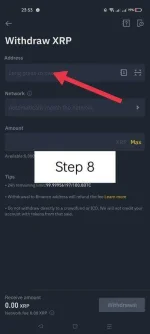
Step 6: Click Withdrawal and put the Coins PH XRP Address
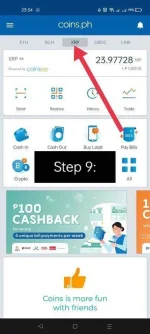
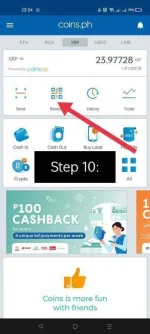
Step 7: Open Coins PH App go to XRP Tab above.
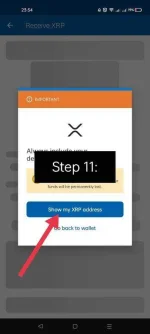
Step 8: Click Receive and Click "Show m XRP address"
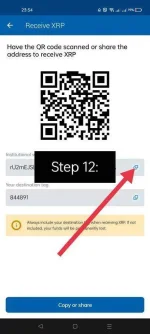
Step 9: Copy your XRP Address and Destination Tag on your Coins PH
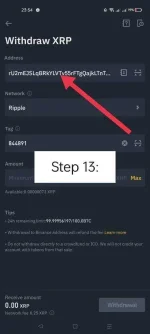
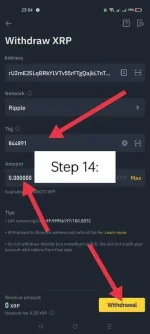
Step 10: Paste your XRP Address and Tag on your Binance XRP Withdrawal
Step 11: Put the Amount and Click Withdrawal and your Done.
Congrats! You Claimed your SLP!
and here's a Tutorial how to Convert your Coins PH XRP to PHP
Step 1: Open Coins PH App
Step 2: Go to XRP Tab on top
Step 3: Click "Crypto"
Step 4: Click Convert
Step 5: Set the Conversion to XRP to PHP
Step 6: Click "Convert All"
Step 7: Slide to Convert
Well Done! You Claimed your SLP to PHP with small Network Fee.
Thank you
PS: Will update this Thread with Photos on how to do it step by step.
UPDATE to this Thread:
You CAN now Convert SLP > XRP directly and Withdraw Binance XRP to Coins PH.
Thank you for your support. Will continue to share knowledge for more convenient ways of success.
Step 1: Open Binance and go to Trade Tab (below in the Middle)
Step 2: Open the Convert Tab (Top Left on the screen)
Step 3: Put From SLP to XRP Conversion
Step 4: Put the Amount of SLP that you want to Convert
Step 5: Go back to Spot Wallet on your Binance and Click XRP
Step 6: Click Withdrawal and put the Coins PH XRP Address
Step 7: Open Coins PH App go to XRP Tab above.
Step 8: Click Receive and Click "Show m XRP address"
Step 9: Copy your XRP Address and Destination Tag on your Coins PH
Step 10: Paste your XRP Address and Tag on your Binance XRP Withdrawal
Step 11: Put the Amount and Click Withdrawal and your Done.
Congrats! You Claimed your SLP!
and here's a Tutorial how to Convert your Coins PH XRP to PHP
Step 1: Open Coins PH App
Step 2: Go to XRP Tab on top
Step 3: Click "Crypto"
Step 4: Click Convert
Step 5: Set the Conversion to XRP to PHP
Step 6: Click "Convert All"
Step 7: Slide to Convert
Well Done! You Claimed your SLP to PHP with small Network Fee.
Thank you
PS: Will update this Thread with Photos on how to do it step by step.
UPDATE to this Thread:
You CAN now Convert SLP > XRP directly and Withdraw Binance XRP to Coins PH.
Thank you for your support. Will continue to share knowledge for more convenient ways of success.
Attachments
-
 245394459_606082887260921_5772321036973055866_n.webp42.2 KB · Views: 25
 -
 245246682_1013994399380653_3793081195662006512_n.webp26.9 KB · Views: 22
 -
 245605970_1706699246199027_291999641397575878_n.webp14.1 KB · Views: 21
 -
 245435664_415516466652970_4154593493233534963_n.webp12.6 KB · Views: 19
 -
 245330246_556241405476013_6946834852698554108_n.webp15.8 KB · Views: 23
 -
 245499220_303125958029232_5242680428298121538_n.webp31.2 KB · Views: 24
 -
 248078661_2943637872516466_6483021499080247852_n.webp28.2 KB · Views: 19
 -
 245084658_1002296480626289_5233434071931329822_n.webp21.8 KB · Views: 21
 -
 247619635_262763082308449_6183072115669386206_n.webp36.1 KB · Views: 20
 -
 245207078_3099098170414885_4509735491728783419_n.webp35.6 KB · Views: 19
 -
 246049365_466287684672070_9218925410854225741_n.webp15 KB · Views: 21
 -
 245139390_4252505838208424_6395914761901534695_n.webp31.3 KB · Views: 19
 -
 245527139_147125574261885_6594122866042305252_n.webp26.2 KB · Views: 21
 -
 245622774_940912740105822_1548505122896386527_n.webp29.6 KB · Views: 21

