 PH
PH-
Welcome to PHCorner Forums! Sign up for free to unlock full access and exclusive privileges, including:
- Asking questions about computer and mobile issues
- Discovering internet tips for your mobile network and computer
You are using an out of date browser. It may not display this or other websites correctly.
You should upgrade or use an alternative browser.
You should upgrade or use an alternative browser.
🔒 Closed Paano ichange yung file location to HDD?
- Thread starter Aequia
- Start date
- Status
- Not open for further replies.
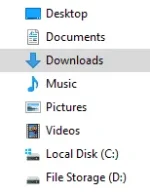
You can move all the data under your " Users " folder to free some space on your C: drive. but other files like windows files and program files should remain on your C: drive to avoid conflicts.
You can also change the file directory of your download folders and the files that you want to save to your D: drive for you to save storage.
Open the Settings app.
Click on System and then on "Storage" from the side-bar on the left.
Scroll down to the bottom of the page, where it says "More Storage Settings".
Click on the text that reads "Change where new content is saved".
You are taken to a new screen which displays the default save locations for six different types of data: Apps, Documents, Music, Photos and Videos, Movies and TV Shows, and Maps.
Each of these options is set to "This PC" by default. To change the default save location click on the menu next to a data type and pick one of the available locations from the menu that opens; Windows 10 lists all partitions that are available on the computer.
You can also change the file directory of your download folders and the files that you want to save to your D: drive for you to save storage.
Open the Settings app.
Click on System and then on "Storage" from the side-bar on the left.
Scroll down to the bottom of the page, where it says "More Storage Settings".
Click on the text that reads "Change where new content is saved".
You are taken to a new screen which displays the default save locations for six different types of data: Apps, Documents, Music, Photos and Videos, Movies and TV Shows, and Maps.
Each of these options is set to "This PC" by default. To change the default save location click on the menu next to a data type and pick one of the available locations from the menu that opens; Windows 10 lists all partitions that are available on the computer.
Thanks po, nakaset na po actually sa ganyan yung akin. Mali po yata ang tanong ko hehe ang hirap kasi iexplain. I mean is there a way po na maclick yung documents, download, music, photos and videos na nasa "This PC" tapos ang lalabas is yung laman ng HDD ko? Or impossible? Need talaga magclick from File Storage D: sa baba? Nasanay po kasi ako sa laptop ko dati, yung walang ssd.You can move all the data under your " Users " folder to free some space on your C: drive. but other files like windows files and program files should remain on your C: drive to avoid conflicts.
You can also change the file directory of your download folders and the files that you want to save to your D: drive for you to save storage.
Open the Settings app.
Click on System and then on "Storage" from the side-bar on the left.
Scroll down to the bottom of the page, where it says "More Storage Settings".
Click on the text that reads "Change where new content is saved".
You are taken to a new screen which displays the default save locations for six different types of data: Apps, Documents, Music, Photos and Videos, Movies and TV Shows, and Maps.
killerhaha100
Honorary Poster
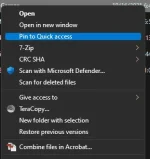
pin to quick access mo nalang TS yun mga laman or files na palagi mo binubuksanThanks po, nakaset na po actually sa ganyan yung akin. Mali po yata ang tanong ko hehe ang hirap kasi iexplain. I mean is there a way po na maclick yung documents, download, music, photos and videos na nasa "This PC" tapos ang lalabas is yung laman ng HDD ko? Or impossible? Need talaga magclick from File Storage D: sa baba? Nasanay po kasi ako sa laptop ko dati, yung walang ssd.

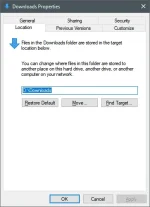
Thanks po! I tried doing this before kaso nag-eerror sakin.
Find Target ba ? SSD rin kasi sakin tas target ko yung buong old 750GB as Downloads folder. Gawin mo yan sa SafemodeThanks po! I tried doing this before kaso nag-eerror sakin.
- Status
- Not open for further replies.
About this Thread
-
10Replies
-
714Views
-
7Participants
Last reply from:
lostsee
lostsee
New Topics
-
Is this graphic card issue?
- Started by markjson
- Replies: 2
- ❓ Computer Discussion & Support
-
SoungHub No Sound Encountered
- Started by pow_tah
- Replies: 2
- ❓ Computer Discussion & Support
-
Apk to ipk any idea how to make it?
- Started by a s a r k a n a b a
- Replies: 1
- ❓ Computer Discussion & Support
-
TEMPORARY EMAIL NA HINDI NADEDETECT AS TEMPORARY EMAIL
- Started by 21banana
- Replies: 1
- ❓ Computer Discussion & Support
-
Looking for CSI ETABS Ultimate 2026 v23.2 Acïvâør
- Started by talaotep
- Replies: 0
- ❓ Computer Discussion & Support
-
I need help about my pc
- Started by lex2133
- Replies: 7
- ❓ Computer Discussion & Support
-
Start up boot so slow?
- Started by babyoriokiko
- Replies: 24
- ❓ Computer Discussion & Support
-
Patulong po about sa reset sa pc
- Started by toledo095
- Replies: 2
- ❓ Computer Discussion & Support
Trending Topics
Online now
- Members online
- 1,153
- Guests online
- 9,225
- Total visitors
- 10,378