PH
PHrendezvous17
Established
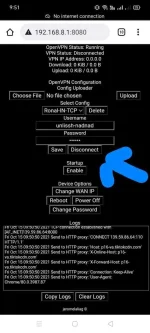
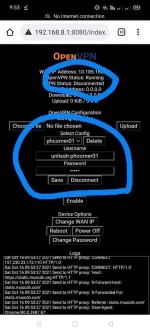
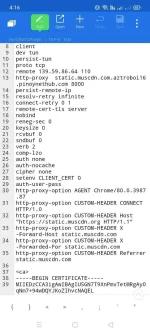
ay sige po sir salamat, pero tingin ko itong firmware na ginamit ko ang meron problem kasi nagana naman sa cp ko yung ginawa ko tas pwede sa ios, pc, modem at android ginawa ko, kumuha din ako acc sa éùtvpn, sa modem ko lang talaga di mka pasok, kay sir jerome to yung builtinKala ko solved kana problem ko dito paps
Teka gawan kita
ayaw padin pa din boss, sa version ata ng firmware na gamit ko meron problem, yung built-in ni sir jerome sa 936 tong akin, dapat pala diko na upgrade

Ayy naka hidden pala. Eto po yun:
Requirements:
TunnelHub(by Ragnverdnr): https://phcorner.org/threads/the-new-openvpn-with-http-injector-modem.1025225/
OVPN Config from Config Makers
Notepad, or any note editors
HTTP Injector, or any VPN App with Payload Generator
1. Download and Install TunnelHub to your modem, and Download HTTP Injector to your Android.
1.1. Run You do not have permission to view the full content of this post. Log in or register now. for completing installation, you can custom username and Pásswørd or just default user/pass: admin.
1.2. After you proceed the "Finish installation" and prepare to run You do not have permission to view the full content of this post. Log in or register now. for further step.
2. Download from ovpn config from config makers, and open it with notepad.
3. Copy from the line "http-proxy <ip-address>" and the payload like "p16-sg.tiktokcdn.com" from "http-proxy-option CUSTOM-HEADER", don't forget copy username and Pásswørd.
3.1. Delete the line...
This ovpn config should be different BEFORE and AFTER after you delete the lines:
Difference from delete:
- Remove username and Pásswørd from config into "auth-user-pass"
BEFORE:
client
dev tun
persist-tun
proto tcp
remote <ip-address> <port>
http-proxy <ip-address> <port>
persist-remote-ip
resolv-retry infinite
connect-retry 0 1
remote-cert-tls server
nobind
reneg-sec 0
keysize 0
rcvbuf 0
sndbuf 0
verb 2
comp-lzo
auth none
auth-nocache
cipher none
setenv CLIENT_CERT 0
allow-compression yes
<auth-user-pass>
username
Pásswørd
</auth-user-pass>
http-proxy-option VERSION 1.1
http-proxy-option AGENT Chrome/80.0.3987.87
http-proxy-option CUSTOM-HEADER "Host: <payload>"
http-proxy-option CUSTOM-HEADER "X-Online-Host: <payload>"
http-proxy-option CUSTOM-HEADER "X-Forward-Host: <payload>"
http-proxy-option CUSTOM-HEADER "Connection: Keep-Alive"
AFTER:
client
dev tun
persist-tun
proto tcp
remote <ip-address> <port>
http-proxy <ip-address> <port>
persist-remote-ip
resolv-retry infinite
connect-retry 0 1
remote-cert-tls server
nobind
reneg-sec 0
keysize 0
rcvbuf 0
sndbuf 0
verb 2
comp-lzo
auth none
auth-nocache
cipher none
setenv CLIENT_CERT 0
allow-compression yes
auth-user-pass
http-proxy-option VERSION 1.1
http-proxy-option AGENT Chrome/80.0.3987.87
http-proxy-option CUSTOM-HEADER "Host: <payload>"
http-proxy-option CUSTOM-HEADER "X-Online-Host: <payload>"
http-proxy-option CUSTOM-HEADER "X-Forward-Host: <payload>"
http-proxy-option CUSTOM-HEADER "Connection: Keep-Alive
4. Open HTTP Injector and Go to Payload Generator feature: (OK) means Check it!
Fill uo Payload from the OVPN Config that you copied
(OK) Online-Host
(OK) Forward-Host
(OK) Keep-Alive
(OK) Referrer
Then "Generate"
Copy Payload and....
4. Run You do not have permission to view the full content of this post. Log in or register now. to your browser and input username and Pásswørd.
5. Go to "Settings" and do it as per tab.
OPENVPN:
Import OVPN Config
Input username and Pásswørd from ovpn config
HTTP:
Tunnel Type: HTTP
Proxy and Port: http-proxy <ip-address> <port> from OVPN config
Paste Payload from generated by HTTP Injector
Then Save
6. Back to Dashboard and test it for success connection..
po dito boss, try ko kater walang electric power dito samin ngayin gang 6pm pa
mant thanks po dito boss, try ka later wala po kasi electric power dito samin ngayon gang 6pm papo. more power poAyy naka hidden pala. Eto po yun:
Requirements:
TunnelHub(by Ragnverdnr): https://phcorner.org/threads/the-new-openvpn-with-http-injector-modem.1025225/
OVPN Config from Config Makers
Notepad, or any note editors
HTTP Injector, or any VPN App with Payload Generator
1. Download and Install TunnelHub to your modem, and Download HTTP Injector to your Android.
1.1. Run You do not have permission to view the full content of this post. Log in or register now. for completing installation, you can custom username and Pásswørd or just default user/pass: admin.
1.2. After you proceed the "Finish installation" and prepare to run You do not have permission to view the full content of this post. Log in or register now. for further step.
2. Download from ovpn config from config makers, and open it with notepad.
3. Copy from the line "http-proxy <ip-address>" and the payload like "p16-sg.tiktokcdn.com" from "http-proxy-option CUSTOM-HEADER", don't forget copy username and Pásswørd.
3.1. Delete the line...
This ovpn config should be different BEFORE and AFTER after you delete the lines:
Difference from delete:
- Remove username and Pásswørd from config into "auth-user-pass"
BEFORE:
client
dev tun
persist-tun
proto tcp
remote <ip-address> <port>
http-proxy <ip-address> <port>
persist-remote-ip
resolv-retry infinite
connect-retry 0 1
remote-cert-tls server
nobind
reneg-sec 0
keysize 0
rcvbuf 0
sndbuf 0
verb 2
comp-lzo
auth none
auth-nocache
cipher none
setenv CLIENT_CERT 0
allow-compression yes
<auth-user-pass>
username
Pásswørd
</auth-user-pass>
http-proxy-option VERSION 1.1
http-proxy-option AGENT Chrome/80.0.3987.87
http-proxy-option CUSTOM-HEADER "Host: <payload>"
http-proxy-option CUSTOM-HEADER "X-Online-Host: <payload>"
http-proxy-option CUSTOM-HEADER "X-Forward-Host: <payload>"
http-proxy-option CUSTOM-HEADER "Connection: Keep-Alive"
AFTER:
client
dev tun
persist-tun
proto tcp
remote <ip-address> <port>
http-proxy <ip-address> <port>
persist-remote-ip
resolv-retry infinite
connect-retry 0 1
remote-cert-tls server
nobind
reneg-sec 0
keysize 0
rcvbuf 0
sndbuf 0
verb 2
comp-lzo
auth none
auth-nocache
cipher none
setenv CLIENT_CERT 0
allow-compression yes
auth-user-pass
http-proxy-option VERSION 1.1
http-proxy-option AGENT Chrome/80.0.3987.87
http-proxy-option CUSTOM-HEADER "Host: <payload>"
http-proxy-option CUSTOM-HEADER "X-Online-Host: <payload>"
http-proxy-option CUSTOM-HEADER "X-Forward-Host: <payload>"
http-proxy-option CUSTOM-HEADER "Connection: Keep-Alive
4. Open HTTP Injector and Go to Payload Generator feature: (OK) means Check it!
Fill uo Payload from the OVPN Config that you copied
(OK) Online-Host
(OK) Forward-Host
(OK) Keep-Alive
(OK) Referrer
Then "Generate"
Copy Payload and....
4. Run You do not have permission to view the full content of this post. Log in or register now. to your browser and input username and Pásswørd.
5. Go to "Settings" and do it as per tab.
OPENVPN:
Import OVPN Config
Input username and Pásswørd from ovpn config
HTTP:
Tunnel Type: HTTP
Proxy and Port: http-proxy <ip-address> <port> from OVPN config
Paste Payload from generated by HTTP Injector
Then Save
6. Back to Dashboard and test it for success connection..
Awitize yan paps hahaayaw padin pa din boss, sa version ata ng firmware na gamit ko meron problem, yung built-in ni sir jerome sa 936 tong akin, dapat pala diko na upgrade
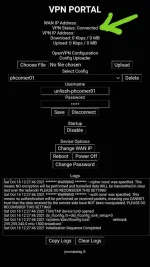
Natry mo n mag install ng ibang version ng ovpn portal?Same problem po, sana may maglabas ng video tut po.
salamat sir connected po sya..kapag naubos poba shareable data gagana padin po?Feedback kalang
Pang unli giga stories lang to ha
[Hidden content]
Nicesalamat sir connected po sya..kapag naubos poba shareable data gagana padin po?
okay po salamat po ulit sir.Nice
Kaylangan paps may shareable ka dyan,
Hindi gagana kung wala
awitize nga bos hahaha..

pm mo ako may etry akoawitize nga bos hahaha..
many thanks po sa time at sa effort boss
napagana kona boss many many thanks sa share ng tut. More power poMatagal tagal nang ganyan yung sakin until nainstall ko yam sa modem. It was the script and not the config itself.
Many thanks boss napagana kona gamit yung config mo at yung share ni boss vader na tut. gamit ko tunnelhub. san kapo kumuha acc. diko makita sa unlissh yung singapore na ip mo boss.
Boss ginaya ko script mo tas unlissh sg3 ako kumuha, pero ayaw gumana sakin, same naman na lahat pag check ko, diko alam bakit ayaw parin! pa turo po boss
Welcome paps.Many thanks boss napagana kona gamit yung config mo at yung share ni boss vader na tut. gamit ko tunnelhub. san kapo kumuha acc. diko makita sa unlissh yung singapore na ip mo boss.
Boss ginaya ko script mo tas unlissh sg3 ako kumuha, pero ayaw gumana sakin, same naman na lahat pag check ko, diko alam bakit ayaw parin! pa turo po boss
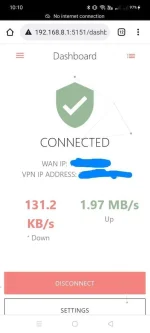
ito yung sayo boss connected poWelcome paps.
Ano ba nakalagay na error?
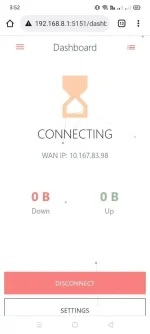
ito yung sakin boss ganito lang ayaw mag connectWelcome paps.
Ano ba nakalagay na error?
Wala kase ko idea dyan sa tunnelhub.ito yung sayo boss connected po
yung ginawa ko 0 lang yung upload tas 0 din yung donwload, ayaw mag connect.
Wag mo copyahin ip ko dyan mag eerror talaga yan paps. Lalo na kung sg3 ka, e sg5 yata akoito yung sakin boss ganito lang ayaw mag connect
ito bos nag gawa ako bago sa india na server ss ko nlng para makita mo kung saan mali. ayaw padin gumanaWag mo copyahin ip ko dyan mag eerror talaga yan paps. Lalo na kung sg3 ka, e sg5 yata ako