 PH
PHZiiowns2323
Leecher
After nyo mag connect sa VPN(Kahit ano, Naps, v2ray, tunnel,, etc.) mag download kayo ng EVERY PROXY sa play store.
-Enable ang HTTPS
-Connect nyo through USB or gawa kayo ng wifi hotspot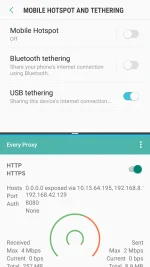
take note po ung 10.13.64.195(Kung ano po unang nalagay)
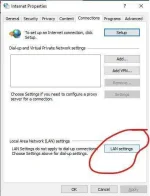
-
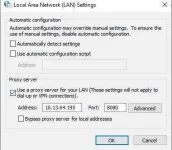
-iset nyo po ng ganyan
-disconnect nyo po ng 5 seconds ung cellphone then i USB TETHERING nyo po ulit or connect ulit kayo wifi kung hotspot ang gamit.
SNA MAKATULONG.
-Enable ang HTTPS
-Connect nyo through USB or gawa kayo ng wifi hotspot
take note po ung 10.13.64.195(Kung ano po unang nalagay)
-
-iset nyo po ng ganyan
-disconnect nyo po ng 5 seconds ung cellphone then i USB TETHERING nyo po ulit or connect ulit kayo wifi kung hotspot ang gamit.
SNA MAKATULONG.