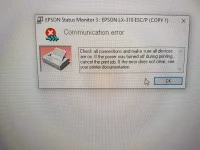
TS nakita ko lang din try mo din
Step 1
Uninstall the driver that you have installed recently.
Open Devices and Printers by clicking the Start button , and then, on the Start menu, clicking Devices and Printers.
Right click the printer-> Click on Properties-> click the
Driver tab, and then click
Uninstall. Follow the instructions.
Now download the drivers from the following link and install it and check if it helps.
You do not have permission to view the full content of this post.
Log in or register now.
Install the driver and check if it helps.
Step 2
Try the Printer troubleshooter, which will attempt to automatically diagnose and fix your problem.
Open the Printer troubleshooter by clicking the Start button, and then clicking Control Panel.
In the search box, type troubleshooter, and then click Troubleshooting. Under Hardware and Sound, click
Use a printer.
Next, try updating the printer driver on your computer. Printer problems sometimes stem from out-of-date driver software, and can be solved by installing—or reinstalling—the latest driver.
Refer this link for more information:
Why can't I print?
You do not have permission to view the full content of this post.
Log in or register now. PH
PH