 PH
PH-
Welcome to PHCorner Forums! Sign up for free to unlock full access and exclusive privileges, including:
- Asking questions about computer and mobile issues
- Discovering internet tips for your mobile network and computer
You are using an out of date browser. It may not display this or other websites correctly.
You should upgrade or use an alternative browser.
You should upgrade or use an alternative browser.
🎓 Academic Packet Tracer (4th Year BSIT)
- Thread starter IkaMusume
- Start date
- Status
- Not open for further replies.
PHC-PROXYPIRATE
Contributor
Anu ba itratrace kapag packet tracer?
Yung packet ang itratrace?
Yung packet ang itratrace?
Packet tracer po sya for cisco poAnu ba itratrace kapag packet tracer?
Yung packet ang itratrace?
PHC-PROXYPIRATE
Contributor
Packet tracer po sya for cisco po
Wait lang parang similar sya sa Wireshark mag iisniff kanu

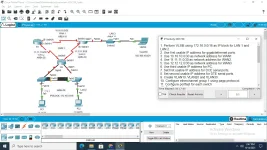
1. Perform VLSM using You do not have permission to view the full content of this post. Log in or register now. as IP block for LAN 1 and LAN 2. 2. Use first usable IP address for gigabitethernet ports. 3. Use You do not have permission to view the full content of this post. Log in or register now. as network address for WAN1. 4. Use You do not have permission to view the full content of this post. Log in or register now. as network address for WAN2. 5. Use You do not have permission to view the full content of this post. Log in or register now. as network address for WAN3. 6. Use third usable IP address for PC. 7. Set first usable IP address for DCE serial ports. 8. Set second usable IP address for DTE serial ports. 9. Create VLAN10, VLAN20 and VLAN30. 10. Configure etherchannel group 1 using pagp protoccol. 11. Configure portfast for each switch. 12. Configure inter vlan. 13. Use multi-area OSPF as routing protocol with Process ID 1. Note: PC1 and PC2 should ping Laptop successfully. Note: PC2 should have access to R3 via ssh. Other Requirements: Use the following reference. Domain name: cisco.com Username: admin Password: cisco * Plain text passwords should be encrypted.
ganito boss oh
BSIT po ako1. Perform VLSM using You do not have permission to view the full content of this post. Log in or register now. as IP block for LAN 1 and LAN 2. 2. Use first usable IP address for gigabitethernet ports. 3. Use You do not have permission to view the full content of this post. Log in or register now. as network address for WAN1. 4. Use You do not have permission to view the full content of this post. Log in or register now. as network address for WAN2. 5. Use You do not have permission to view the full content of this post. Log in or register now. as network address for WAN3. 6. Use third usable IP address for PC. 7. Set first usable IP address for DCE serial ports. 8. Set second usable IP address for DTE serial ports. 9. Create VLAN10, VLAN20 and VLAN30. 10. Configure etherchannel group 1 using pagp protoccol. 11. Configure portfast for each switch. 12. Configure inter vlan. 13. Use multi-area OSPF as routing protocol with Process ID 1. Note: PC1 and PC2 should ping Laptop successfully. Note: PC2 should have access to R3 via ssh. Other Requirements: Use the following reference. Domain name: cisco.com Username: admin Password: cisco * Plain text passwords should be encrypted.
ganito boss oh
PHC-PROXYPIRATE
Contributor
Ganto ba?1. Perform VLSM using You do not have permission to view the full content of this post. Log in or register now. as IP block for LAN 1 and LAN 2. 2. Use first usable IP address for gigabitethernet ports. 3. Use You do not have permission to view the full content of this post. Log in or register now. as network address for WAN1. 4. Use You do not have permission to view the full content of this post. Log in or register now. as network address for WAN2. 5. Use You do not have permission to view the full content of this post. Log in or register now. as network address for WAN3. 6. Use third usable IP address for PC. 7. Set first usable IP address for DCE serial ports. 8. Set second usable IP address for DTE serial ports. 9. Create VLAN10, VLAN20 and VLAN30. 10. Configure etherchannel group 1 using pagp protoccol. 11. Configure portfast for each switch. 12. Configure inter vlan. 13. Use multi-area OSPF as routing protocol with Process ID 1. Note: PC1 and PC2 should ping Laptop successfully. Note: PC2 should have access to R3 via ssh. Other Requirements: Use the following reference. Domain name: cisco.com Username: admin Password: cisco * Plain text passwords should be encrypted.
ganito boss oh
Here
 .
.172.16.0.0/16 = AS31313 172.16.0.0/12 Internet Assigned Numbers Authority
10.10.10.0/30 = AS559 10.10.10.0/24 Internet Assigned Numbers Authority
11.11.11.0/30 = AS749 11.0.0.0/8 DoD Network
11.11.11.0/30 = AS749 11.11.11.0/24 DoD Network Information Center
12.12.12.0/30 = AS7018 12.0.0.0/8 AT&T Services, Inc.
12.12.12.0/30 = AS7018 12.0.0.0/9 AT&T Services, Inc.
wait po try kopo ginawa kopo kasiGanto ba?
Here
172.16.0.0/16 = AS31313 172.16.0.0/12 Internet Assigned Numbers Authority
10.10.10.0/30 = AS559 10.10.10.0/24 Internet Assigned Numbers Authority
11.11.11.0/30 = AS749 11.0.0.0/8 DoD Network
11.11.11.0/30 = AS749 11.11.11.0/24 DoD Network Information Center
12.12.12.0/30 = AS7018 12.0.0.0/8 AT&T Services, Inc.
12.12.12.0/30 = AS7018 12.0.0.0/9 AT&T Services, Inc.
Ganto ba?
Here
172.16.0.0/16 = AS31313 172.16.0.0/12 Internet Assigned Numbers Authority
10.10.10.0/30 = AS559 10.10.10.0/24 Internet Assigned Numbers Authority
11.11.11.0/30 = AS749 11.0.0.0/8 DoD Network
11.11.11.0/30 = AS749 11.11.11.0/24 DoD Network Information Center
12.12.12.0/30 = AS7018 12.0.0.0/8 AT&T Services, Inc.
12.12.12.0/30 = AS7018 12.0.0.0/9 AT&T Services, Inc.
PHC-PROXYPIRATE
Contributor
Oh ayan naman Pala lods eh
 .
.Nakita ko ganyan sa YouTube
 .
.pa send nung link sa yt lodsOh ayan naman Pala lods eh
Nakita ko ganyan sa Y⊕ùTùbé
ICE Coffee
⭐⭐☕⭐⭐
check ka lang sa YT or kay pareng google paps, buti nga ngayong panahon nyo madali na lang ang internet at mga computer, nung kami kung wala kang laptop mahirap talaga hirap pa sa internet umaasa na lang sa psiphon ahahahahaha
lods baka meron po kau jan packet tracer yung bago po .. baka pede po makahingi ..
nag try kasi ako mag reg puro failed . .di ko alam bakit ...
nag install ako nung luma pero my mga commands na di gumagana sa luma . .sa bago lang ..
lods baka pede po makahingi ng NEW PACKET TRACER .. di ok masabayan yung tutorials sa youtube gamit yung luma ...
salamat po
nag try kasi ako mag reg puro failed . .di ko alam bakit ...
nag install ako nung luma pero my mga commands na di gumagana sa luma . .sa bago lang ..
lods baka pede po makahingi ng NEW PACKET TRACER .. di ok masabayan yung tutorials sa youtube gamit yung luma ...
salamat po
- Status
- Not open for further replies.
Similar threads
-
[UDEMY] Cisco Packet Tracer: CCNA, Network Design, and Protocols
- Started by flex012
- Replies: 0
-
About this Thread
-
12Replies
-
891Views
-
4Participants
Last reply from:
Ze_Ro
Ze_Ro
New Topics
-
How Can I Deal With a Breakup?
- Started by Gentleman007
- Replies: 0
- 🤝 Social & Personal
-
Tigang Na Tadhana
- Started by spike19
- Replies: 5
- 🤝 Social & Personal
-
Daily Mass Readings:
- Started by jdoomtwenty14
- Replies: 0
- 🤝 Social & Personal
-
Happy birthday brother!
- Started by max04
- Replies: 2
- 🤝 Social & Personal
-
Daily Mass Readings: September 30, 2026
- Started by jdoomtwenty14
- Replies: 0
- 🤝 Social & Personal
-
Daily Mass Readings: September 29, 2026
- Started by jdoomtwenty14
- Replies: 0
- 🤝 Social & Personal
Trending Topics
Online now
- Members online
- 1,247
- Guests online
- 1,977
- Total visitors
- 3,224