🔒 Closed Get Free office365 + 5TB onedrive

Status
Not open for further replies.

MAZ3

Forum Guru

1. Go To: You do not have permission to view the full content of this post. Log in or register now.

2. Create a temporary email ENSURE IT IS USING @thechildrensfocus.com

3. Go To Microsoft Website You do not have permission to view the full content of this post. Log in or register now.

4. Enter Your Generated email address and hit sign up (If it's already in use generate a new email).

5. Go through the sign up process

6. You can use fake information or even your own if you feel like it, once done you will receive verification code on XKX where you had created the temp email. Copy that verification code and verify it.

7. Click Start and Then Skip

8. Click on Start after filling the form. On the next page click skip.

9. Press Next, It will ask for more information.

10. Here you have to put more information so that you can access your account in any case you lose it or forget the password. I recommend enabling/setting up both options just to be safe. Click finish and enjoy!


Now just click finish and enjoy 5TB Cloud Space and other Microsoft Services like Office 365!


Need Feedback
No Hit and run

CTTO - Premium Hcking
 
thank you po! makakatulong po 'to sa mga student.
edited: i tried it po and kung ano 'yong naka-indicate sa thread is meron sa nagawa kong acc.
 
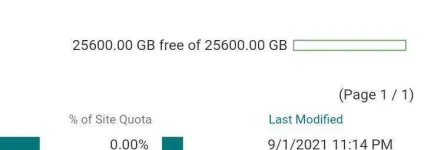
sir pano po maview yung cloud storage?
Punta ka sa onedrive/ sharepoint paps (May nakalagay na Error kasi di naman certified)
Tapos may Settings option sa right side, click mo yung Onedrive/sharepoint/Site settings.
Then may nakalagay dun maraming link options
Hanapin mo yung may word na cloud storage or storage metrics
Dun paps

Sensya kung di malinaw
 
Punta ka sa cloud / sharepoint paps (May nakalagay na Error kasi di naman certified)
Tapos may Settings option sa right side, click mo yung Cloud/sharepoint settings.
Then may nakalagay dun maraming link options
Hanapin mo yung may word na cloud storage or storage
Dun paps

Sensya kung di malinaw
Saan yang Cloud/Sharepoint settings wala bang screenshot lods.
 
Status
Not open for further replies.

About this Thread

  • 31
    Replies
  • 2K
    Views
  • 21
    Participants
Last reply from:
ilokano1234

Trending Topics

Online now

Members online
1,122
Guests online
5,104
Total visitors
6,226

Forum statistics

Threads
2,312,830
Posts
29,170,342
Members
1,185,391
Latest member
faker_69
Back
Top