 PH
PH-
Welcome to PHCorner Forums! Sign up for free to unlock full access and exclusive privileges, including:
- Asking questions about computer and mobile issues
- Discovering internet tips for your mobile network and computer
You are using an out of date browser. It may not display this or other websites correctly.
You should upgrade or use an alternative browser.
You should upgrade or use an alternative browser.
🔒 Closed Telegram multiple files
- Thread starter brznxplr
- Start date
- Status
- Not open for further replies.
.rar po yung file , may instruction rn po dun pero d ko gets, pede maturo po yung may video, sayang rn kasi nadownload ko, android po toAno ang file extensions?
Kung .rar or .zip, Try WinRar/7zip.
Pasensya po, di na mauulit
arjoe_ajfc
Forum Guru
paki-screenshot yung laman ng rar file mo....rar po yung file , may instruction rn po dun pero d ko gets, pede maturo po yung may video, sayang rn kasi nadownload ko, android po to
depende kasi iyan sa content nung file, kung maraming files then puwedeng by-parts ang pagcompress. Pag ganoon, kalimitan i-unzip mo lang iyong laman.
Pero minsan, pag-iisa lang iyong source file tapos malaki pa iyong file size niya (like movies/videos, programs, ISO's, etc.) then need talaga i-by parts or chop-chop-in iyan..
paki-screenshot yung laman ng rar file mo...
depende kasi iyan sa content nung file, kung maraming files then puwedeng by-parts ang pagcompress. Pag ganoon, kalimitan i-unzip mo lang iyong laman.
Pero minsan, pag-iisa lang iyong source file tapos malaki pa iyong file size niya (like movies/videos, programs, ISO's, etc.) then need talaga i-by parts or chop-chop-in iyan..
arjoe_ajfc
Forum Guru
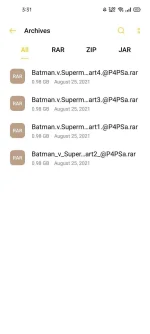
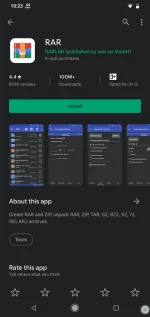
Gamitin mo si WinRAR application,see screenshot. Then yung part1 lang ung i-extract mo, the rest si winrar na po bahala dun. See the attached video for the procedure.
Note: kapag corrupted or incomplete yung file na na-extract, check mo if tama yung file name ng bawat parts...napansin ko kasi yung part2 file mo iba yung name compare sa ibang parts. underscore "_" sa part2, dot "." naman sa ibang parts,minsan kasi puwede mag-cause ng error iyan pero try mo munang i-extract as is. feedback if anong result
Note: kapag corrupted or incomplete yung file na na-extract, check mo if tama yung file name ng bawat parts...napansin ko kasi yung part2 file mo iba yung name compare sa ibang parts. underscore "_" sa part2, dot "." naman sa ibang parts,minsan kasi puwede mag-cause ng error iyan pero try mo munang i-extract as is. feedback if anong result
Attachments
arjoe_ajfc
Forum Guru
i-view mo sa VLC or any video player yung attached video kung hindi ma-view sa browser mo.
Thank you boss, try ko mamayaGamitin mo si WinRAR application,see screenshot. Then yung part1 lang ung i-extract mo, the rest si winrar na po bahala dun. See the attached video for the procedure.
Note: kapag corrupted or incomplete yung file na na-extract, check mo if tama yung file name ng bawat parts...napansin ko kasi yung part2 file mo iba yung name compare sa ibang parts. underscore "_" sa part2, dot "." naman sa ibang parts,minsan kasi puwede mag-cause ng error iyan pero try mo munang i-extract as is. feedback if anong result
View attachment 1592014
Okay poi-view mo sa VLC or any video player yung attached video kung hindi ma-view sa browser mo
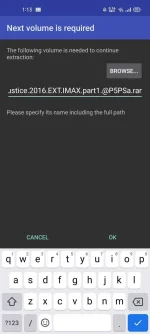
Boss ito po nagpapakita after maextract yung part1Gamitin mo si WinRAR application,see screenshot. Then yung part1 lang ung i-extract mo, the rest si winrar na po bahala dun. See the attached video for the procedure.
Note: kapag corrupted or incomplete yung file na na-extract, check mo if tama yung file name ng bawat parts...napansin ko kasi yung part2 file mo iba yung name compare sa ibang parts. underscore "_" sa part2, dot "." naman sa ibang parts,minsan kasi puwede mag-cause ng error iyan pero try mo munang i-extract as is. feedback if anong result
View attachment 1592014
arjoe_ajfc
Forum Guru
Hanapin mo si part 2, kapag ganyan ulit sunod mo si part 3 and so on..
Hanapin mo si part 2, kapag ganyan ulit sunod mo si part 3 and so on..
Sige poHanapin mo si part 2, kapag ganyan ulit sunod mo si part 3 and so on..
Tol ayos na, ganun pala, hanapin mo yung ibang parts , thank you so much pre, salamat sa timeGamitin mo si WinRAR application,see screenshot. Then yung part1 lang ung i-extract mo, the rest si winrar na po bahala dun. See the attached video for the procedure.
Note: kapag corrupted or incomplete yung file na na-extract, check mo if tama yung file name ng bawat parts...napansin ko kasi yung part2 file mo iba yung name compare sa ibang parts. underscore "_" sa part2, dot "." naman sa ibang parts,minsan kasi puwede mag-cause ng error iyan pero try mo munang i-extract as is. feedback if anong result
View attachment 1592014
arjoe_ajfc
Forum Guru
welcome, happy to help..
Tol pano pala pag .mkv yung file na may parts dn?welcome, happy to help..
arjoe_ajfc
Forum Guru
ganun din, kahit ano pa iyang laman ng compressed file.Tol pano pala pag .mkv yung file na may parts dn?
- Status
- Not open for further replies.
Similar threads
-
👥 Referral ATF miner Thru Telegram legit & tested ko na.
- Started by deceived
- Replies: 2
-
[Showcase] Almaras Mega Store - Telegram MTProto 2GB Video Streaming Engine & Web Shop
- Started by Pinomax tv premium
- Replies: 4
-
👨🏫 Tutorial Maximizing Multiple Cloud Storage Accounts
- Started by __LuLu
- Replies: 0
-
-
👨🏫 Tutorial MULTIPLE Free API CREDITS (One with $200 credits when you register)
- Started by microscope
- Replies: 6
About this Thread
-
18Replies
-
2KViews
-
4Participants
Last reply from:
Spies
Spies
New Topics
-
SAMSUNG S26 ULTRA SMARTLOCKED 2G IN DATA
- Started by JayMarkViloan
- Replies: 0
- ❓ Mobile Discussion & Support
-
Lf unlocktool for rent
- Started by Bananaque2
- Replies: 0
- ❓ Mobile Discussion & Support
-
Avoid using modded android apk apps
- Started by No liabilities
- Replies: 1
- ❓ Mobile Discussion & Support
-
Oppo a5 2025 frp bypass
- Started by Torky
- Replies: 0
- ❓ Mobile Discussion & Support
-
Best smartwatch with google wallet?
- Started by blackangel57
- Replies: 2
- ❓ Mobile Discussion & Support
-
AdBlock detected on Chrome Mobile device
- Started by jayyaj215
- Replies: 4
- ❓ Mobile Discussion & Support
-
Report Viewer for ASP Net Project
- Started by Porky Chao Fan
- Replies: 0
- ❓ Mobile Discussion & Support
-
Android Mobile App for Dev
- Started by Porky Chao Fan
- Replies: 1
- ❓ Mobile Discussion & Support
-
Looking for Chimera tool rent
- Started by Deviroche
- Replies: 0
- ❓ Mobile Discussion & Support
Trending Topics
Online now
- Members online
- 1,058
- Guests online
- 8,624
- Total visitors
- 9,682