 PH
PHBlueraven05
Eternal Poster
Hi sino may alam pano toh e solusyonan? walang kwenta csr ng shopee 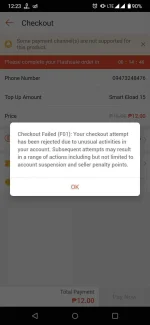
tae bat di koto na isap? hahaha ok na tnxIs your Android device rooted? Do you have Magisk installed?
If YES to both questions, then try this:
1. Open Magisk and check if MagiskHide is enabled.
2. Open Superuser (Shield icon) then open MagiskHide.
3. Look for Shopee and tick its box.
4. Log in to your Shopee account.
5. Check if you still encounter the "Checkout Failed (F01)" error message.
na try kuna na mag change number araw parinchange no.
ito preFf. Nakadalawang simpack na ako.
Is your Android device rooted? Do you have Magisk installed?
If YES to both questions, then try this:
1. Open Magisk and check if MagiskHide is enabled.
2. Open Superuser (Shield icon) then open MagiskHide.
3. Look for Shopee and tick its box.
4. Log in to your Shopee account.
5. Check if you still encounter the "Checkout Failed (F01)" error message.
Good. You're welcome.tae bat di koto na isap? hahaha ok na tnx
Hindi po rootedito pre

ito reply ng csr nila sakinHindi po rooted
tnxIs your Android device rooted? Do you have Magisk installed?
If YES to both questions, then try this:
1. Open Magisk and check if MagiskHide is enabled.
2. Open Superuser (Shield icon) then open MagiskHide.
3. Look for Shopee and tick its box.
4. Log in to your Shopee account.
5. Check if you still encounter the "Checkout Failed (F01)" error message.

No probs.

Salamat tagal ko nang problema to. Godbless priIs your Android device rooted? Do you have Magisk installed?
If YES to both questions, then try this:
1. Open Magisk and check if MagiskHide is enabled.
2. Open Superuser (Shield icon) then open MagiskHide.
3. Look for Shopee and tick its box.
4. Log in to your Shopee account.
5. Check if you still encounter the "Checkout Failed (F01)" error message.
Na fix sayo? sakin na fix ng support pero ngayon hindi nako nakakagamit ng vouchers, free shipping nlang nagagamit ko?ito reply ng csr nila sakin
Hi ryzennn,
Greetings from Shopee!
I am contacting you regarding your F01 checkout error. Please be advised that I manager to coordinate this to the team. As per advised this is a usual issues if a customers used a Shopee voucher in different account registered in one device. Please log in using other device with no existing account associated on it.
Should you have concerns other than this, you may reach us through the following Shopee Customer Service channels:
You can reach us through our Shopee Customer Service channel: Chat Support (Shopee App Help Centre) - 24/7
Best regards,
Jenny
Na fix sayo? sakin na fix ng support pero ngayon hindi nako nakakagamit ng vouchers, free shipping nlang nagagamit ko?
rooted cp ko ng magisk pero di updated gamit kong shoppee app.Is your Android device rooted? Do you have Magisk installed?
If YES to both questions, then try this:
1. Open Magisk and check if MagiskHide is enabled.
2. Open Superuser (Shield icon) then open MagiskHide.
3. Look for Shopee and tick its box.
4. Log in to your Shopee account.
5. Check if you still encounter the "Checkout Failed (F01)" error message.
My Shopee app (on my rooted tablet) is updated to the latest version.rooted cp ko ng magisk pero di updated gamit kong shoppee app.
pag gagamit lang ng vouchers nag eerror siya sometimes. free shipping puede siya..
pag po nag succeed tapos magCCO ka ulit, need ireset pa yung phone?Is your Android device rooted? Do you have Magisk installed?
If YES to both questions, then try this:
1. Open Magisk and check if MagiskHide is enabled.
2. Open Superuser (Shield icon) then open MagiskHide.
3. Look for Shopee and tick its box.
4. Log in to your Shopee account.
5. Check if you still encounter the "Checkout Failed (F01)" error message.
Is your Android device rooted? Do you have Magisk installed?You do not have permission to view the full content of this post. Log in or register now.
If YES to both questions, then try this:
1. Open Magisk and check if MagiskHide is enabled.
2. Open Superuser (Shield icon) then open MagiskHide.
3. Look for Shopee and tick its box.
4. Log in to your Shopee account.
5. Check if you still encounter the "Checkout Failed (F01)" error message.