 PH
PHZhalamand3rz
Eternal Poster
Sa mga wala pa neto try nyo na hehe.
Use my referral :
You do not have permission to view the full content of this post. Log in or register now.
TUT:
INSTRUCTION:
Step by Step Tutorial.
[CODE title="SMMBOT.PY"]import requests
import json
import time
import random
from datetime import datetime
#your email
email='EMAIL ADD NYO'
#password
password='PASSWORD NYO'
#link if you need to sign up
# www.smmshop.com/ptc-sites-pay-per-click?jobs_ref=0cbaf2b1f64178adf51fcf771146b20c
SIGNUP_URL = 'https://jobs.smmshop.com/bot/register'
#login and generate auth token
def login():
payload = {'email' : email,
'password' : password,
'bot_type_id' : 1 }
resp = requests.post(SIGNUP_URL, payload)
apiresp=resp.text
apiresp = json.loads(apiresp)
key=apiresp['data']['bot_auth_key_hash']
return key
#get task and wait for next task
def gettask(key):
payload = {'auth_key_hash' : key}
resp = requests.post('https://jobs.smmshop.com/bot/task/get', payload)
apiresp=resp.text
apiresp = json.loads(apiresp)
try:
id=apiresp['data']['task']['id']
print(id)
return(id)
except:
time.sleep(300)
return("none")
#submit task
def submittask(id,key):
x=round(random.uniform(90, 126),0)
time.sleep(x)
payload = {'task_id_return' : id,'auth_key_hash' : key, 'version' : '5.1.3'}
resp = requests.post('https://jobs.smmshop.com/bot/task/report', payload)
apiresp=resp.text
print("Task Done - Waiting for next "+str(datetime.now().time()))
print('\n')
print("""
Made by https://gensexpress.phc.onl/#forbidden#/
Bot Started and waiting for tasks. """+str(datetime.now().time())+"""
It might take few hours to get some tasks so run this in background and chill.
""")
key=login()
#loop for lifetime
while True:
id="none"
id=gettask(key)
if(id!="none"):
submittask(id,key)
else:
pass[/CODE]
1: First download at install nyo muna yung Python ---https://www.python.org/downloads/
2: Then hanapin nyo kung saan ang directory ng pip folder, saken dito siya nakalagay C:\Users\Zhhh\AppData\Local\Programs\Python\Python39\Scripts
3: After that, Open nyo CMD as admin
4: Type nyo ang directory ng pip file nio ex.(cd\Users\Zhhh\AppData\Local\Programs\Python\Python39\Scripts)
tignan nio po mabuti. cd\ at hindi C:\ palitan nyo po sya bago nyo po ienter. (copy nto muna sa notepad then edit at pag ok na paste nyo na.)
5: Type-- pip install requests -- at hintayin lang matapos... uulitin ko po TYPE pip install requests
6: Open notepad at copy niyo code sa thread sa taas (ung script). edit nyo ung script at ilagay ninyo ang email at password nyo at save as smmbot.py (save as type -ALL FILES-).. then kunin ninyo yung directory nya.
like this C:\Users\Zhhh\Documents\Custom Office Templates\MyFolder ....palitan ng cd\ yung C:\ (make sure bago ienter)
7: After pag na enter na yung step6 ganto kakalabasan nya dapat C:\Users\Zhhh\Documents\Custom Office Templates\MyFolder> (depende yan kung san nyo sinave o nilagay si smmbot.py kanina) then
8: Lastly, Type-- py smmbot.py ...enter and DONE!!! again TYPE py smmbot.py
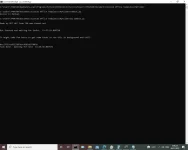
success yung procedure pag ganto na sya pagkatapos mo gawin to..
Made by BOT HAT from TBN You do not have permission to view the full content of this post. Log in or register now.
Bot Started and waiting for tasks. 13:37:19.068720
It might take few hours to get some tasks so run this in background and chill.
Then wait na lang siguro hehe..
Kakatry kolang eh LEGIT naman sya
Maganda to kahit nasa work ka kung lagi ka nasa PC at may net edi pagkakitaan natin hehe.
Pa try na lang po sa mga wala pa at mga gusto.
Note:
CMD - Command Prompt lang po papaganahin nyo if ever po
REPOST:
From Lods
Use my referral :
You do not have permission to view the full content of this post. Log in or register now.
TUT:
INSTRUCTION:
Step by Step Tutorial.
[CODE title="SMMBOT.PY"]import requests
import json
import time
import random
from datetime import datetime
#your email
email='EMAIL ADD NYO'
#password
password='PASSWORD NYO'
#link if you need to sign up
# www.smmshop.com/ptc-sites-pay-per-click?jobs_ref=0cbaf2b1f64178adf51fcf771146b20c
SIGNUP_URL = 'https://jobs.smmshop.com/bot/register'
#login and generate auth token
def login():
payload = {'email' : email,
'password' : password,
'bot_type_id' : 1 }
resp = requests.post(SIGNUP_URL, payload)
apiresp=resp.text
apiresp = json.loads(apiresp)
key=apiresp['data']['bot_auth_key_hash']
return key
#get task and wait for next task
def gettask(key):
payload = {'auth_key_hash' : key}
resp = requests.post('https://jobs.smmshop.com/bot/task/get', payload)
apiresp=resp.text
apiresp = json.loads(apiresp)
try:
id=apiresp['data']['task']['id']
print(id)
return(id)
except:
time.sleep(300)
return("none")
#submit task
def submittask(id,key):
x=round(random.uniform(90, 126),0)
time.sleep(x)
payload = {'task_id_return' : id,'auth_key_hash' : key, 'version' : '5.1.3'}
resp = requests.post('https://jobs.smmshop.com/bot/task/report', payload)
apiresp=resp.text
print("Task Done - Waiting for next "+str(datetime.now().time()))
print('\n')
print("""
Made by https://gensexpress.phc.onl/#forbidden#/
Bot Started and waiting for tasks. """+str(datetime.now().time())+"""
It might take few hours to get some tasks so run this in background and chill.
""")
key=login()
#loop for lifetime
while True:
id="none"
id=gettask(key)
if(id!="none"):
submittask(id,key)
else:
pass[/CODE]
1: First download at install nyo muna yung Python ---https://www.python.org/downloads/
2: Then hanapin nyo kung saan ang directory ng pip folder, saken dito siya nakalagay C:\Users\Zhhh\AppData\Local\Programs\Python\Python39\Scripts
3: After that, Open nyo CMD as admin
4: Type nyo ang directory ng pip file nio ex.(cd\Users\Zhhh\AppData\Local\Programs\Python\Python39\Scripts)
tignan nio po mabuti. cd\ at hindi C:\ palitan nyo po sya bago nyo po ienter. (copy nto muna sa notepad then edit at pag ok na paste nyo na.)
5: Type-- pip install requests -- at hintayin lang matapos... uulitin ko po TYPE pip install requests
6: Open notepad at copy niyo code sa thread sa taas (ung script). edit nyo ung script at ilagay ninyo ang email at password nyo at save as smmbot.py (save as type -ALL FILES-).. then kunin ninyo yung directory nya.
like this C:\Users\Zhhh\Documents\Custom Office Templates\MyFolder ....palitan ng cd\ yung C:\ (make sure bago ienter)
7: After pag na enter na yung step6 ganto kakalabasan nya dapat C:\Users\Zhhh\Documents\Custom Office Templates\MyFolder> (depende yan kung san nyo sinave o nilagay si smmbot.py kanina) then
8: Lastly, Type-- py smmbot.py ...enter and DONE!!! again TYPE py smmbot.py
success yung procedure pag ganto na sya pagkatapos mo gawin to..
Made by BOT HAT from TBN You do not have permission to view the full content of this post. Log in or register now.
Bot Started and waiting for tasks. 13:37:19.068720
It might take few hours to get some tasks so run this in background and chill.
Then wait na lang siguro hehe..
Kakatry kolang eh LEGIT naman sya
Maganda to kahit nasa work ka kung lagi ka nasa PC at may net edi pagkakitaan natin hehe.
Pa try na lang po sa mga wala pa at mga gusto.
Note:
CMD - Command Prompt lang po papaganahin nyo if ever po
REPOST:
From Lods