 PH
PHHi ito po and isang application to watch live tv, movies and TV shows.
It is called oceanstreamz.
3 Method:
Method 1: [Phones:]
For Android 8 and above:
Method 2:

You do not have permission to view the full content of this post. Log in or register now.QR-Code
You do not have permission to view the full content of this post. Log in or register now.
Developer: You do not have permission to view the full content of this post. Log in or register now.
Price: Free+
First, you'll need to install the Send files to TV app from the Play Store on your phone and TV. To install it on your TV, open the Play Store and search for the name, or click the above link on a desktop computer and set your TV as the installation target.
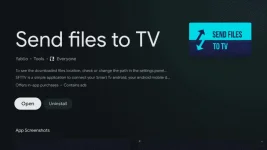
This guide will explain sending files to your TV from an Android phone or tablet. If you don't have an Android device to send files, there's also a You do not have permission to view the full content of this post. Log in or register now.. You can also check the next section for the install process with ADB.
Once the app is done installing on both devices, open the Send files to TV app on your TV, then select the 'Receive' option to start the receiver. Now, open the app on your phone, and press Send. This will open a file browser — you'll need to find the APK file and select it.
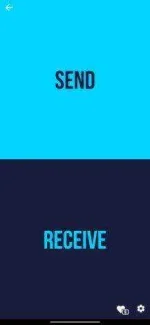
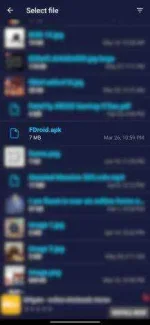
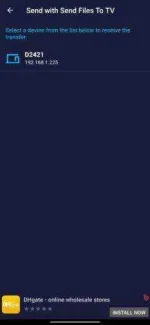
Once the file transfer is done, you should be able to select the file on your TV, then press the 'Open' option. If all goes well, you should get a prompt to install the application.
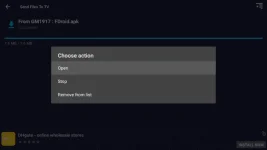
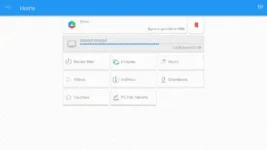
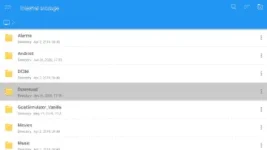
However, the transfer app seems to have an issue where the Open button doesn't always work. If that's the case, you'll need to install a separate file manager application on your TV, like You do not have permission to view the full content of this post. Log in or register now.. In File Commander, select 'Internal storage' on the main screen, then the Download folder. Any files you transferred using Send files to TV will appear here — just press one to open.
If you have a recent version of Android TV, you may get a message that installations from unknown sources are not allowed. If so, select the 'Settings' button, which will open a popup on the side with a list of allowed apps.
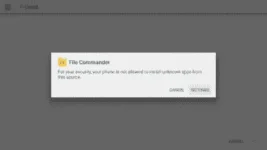
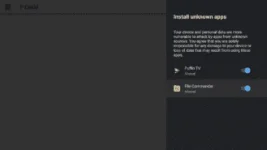
You just need to switch the app attempting to install the APK (either the file manager or Send files to TV) to the 'on' position, and press back on your remote to return to the installation. You only have to do this once, at least.
3) Install app and apk file using file manager.
4) Allow access
Method 3:
5. The ES File Explorer will be installed within a few seconds on your Android Tv, thereafter, you will be able to use it manage files effortlessly. Please note that this method as well follows the manual installation process of Apk files, so you will have to perform the setting mentioned in the previous method on your Android Tv.Use
6. Use ES File Explorer to sideload APK files
To Download:
Dl Link:
You do not have permission to view the full content of this post. Log in or register now.
OR
Please use Yahoo search engine instead of google as google blocked the website from showing. Dont worry po, hindi po virus or maleware. It's just according to Google's updated policy. (Kasi modded and alam ninyo na streaming legalities kasi)
Instructions:
1) search oceanstreamz on yahoo search engine.
2) Enable unknown sources on android. (instructions above)
3) Install app and apk file using file manager.
4) Allow access
5) Enjoy.
It is called oceanstreamz.
3 Method:
Method 1: [Phones:]
For Android 8 and above:
- From a Home screen, swipe up or down from the center of the display to access the apps screen.
- Navigate: Settings. > Apps.
- Tap Menu icon (upper-right).
- Tap Special access.
- Tap Install unknown apps.
- Select the unknown app then tap the Allow from this source switch to turn on or off .
- Install a file manager (such as You do not have permission to view the full content of this post. Log in or register now. or You do not have permission to view the full content of this post. Log in or register now.) so that you can find the APK file after you download it to your phone.
- Download an APK file [Dl Link:You do not have permission to view the full content of this post. Log in or register now.] and open it and install it.
- Bypass Play protect by clicking Deatils and Install Anyway.
- The apk should load on main screen on the Android Phone and ready for use.
Method 2:
Install APKs from an Android phone or tablet
There are a few different methods of transferring APK files to Android TV, like installing a cloud file manager on your TV, or going through the difficult process of setting up ADB on a computer. The easiest method is to use 'Send files to TV,' an application that sends files to an Android TV device (or anything else with Android) over your local network.You do not have permission to view the full content of this post. Log in or register now.QR-Code
You do not have permission to view the full content of this post. Log in or register now.
Developer: You do not have permission to view the full content of this post. Log in or register now.
Price: Free+
First, you'll need to install the Send files to TV app from the Play Store on your phone and TV. To install it on your TV, open the Play Store and search for the name, or click the above link on a desktop computer and set your TV as the installation target.
This guide will explain sending files to your TV from an Android phone or tablet. If you don't have an Android device to send files, there's also a You do not have permission to view the full content of this post. Log in or register now.. You can also check the next section for the install process with ADB.
Once the app is done installing on both devices, open the Send files to TV app on your TV, then select the 'Receive' option to start the receiver. Now, open the app on your phone, and press Send. This will open a file browser — you'll need to find the APK file and select it.
Once the file transfer is done, you should be able to select the file on your TV, then press the 'Open' option. If all goes well, you should get a prompt to install the application.
However, the transfer app seems to have an issue where the Open button doesn't always work. If that's the case, you'll need to install a separate file manager application on your TV, like You do not have permission to view the full content of this post. Log in or register now.. In File Commander, select 'Internal storage' on the main screen, then the Download folder. Any files you transferred using Send files to TV will appear here — just press one to open.
If you have a recent version of Android TV, you may get a message that installations from unknown sources are not allowed. If so, select the 'Settings' button, which will open a popup on the side with a list of allowed apps.
You just need to switch the app attempting to install the APK (either the file manager or Send files to TV) to the 'on' position, and press back on your remote to return to the installation. You only have to do this once, at least.
3) Install app and apk file using file manager.
4) Allow access
- Bypass Play protect by clicking Deatils and Install Anyway.
- The apk should load on main screen on the Android Phone and ready for use.
Method 3:
- Go to Settings > Security & Restrictions
- Toggle the “Unknown Sources” setting to on
- Install ES File Explorer from the Play Store
To download:
Install ES File Explorer on Smart TV using Puffin Browser
This method is useful in case you don’t have a computer or laptop to download and move the Apk file. In this method, we’ll be using a third party Browser app called “Puffin Browser” to directly download the ES File Explorer App on Android Tvand install it manually. You may use other browsers as well if you wish.- Turn ON your Android TV and Open up Google Play Store from the Apps Menu.
- Search for “Puffin Browser” and download the App from the Play Store on your Android Tv.
- Puffin Browser will begin to install automatically once the downloading is complete.
- Now launch the Puffin Browser App on your Android Tv to proceed further in the process.
- Install a file manager You do not have permission to view the full content of this post. Log in or register now. (such as You do not have permission to view the full content of this post. Log in or register now. or You do not have permission to view the full content of this post. Log in or register now.) so that you can find the APK file after you download it to your phone.
- Select the “Download” option on the website to start downloading the Apk file of the App.
- Navigate to the Apk file that you have downloaded using your File Manager App.
- Open the Apk file and grant the necessary permissions to begin installing the App.
5. The ES File Explorer will be installed within a few seconds on your Android Tv, thereafter, you will be able to use it manage files effortlessly. Please note that this method as well follows the manual installation process of Apk files, so you will have to perform the setting mentioned in the previous method on your Android Tv.Use
6. Use ES File Explorer to sideload APK files
- Bypass Play protect by clicking Deatils and Install Anyway.
- The apk should load on main screen on the Android Phone and ready for use.
To Download:
Dl Link:
You do not have permission to view the full content of this post. Log in or register now.
OR
Please use Yahoo search engine instead of google as google blocked the website from showing. Dont worry po, hindi po virus or maleware. It's just according to Google's updated policy. (Kasi modded and alam ninyo na streaming legalities kasi)
Instructions:
1) search oceanstreamz on yahoo search engine.
2) Enable unknown sources on android. (instructions above)
3) Install app and apk file using file manager.
4) Allow access
5) Enjoy.
