 PH
PHerojadevas
Fanatic
Hi guys, does anyone can help sort this numerically from P4/B3/H1 to P4/B3/2.
I have a problem it sorts out by 1 then 10 look at the picture below.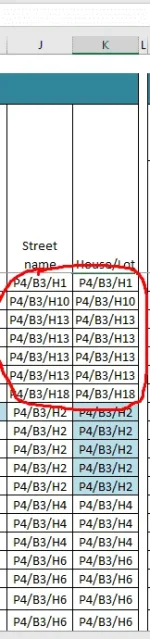
I have a problem it sorts out by 1 then 10 look at the picture below.
ito solution ko boss (galing sa suggestion dito: You do not have permission to view the full content of this post. Log in or register now.)
Gawa ka po reference column tapos e hide mo lang.
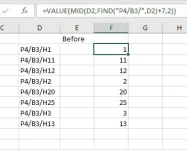
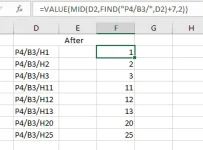
In this example, yun column F ang reference ko.
Then I highlight both columns and click sort.
View attachment 1537412 View attachment 1537424
formula: =VALUE(MID(D2,FIND("P4/B3/",D2)+7,2))
(adjust mo lang based sa spreadsheet mo)
FIND("P4/B3/",D2) = means to find "P4/B3/" sa column D2.. ito kasi common sa mga entries sa kanila
+7 = means chars in the the text we want to find
,2)) = means looking for the other characters (H1, H2, H3)
It will return a number as reference, drag it down.. then we can finally sort it.
Hope this helps
ito solution ko boss (galing sa suggestion dito: You do not have permission to view the full content of this post. Log in or register now.)
Gawa ka po reference column tapos e hide mo lang.
In this example, yun column F ang reference ko.
Then I highlight both columns and click sort.
View attachment 1537412 View attachment 1537424
formula: =VALUE(MID(D2,FIND("P4/B3/",D2)+7,2))
(adjust mo lang based sa spreadsheet mo)
FIND("P4/B3/",D2) = means to find "P4/B3/" sa column D2.. ito kasi common sa mga entries sa kanila
+7 = means chars in the the text we want to find
,2)) = means looking for the other characters (H1, H2, H3)
It will return a number as reference, drag it down.. then we can finally sort it.
Hope this helps
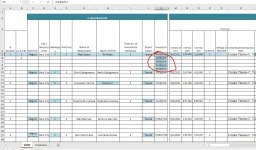
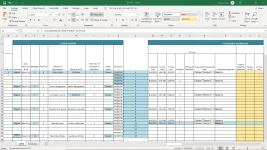
What should I do in this format? Is there a way I can do the one you mentioned above?
Hmm.. I think you can put the reference # (formula/method I gave) at the L column but make sure to make it into white font color to hide it.. and then just highlight the part to be sorted including the reference because sorting will be based there.What should I do in this format? Is there a way I can do the one you mentioned above?
Scavenger Medyo hindi ako familliar sa excel at wala akong masyadong malapitan dito nong nanghingi ako ng tulong. Dude, thank you so much, di ko inexpect may tutulong sa akin sa webiste na ito. Thank you broo.Hmm.. I think you can put the reference # (formula/method I gave) at the L column but make sure to make it into white font color to hide it.. and then just highlight the part to be sorted including the reference because sorting will be based there.
no probs po, I always help when I can.. (among other people here)Scavenger Medyo hindi ako familliar sa excel at wala akong masyadong malapitan dito nong nanghingi ako ng tulong. Dude, thank you so much, di ko inexpect may tutulong sa akin sa webiste na ito. Thank you broo.
I will po thank you so muchno probs po, I always help when I can.. (among other people here)
suggestion lang din sa nagawa mo na. dyan sa column L. highlight mo then change font color to white para di makita.. then paliitin mo yung column width size ng column L.. para magaya sya dun sa original form (yung nasa previous pic mo)