 PH
PHProfessora Akira
☯️ SôulNinetãiL☯️
First dapat may nakasave ka sa gallery mo na signature watermark for later use.
*How to apply your signature watermark signature in Lightroom mobile
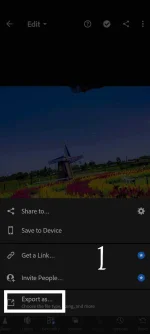
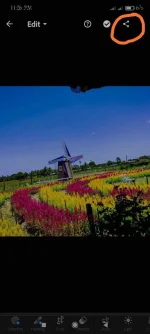
1.Click mo yung share sign in upper right corner
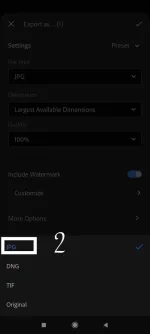
2.Choose "export as"then choose under file type choose "jpg"
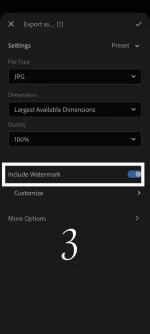
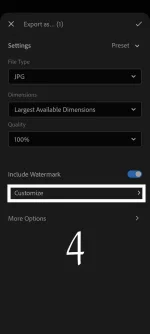
3.Click on "include watermark then choose" customize"
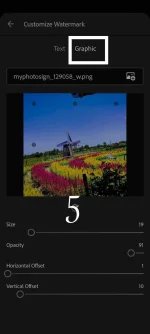
4.There is selection on top wether "text" or "graphic"
choose "graphic" for your personalize signature
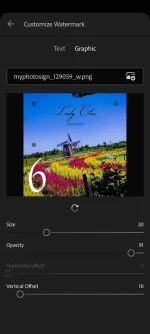
5.Open gallery & choose your desired signature watermark na ginawa mo.
6.You can adjust the opacity & offset of the graphic,either to put down,side or up as well.
lastly save your output .
*In snapseed
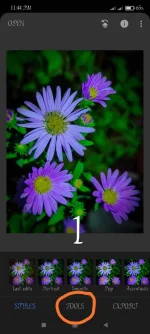
1. Choose any image na gusto mo then click "tools"
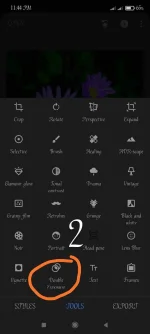
2.Scroll down makikita mo yung double exposure ,click mo lang yun
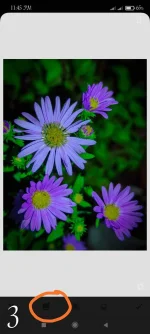
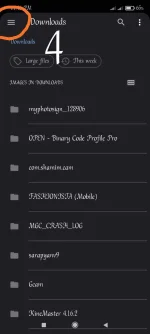
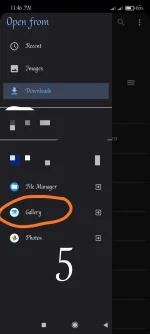
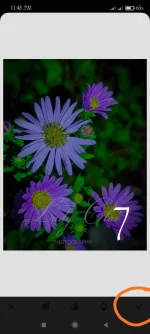
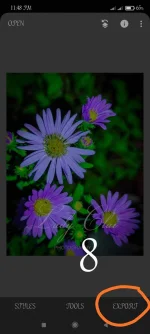
3.Click the image box na nasa bottom part mapupunta ka sa gallery,choose mo want mo na signature text then kaw na mag adjust ng size & offset nya then click export or save.Done.

*How to apply your signature watermark signature in Lightroom mobile
1.Click mo yung share sign in upper right corner
2.Choose "export as"then choose under file type choose "jpg"
3.Click on "include watermark then choose" customize"
4.There is selection on top wether "text" or "graphic"
choose "graphic" for your personalize signature
5.Open gallery & choose your desired signature watermark na ginawa mo.
6.You can adjust the opacity & offset of the graphic,either to put down,side or up as well.
lastly save your output .
*In snapseed
1. Choose any image na gusto mo then click "tools"
2.Scroll down makikita mo yung double exposure ,click mo lang yun
3.Click the image box na nasa bottom part mapupunta ka sa gallery,choose mo want mo na signature text then kaw na mag adjust ng size & offset nya then click export or save.Done.