 PH
PHBellaPouch29
Forum Veteran
Since we don't have another working unblocking tricks as of the moment apart from the current one we're using ( rooming tricks to 333 ) this way may help you know if your sts sim has a chance to be unblocked or not. Moreover, this will able you to save time and effort, I promise you!
If your sts sim gets blocked, dial *133#1# and see if you get this response in screen shot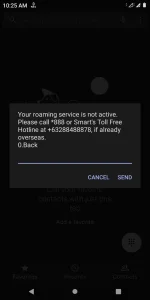
If you get this response, then be glad you can still unblock your sim, just incase you don't know roaming tricks yet please follow this instructions: 1. first set your data to 2G next
2. Go to your default messaging app and type ROAM ON x2 then ROAM OFF x2 to 333,
3. flight mode 4. Lastly, set back your data to 4G.
However, this may work only once because once you get the roaming activated you'll never get it deactivated again... At least for the time being since we haven't figured out yet a way to turn the roaming off after activation. This is what you'll see once roaming is activated, also at the time being roaming trick doesn't work on it.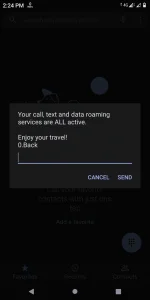
Hope this would help..
[/CODE]
If your sts sim gets blocked, dial *133#1# and see if you get this response in screen shot
If you get this response, then be glad you can still unblock your sim, just incase you don't know roaming tricks yet please follow this instructions: 1. first set your data to 2G next
2. Go to your default messaging app and type ROAM ON x2 then ROAM OFF x2 to 333,
3. flight mode
4. Lastly, set back your data to 4G.However, this may work only once because once you get the roaming activated you'll never get it deactivated again... At least for the time being since we haven't figured out yet a way to turn the roaming off after activation. This is what you'll see once roaming is activated, also at the time being roaming trick doesn't work on it.
Hope this would help..
[/CODE]