 PH
PHBug Host Request
Forum Contributor
How to create your own STS no load DNS Method
(1.) Install apks
ONE VPN:
You do not have permission to view the full content of this post. Log in or register now.
onevpn Plug-in:
You do not have permission to view the full content of this post. Log in or register now.
Full tutorial (.txt):
 DELETED TUTORIAL.
REASON: hindi na kasi working ang old set-up. Update ko lang
Itong post ulet. Makikita parin ang links na ito sa status post
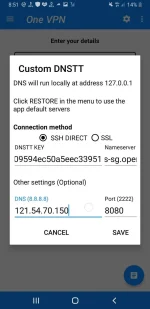
Sample settings:
(Old settings)
NOk.longer connected. May be on PORT settings only.
NOTE: why I personally recommend DNS method?
DISCLAIMER:
Since DNS method siya, good as basic browsing at YouTube lang siya mga paps.
Slow DNS method in other words MABAGAL. (But sulit personal) STS no load Backup

(1.) Install apks
ONE VPN:
You do not have permission to view the full content of this post. Log in or register now.
onevpn Plug-in:
You do not have permission to view the full content of this post. Log in or register now.
Full tutorial (.txt):
DELETED TUTORIAL.REASON: hindi na kasi working ang old set-up. Update ko lang
Itong post ulet. Makikita parin ang links na ito sa status post
Sample settings:
(Old settings)
NOk.longer connected. May be on PORT settings only.
NOTE: why I personally recommend DNS method?
Kasi less or no blocking po siya , as compared sa v2ray Method.
So far, hindi pa naman ako na Blocked using DNS Method. Mas sulit na ito at least may Backup STS no load at pwedi rin ito pang bypass sa legit promos. Tested ko ito sa Giga stories 299. Once connected, access all sites na siya.
DISCLAIMER:
Since DNS method siya, good as basic browsing at YouTube lang siya mga paps.
Slow DNS method in other words MABAGAL. (But sulit personal) STS no load Backup


