 PH
PHPhcoornerist
Fanatic
Sorry wala ss 
Photoshop Brushes napulot lang sa tabi.
DL Link: You do not have permission to view the full content of this post. Log in or register now.
How to Install:
Photoshop Brushes napulot lang sa tabi.
DL Link: You do not have permission to view the full content of this post. Log in or register now.
How to Install:
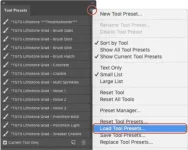
- Open the Tool Presets Panel (Window > Tool Presets) and click the fly-out menu in the top right corner.
- Select "Load Tool Presets..." from the menu and locate the .tpl file on your hard drive then click open to install.
- The brush tool presets will appear in the Tool Presets panel whenever the Brush Tool is selected.