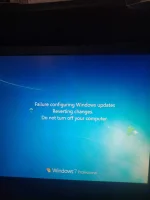
M Man with No Name Forum Guru Aug 1, 2021 #3 Refer to the article below from official Microsoft Support page (Read thoroughly and try the suggested resolutions) You do not have permission to view the full content of this post. Log in or register now. Upvote 0 Downvote
Refer to the article below from official Microsoft Support page (Read thoroughly and try the suggested resolutions) You do not have permission to view the full content of this post. Log in or register now.
I Ipyok23 Established Aug 3, 2021 #4 Lods, since Win7 ang gamit mo. Para bumalik sa dati. Restart mo computer mo punta ka ng safe mode. Tapos mag system restore ka choose restore point date. Upvote 0 Downvote
Lods, since Win7 ang gamit mo. Para bumalik sa dati. Restart mo computer mo punta ka ng safe mode. Tapos mag system restore ka choose restore point date.
J josephbojos Fanatic Aug 4, 2021 #5 Probably boot loop na to. Find a W7 installation media then fix mo ung OS gamit Startup Repair. Upvote -1 Downvote
G Gelo121 Enthusiast Aug 5, 2021 #6 Gamit ka ng bootable flash drive na may windows 7 OS, tapos punta ka ng Windows Startup Repair. Then hanapin mo nalang dun. Upvote 0 Downvote
Gamit ka ng bootable flash drive na may windows 7 OS, tapos punta ka ng Windows Startup Repair. Then hanapin mo nalang dun.