 PH
PH-
Welcome to PHCorner Forums! Sign up for free to unlock full access and exclusive privileges, including:
- Asking questions about computer and mobile issues
- Discovering internet tips for your mobile network and computer
You are using an out of date browser. It may not display this or other websites correctly.
You should upgrade or use an alternative browser.
You should upgrade or use an alternative browser.
🔒 Closed HELP!!! svhost.exe at DLL.exe running background by user VIRUS paano tangalin
- Thread starter PHC-HEsh
- Start date
- Status
- Not open for further replies.

a s a r k a n a b a
Elite
virus pala yang svchost? lagi ko nakikita yan sa task manager ko eh
arsenal1205
Rarely opens PHC
Because svchost.exe is a common process in the Task Manager, malware programs sometimes mask themselves by running under the same process name of svchost.exe. Other times, a malware program may run, or inject, its service into an already running svchost.exe process. In either case, this masking action can make it difficult to detect and remove these malware programs.
The easiest way to see if your computer is infected with malware running under the “Svchost.exe” name, is to open your Windows Task Manager by pressing CTRL + ALT + DEL on your keyboard,
the right-click on the Svchost.exe which you suspect is malware, and then click on “Open file location”
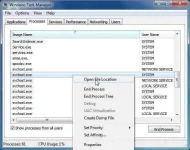
The SvcHost.exe from Windows should be located in the C:\Windows\System32 folder. Any file named “svchost.exe” located in other folder can be considered as a malware.
Kung iba ang location niyan. Malamang virus na iyan.
The easiest way to see if your computer is infected with malware running under the “Svchost.exe” name, is to open your Windows Task Manager by pressing CTRL + ALT + DEL on your keyboard,
the right-click on the Svchost.exe which you suspect is malware, and then click on “Open file location”
The SvcHost.exe from Windows should be located in the C:\Windows\System32 folder. Any file named “svchost.exe” located in other folder can be considered as a malware.
Kung iba ang location niyan. Malamang virus na iyan.
- Status
- Not open for further replies.
About this Thread
-
6Replies
-
419Views
-
3Participants
Last reply from:
PHC-HEsh
PHC-HEsh
New Topics
-
Tropic Colour - Sino meron nito?
- Started by mikehacker182
- Replies: 0
- ❓ Computer Discussion & Support
-
WINDOWS PRODUCT KEY
- Started by jhengky22
- Replies: 0
- ❓ Computer Discussion & Support
-
Request : 2027 calendars with Holidays
- Started by the_jinx
- Replies: 0
- ❓ Computer Discussion & Support
-
Dapat ba akong maalarma dito? Nagback-up na paunti-unti ako.
- Started by Jeii
- Replies: 0
- ❓ Computer Discussion & Support
-
Realtek audio missing in device manager
- Started by PHC-MERCURIAL
- Replies: 4
- ❓ Computer Discussion & Support
-
Suggest OS para sa budget pc yung lightweight.
- Started by YourR3ze
- Replies: 2
- ❓ Computer Discussion & Support
-
Microsoft copilot personal
- Started by WEIRJD
- Replies: 0
- ❓ Computer Discussion & Support
-
Lock profile or browser?
- Started by heyhey
- Replies: 7
- ❓ Computer Discussion & Support
-
Light/Gaming OS for 4 year old laptop
- Started by Genesis Storm
- Replies: 10
- ❓ Computer Discussion & Support
-
HWID SPOOFER HELP!
- Started by Balisain
- Replies: 0
- ❓ Computer Discussion & Support
Trending Topics
Online now
- Members online
- 1,096
- Guests online
- 5,941
- Total visitors
- 7,037