 PH
PHGusto mo ba ma wala ang palagiang updates ng Windows 10 pc mo ito na ang solusyon sa problema mo.
1. Press Windows key + R key this run textbox will pop up then type services.msc and find windows update
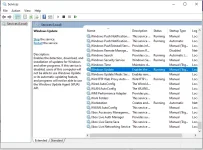
Then doble click it and choose disable in startup type: option then hit apply and ok
2. Press Windows key + R key this run textbox will pop up then type gpedit.msc then go to this directory
{Computer Configuration - Administrative Templates - Windows Components - Windows update}
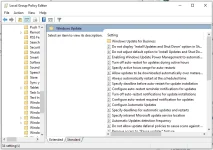
Doble click (Configure automatic updates), then click disable and apply & ok.
Now no more windows update will show anymore...
1. Press Windows key + R key this run textbox will pop up then type services.msc and find windows update
Then doble click it and choose disable in startup type: option then hit apply and ok
2. Press Windows key + R key this run textbox will pop up then type gpedit.msc then go to this directory
{Computer Configuration - Administrative Templates - Windows Components - Windows update}
Doble click (Configure automatic updates), then click disable and apply & ok.
Now no more windows update will show anymore...