PH
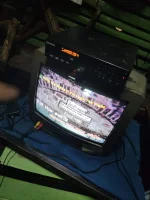
PHShare ko po sa inyo ang Karavision k12/k12+/k16/k16+ Volume 37 file.
Latest Songs as of December 2020, NO MTV.
Pwede nyo po syang ilagay sa USB flash drive para gawing USB Karaoke!.
Burning Procedures.
1. Gumamit ng PowerISO, Burnaware, Nero or MagicISO
2. I-burn ang vol 37 iso file sa inyong blank CD. (Note: DVD-R 4.7 GB ang gagamitin nyong blank disc.)
3. I-testing sa inyong Karavision K12,16 unit.
USB Karaoke. Compatible sa Karavision K12, K16.
1. Punta sa dinownload mong ISO file.
2. Right click sa file at pindutin ang "Mount"
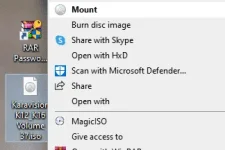
3. I-copy and paste sa USB flash drive ang mga files na nasa ISO. Kailangan nasa 4gb pataas ang iyong flash drive.
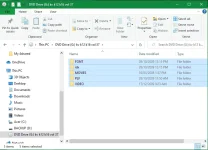
4. Isaksak sa inyong player at ready nang kumanta!
Paalala: ANG KARAVISION K12/16 ISO FILE NA ITO AY HINDI PWEDE SA IBANG MIDI DVD PLAYER.
Link Google Drive: You do not have permission to view the full content of this post. Log in or register now.
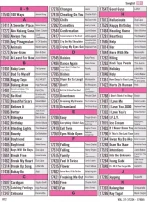
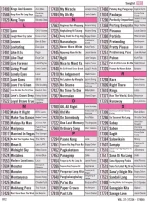
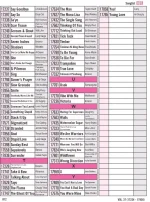
Song List:☺
Have a good day!
Latest Songs as of December 2020, NO MTV.
Pwede nyo po syang ilagay sa USB flash drive para gawing USB Karaoke!.
Burning Procedures.
1. Gumamit ng PowerISO, Burnaware, Nero or MagicISO
2. I-burn ang vol 37 iso file sa inyong blank CD. (Note: DVD-R 4.7 GB ang gagamitin nyong blank disc.)
3. I-testing sa inyong Karavision K12,16 unit.
USB Karaoke. Compatible sa Karavision K12, K16.
1. Punta sa dinownload mong ISO file.
2. Right click sa file at pindutin ang "Mount"
3. I-copy and paste sa USB flash drive ang mga files na nasa ISO. Kailangan nasa 4gb pataas ang iyong flash drive.
4. Isaksak sa inyong player at ready nang kumanta!
Paalala: ANG KARAVISION K12/16 ISO FILE NA ITO AY HINDI PWEDE SA IBANG MIDI DVD PLAYER.
Link Google Drive: You do not have permission to view the full content of this post. Log in or register now.
Song List:☺
Have a good day!