3.
Router1(config)#hostname R1
R1(config)#
Router2(config)#hostname R2
R2(config)#
Router3(config)#hostname R3
R3(config)#
4. Interface config
On R1
R1(config)#interface s0/0
R1(config)#ip address 10.0.0.1 255.248.0.0
R1(config)#clock rate 64000
R1(config)#no shut
R1(config)#interface fa0/0
R1(config)#ip address 192.168.0.1 255.255.255.240
R1(config)#no shut
On R2
R2(config)#interface s0/0
R2(config)#ip address 10.0.0.2 255.248.0.0
R2(config)#no shut
R2(config)#interface s0/1
R2(config)#ip address 121.0.0.1 255.255.192.0
R2(config)#clock rate 64000
R2(config)#no shut
R2(config)#interface fa0/0
R2(config)#ip address 200.178.0.1 255.255.255.248
R2(config)#no shut
On R3
R3(config)#interface s0/1
R3(config)#ip address 121.0.0.2 255.255.192.0
R3(config)#no shut
R3(config)#interface fa0/0
R3(config)#ip address 222.20.10.1 255.255.255.128
5.
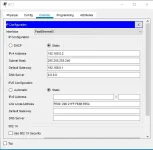
To assign IP address to the PC, just click on the PC icon and go to
IP config.
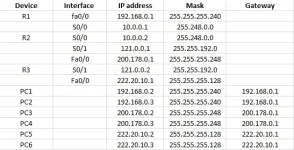
Pls see attached sample for PC1 IP assignment. Just follow the IP addresses on the table.
Step-by-step explanation
 PH
PH

