 PH
PH-
Welcome to PHCorner Forums! Sign up for free to unlock full access and exclusive privileges, including:
- Asking questions about computer and mobile issues
- Discovering internet tips for your mobile network and computer
You are using an out of date browser. It may not display this or other websites correctly.
You should upgrade or use an alternative browser.
You should upgrade or use an alternative browser.
- Status
- Not open for further replies.

Pa help dito TS.
You do not have permission to view the full content of this post. Log in or register now.
You do not have permission to view the full content of this post. Log in or register now.
hsha miss u
Elite
thanks for helping others ts




Lods pa unlock po maraming salamat po
You do not have permission to view the full content of this post. Log in or register now.
You do not have permission to view the full content of this post. Log in or register now.
You do not have permission to view the full content of this post. Log in or register now.
You do not have permission to view the full content of this post. Log in or register now.
You do not have permission to view the full content of this post. Log in or register now.
You do not have permission to view the full content of this post. Log in or register now.
You do not have permission to view the full content of this post. Log in or register now.
You do not have permission to view the full content of this post. Log in or register now.
You do not have permission to view the full content of this post. Log in or register now.
You do not have permission to view the full content of this post. Log in or register now.
You do not have permission to view the full content of this post. Log in or register now.
You do not have permission to view the full content of this post. Log in or register now.

1st Link
Step 1 - Analysis and Algorithm
As per the given question, the required program is implemented in Python programming language.
Module 1 - For Gross salary calculation
Module 2 - For Deductions calculation
Module 3 - For Net Pay Calculation
Salary.py is the final module that implements above three modules.
Gross pay, Deductions and Net Pay is printed to the output.
Use the below formulas for Net pay calculation :
Gross Pay = Numbers of hours * 500
Deductions = Gross Pay - 12 % Tax deduction - Loan amount deduction - Health Insurance premium deduction
Net Pay = Gross pay - Deductions
Step 2 - Python Code
GrossSalary.py
def gross(hour):
return (float(hour) * 500)
SalaryDeductions.py
def deduct(gross, loan, health_ins):
tax = (float(gross) * 0.12)
return float(loan) + float(health_ins) + tax
NetSalary.py
def net(gross, ded):
return float(gross) - float(ded)
Salary.py
import GrossSalary
import SalaryDeductions
import NetSalary
Name = raw_input("Enter the name ")
Hour = raw_input("Enter the number of hours worked ")
Loan = raw_input("Enter the loan amount deducted ")
Health_Insurance = raw_input("Enter the Health Insurance amount deducted ")
Gross = GrossSalary.gross(Hour)
print("Gross Salary is ",Gross)
Deductions = SalaryDeductions.deduct(Gross, Loan, Health_Insurance)
print("Total Deductions ",Deductions)
Net = NetSalary.net(Gross, Deductions)
print("Net Salary is ",Net)
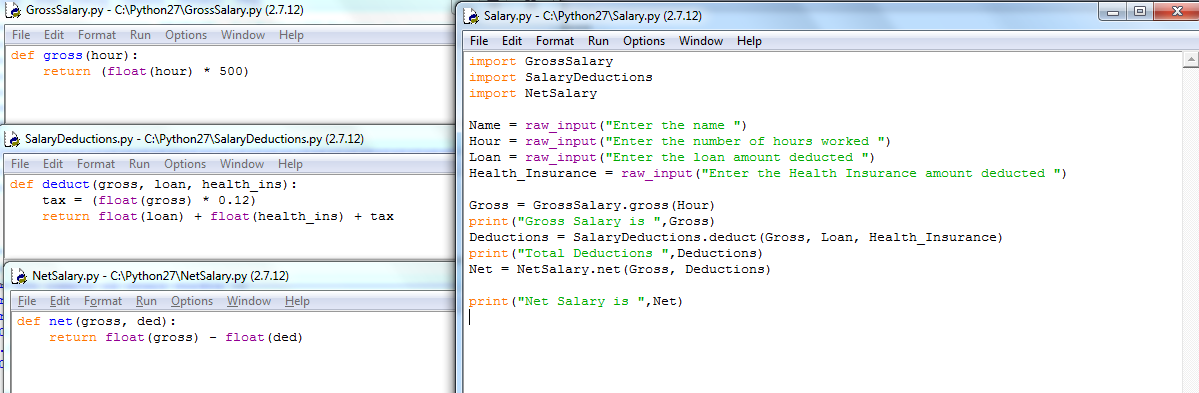
Step 3 - Code Screenshot
Step 4 - Output
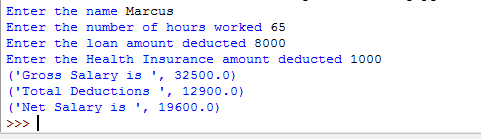
Gross Salary = 65 * 500 = 32500
Deductions:
Tax 12% tax deducted (3900), 8000 loan amount deducted, 1000 health insuarance deducted
Total deductions : 3900 + 8000 + 1000 = 12900
Net Salary = Gross - Deductions
Net Salary = 32500 -12900 = 19600
Thanks.
Step 1 - Analysis and Algorithm
As per the given question, the required program is implemented in Python programming language.
Module 1 - For Gross salary calculation
Module 2 - For Deductions calculation
Module 3 - For Net Pay Calculation
Salary.py is the final module that implements above three modules.
Gross pay, Deductions and Net Pay is printed to the output.
Use the below formulas for Net pay calculation :
Gross Pay = Numbers of hours * 500
Deductions = Gross Pay - 12 % Tax deduction - Loan amount deduction - Health Insurance premium deduction
Net Pay = Gross pay - Deductions
Step 2 - Python Code
GrossSalary.py
def gross(hour):
return (float(hour) * 500)
SalaryDeductions.py
def deduct(gross, loan, health_ins):
tax = (float(gross) * 0.12)
return float(loan) + float(health_ins) + tax
NetSalary.py
def net(gross, ded):
return float(gross) - float(ded)
Salary.py
import GrossSalary
import SalaryDeductions
import NetSalary
Name = raw_input("Enter the name ")
Hour = raw_input("Enter the number of hours worked ")
Loan = raw_input("Enter the loan amount deducted ")
Health_Insurance = raw_input("Enter the Health Insurance amount deducted ")
Gross = GrossSalary.gross(Hour)
print("Gross Salary is ",Gross)
Deductions = SalaryDeductions.deduct(Gross, Loan, Health_Insurance)
print("Total Deductions ",Deductions)
Net = NetSalary.net(Gross, Deductions)
print("Net Salary is ",Net)
Step 3 - Code Screenshot
Step 4 - Output
Gross Salary = 65 * 500 = 32500
Deductions:
Tax 12% tax deducted (3900), 8000 loan amount deducted, 1000 health insuarance deducted
Total deductions : 3900 + 8000 + 1000 = 12900
Net Salary = Gross - Deductions
Net Salary = 32500 -12900 = 19600
Thanks.
2nd link
Step 1
Code:
import random
FirstName = ['Benjamin','Elijah','James','Liam','Lucas','Mary','Noah','Oliver','Patricia','William']
MiddleName = ['Arden', 'Belle', 'Bowie', 'Claire', 'Jude', 'Nash', 'Orion', 'River','Grace','Louise']
LastName = [ 'Brown','Davis','Johnson','Jones','Miller','Moore','Smith','Taylor','Thomas','Wilson']
Names = [None]*10
i=0
while True:
Names = FirstName[random.randint(0,9)]+" "
Names+=MiddleName[random.randint(0,9)]+ " "
Names+=LastName[random.randint(0,9)]
print("Congratulations! Your new name is ", Names)
print("\nDo you want to continue [y/n] : ")
choice = input();
i+=1
if(choice == 'N' or choice == 'n'):
print("\nThank You!");
for x in range(i):
print(Names[x])
break
Step 3
Output Snapshot:
Update ko later kung may snapshot, mahina signal umuulan kasi dito
Step 1
- Data in FirstName list: list contains 10 FirstNames
- Data in MiddleName list: list contains 10 MiddleNames
- Data in LastName list: list contains 10 LastNames
- Import random module and use the random.randint() functionto generate a random number.
- random.randint(0,9) - Generates a random number between 0 - 9.
Code:
import random
FirstName = ['Benjamin','Elijah','James','Liam','Lucas','Mary','Noah','Oliver','Patricia','William']
MiddleName = ['Arden', 'Belle', 'Bowie', 'Claire', 'Jude', 'Nash', 'Orion', 'River','Grace','Louise']
LastName = [ 'Brown','Davis','Johnson','Jones','Miller','Moore','Smith','Taylor','Thomas','Wilson']
Names = [None]*10
i=0
while True:
Names = FirstName[random.randint(0,9)]+" "
Names+=MiddleName[random.randint(0,9)]+ " "
Names+=LastName[random.randint(0,9)]
print("Congratulations! Your new name is ", Names)
print("\nDo you want to continue [y/n] : ")
choice = input();
i+=1
if(choice == 'N' or choice == 'n'):
print("\nThank You!");
for x in range(i):
print(Names[x])
break
Step 3
Output Snapshot:
Update ko later kung may snapshot, mahina signal umuulan kasi dito
3rd Link
Step 1
the python program is an given below :
# Python program for simple calculator
# Function to add two numbers
def add(num1, num2):
return num1 + num2
# Function to subtract two numbers
def subtract(num1, num2):
return num1 - num2
# Function to multiply two numbers
def multiply(num1, num2):
return num1 * num2
# Function to divide two numbers
def divide(num1, num2):
return num1 / num2
print("Please select operation -\n" \
"1. Add\n" \
"2. Subtract\n" \
"3. Multiply\n" \
"4. Divide\n")
# Take input from the user
select = int(input("Select operations form 1, 2, 3, 4 :"))
number_1 = int(input("Enter first number: "))
number_2 = int(input("Enter second number: "))
if select == 1:
print(number_1, "+", number_2, "=",
add(number_1, number_2))
elif select == 2:
print(number_1, "-", number_2, "=",
subtract(number_1, number_2))
elif select == 3:
print(number_1, "*", number_2, "=",
multiply(number_1, number_2))
elif select == 4:
print(number_1, "/", number_2, "=",
divide(number_1, number_2))
else:
print("Invalid input")
Step 2
output of the above program :
Please select operation -
Enter first number : 15
Enter second number : 14
15 + 14 = 29
Step 1
the python program is an given below :
# Python program for simple calculator
# Function to add two numbers
def add(num1, num2):
return num1 + num2
# Function to subtract two numbers
def subtract(num1, num2):
return num1 - num2
# Function to multiply two numbers
def multiply(num1, num2):
return num1 * num2
# Function to divide two numbers
def divide(num1, num2):
return num1 / num2
print("Please select operation -\n" \
"1. Add\n" \
"2. Subtract\n" \
"3. Multiply\n" \
"4. Divide\n")
# Take input from the user
select = int(input("Select operations form 1, 2, 3, 4 :"))
number_1 = int(input("Enter first number: "))
number_2 = int(input("Enter second number: "))
if select == 1:
print(number_1, "+", number_2, "=",
add(number_1, number_2))
elif select == 2:
print(number_1, "-", number_2, "=",
subtract(number_1, number_2))
elif select == 3:
print(number_1, "*", number_2, "=",
multiply(number_1, number_2))
elif select == 4:
print(number_1, "/", number_2, "=",
divide(number_1, number_2))
else:
print("Invalid input")
Step 2
output of the above program :
Please select operation -
- Add
- Subtract
- Multiply
- Divide
Enter first number : 15
Enter second number : 14
15 + 14 = 29
4th Link
Program Explanation
class Employee: #class
def init(self, name, telephone, email): #function
self.name = name #variable
self.telephone = telephone #variable
self.email = email #variable
Emp1 = Employee( #object with values
"ABC",
"123456789",
"ABC@example.com"
)
Emp2= Employee( #object with values
"XYZ",
"987654321",
"XYZ@example.com")
print("Details for employee 1:") #print statement
print("Name:" ,Emp1.name) #print result
print("Email Id:" , Emp1.email) #print result
print("Phone number:", Emp1.telephone) #print result
print("Details for employee 2:") #print statement
print("Name:" ,Emp2.name) #print result
print("Email Id:", Emp2.email) #print result
print("Phone number:", Emp2.telephone) #print result
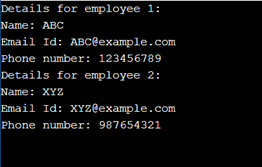
Output
Program Explanation
- Define class Employee
- Define init function with 4 parameter variables self, name, telephone, and email
- Define variable name, telephone and email and use self to make them a property of class Employee
- Define object Emp1 for class Employee
- Mention the data(name, telephone, and email) for Emp1
- Define object Emp2 for class Employee
- Mention the data(name, telephone, and email) for Emp2
- Print the outputs of these objects simultaneously taking into consideration of their properties mentioned in the init function.
- Display the result
class Employee: #class
def init(self, name, telephone, email): #function
self.name = name #variable
self.telephone = telephone #variable
self.email = email #variable
Emp1 = Employee( #object with values
"ABC",
"123456789",
"ABC@example.com"
)
Emp2= Employee( #object with values
"XYZ",
"987654321",
"XYZ@example.com")
print("Details for employee 1:") #print statement
print("Name:" ,Emp1.name) #print result
print("Email Id:" , Emp1.email) #print result
print("Phone number:", Emp1.telephone) #print result
print("Details for employee 2:") #print statement
print("Name:" ,Emp2.name) #print result
print("Email Id:", Emp2.email) #print result
print("Phone number:", Emp2.telephone) #print result
Output
5th Link
Step 1
Requirement -
1. Create House Class with the following properties and methods
a.floorSize
b. noOfFloors
c. noOfDoors
d.switchOn()
e.lightOpen()
f.ovenOpen()
2. Create TownHouse Class inherit the House class
3. Modify the value of the following(noOfFloors and noOfDoors)
4. Instantiate the TownHouse Class once
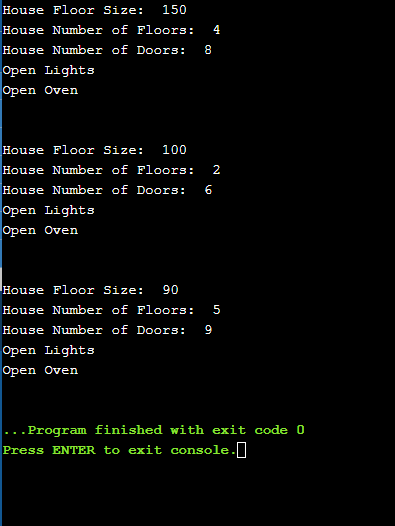
5. Display all the properties
6. Calling the switchOn() will automatically execute lightOpen() and ovenOpen()
Step 2- Code
#House Class
class House:
#Intitalizing House class variables
def init(self,floorSize,noOfFloors,noOfDoors):
self.floorSize=floorSize
self.noOfFloors=noOfFloors
self.noOfDoors=noOfDoors
#Definition of Function switchOn()
#switchOn() function display all variable properties details
#and calls lightOpen() and ovenOpen()
def switchOn(self):
print("House Floor Size: ",self.floorSize)
print("House Number of Floors: ",self.noOfFloors)
print("House Number of Doors: ",self.noOfDoors)
self.lightOpen()
self.ovenOpen()
#Definition of Funtion lightOpen()
def lightOpen(self):
print("Open Lights")
#Definition of Funtion ovenOpen()
def ovenOpen(self):
print("Open Oven")
#TownHouse class inheriting House Class
class TownHouse(House):
##Intitalizing TownHouse class variables using House class init()
def init(self,floorSize,noOfFloors,noOfDoors):
House.init(self,floorSize,noOfFloors,noOfDoors)
#Main function
if name == "main":
#'t' holding object of TownHouse class
t=TownHouse(150,4,8)
#Call switchOn() of TownHouse class
t.switchOn()
print("\n")
#'h1' holding object of House class
h1=House(100,2,6)
#Call switchOn() of House class
h1.switchOn()
print("\n")
#'h2' holding object of House class
h2=House(90,5,9)
#Call switchOn() of House class
h2.switchOn()
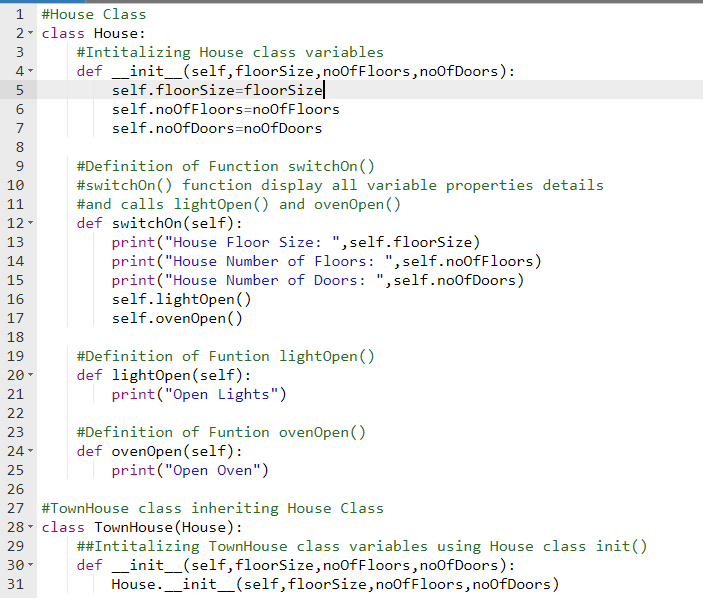
Step 3- Code Screenshot
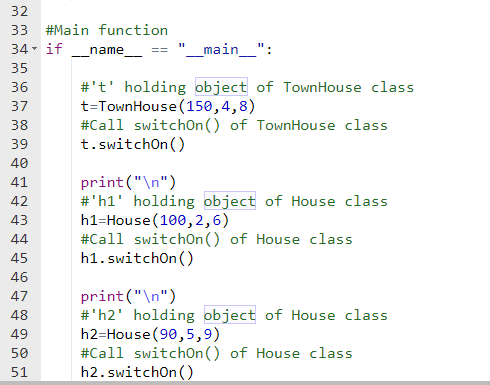
Step 4- Output Screenshot
Step 1
Requirement -
1. Create House Class with the following properties and methods
a.floorSize
b. noOfFloors
c. noOfDoors
d.switchOn()
e.lightOpen()
f.ovenOpen()
2. Create TownHouse Class inherit the House class
3. Modify the value of the following(noOfFloors and noOfDoors)
4. Instantiate the TownHouse Class once
5. Display all the properties
6. Calling the switchOn() will automatically execute lightOpen() and ovenOpen()
Step 2- Code
#House Class
class House:
#Intitalizing House class variables
def init(self,floorSize,noOfFloors,noOfDoors):
self.floorSize=floorSize
self.noOfFloors=noOfFloors
self.noOfDoors=noOfDoors
#Definition of Function switchOn()
#switchOn() function display all variable properties details
#and calls lightOpen() and ovenOpen()
def switchOn(self):
print("House Floor Size: ",self.floorSize)
print("House Number of Floors: ",self.noOfFloors)
print("House Number of Doors: ",self.noOfDoors)
self.lightOpen()
self.ovenOpen()
#Definition of Funtion lightOpen()
def lightOpen(self):
print("Open Lights")
#Definition of Funtion ovenOpen()
def ovenOpen(self):
print("Open Oven")
#TownHouse class inheriting House Class
class TownHouse(House):
##Intitalizing TownHouse class variables using House class init()
def init(self,floorSize,noOfFloors,noOfDoors):
House.init(self,floorSize,noOfFloors,noOfDoors)
#Main function
if name == "main":
#'t' holding object of TownHouse class
t=TownHouse(150,4,8)
#Call switchOn() of TownHouse class
t.switchOn()
print("\n")
#'h1' holding object of House class
h1=House(100,2,6)
#Call switchOn() of House class
h1.switchOn()
print("\n")
#'h2' holding object of House class
h2=House(90,5,9)
#Call switchOn() of House class
h2.switchOn()
Step 3- Code Screenshot
Step 4- Output Screenshot
6th Link
Step 1
Program:
#function for adding record
def addRecord():
#input name
name = input("\nEnter name: ")
#input email
email = input("Enter email: ")
#input address
address = input("Enter address: ")
print()
#open output file
fout = open('records.txt', 'a+')
#write name
fout.write(name +"\n")
#write email
fout.write(email +"\n")
#write address
fout.write(address +"\n\n")
#close the output file
fout.close() # input name from user
#funtioning for displaying the saved records
def viewRecord():
#open file in read mode
fout = open('records.txt', 'r')
print()
#print contents of the file
print(fout.read())
print()
#close the file
fout.close()
#function for clearing all records
def clearRecord():
#open the file
fout = open('records.txt', 'a+')
#remove all contents from the file
fout.truncate(0)
#print message
print("\nNo records found.\n")
#function for exit from program
def Exit():
print("\nThank you")
return exit(0)
#main method
if name == "main":
# while loop always run with true
while True :
#menu
print("A. Add records")
print("B. View records")
print("C. Clear records")
print("D. Exit\n")
#input selection
ch =input("Enter your choice: ")
#for addinh records
if ch == "A":
addRecord()
#for viewing records
elif ch =="B":
viewRecord()
#for clearing records
elif ch =="C":
clearRecord()
#for exiting program
else :
Exit()
Step 2
Screenshot of the program:
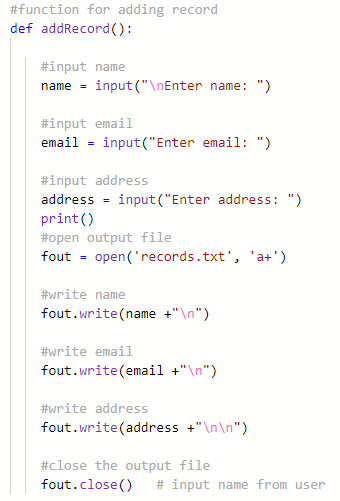
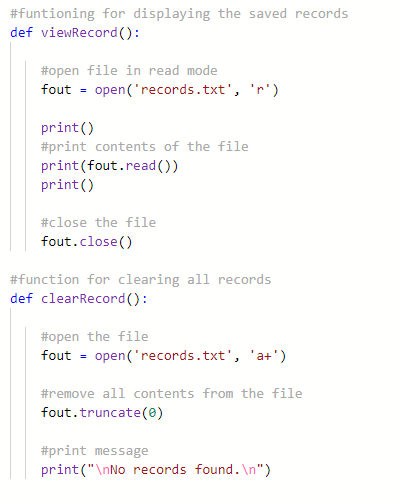
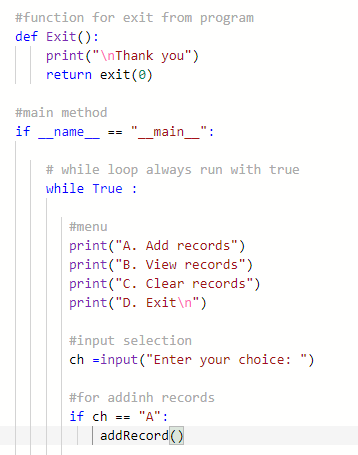
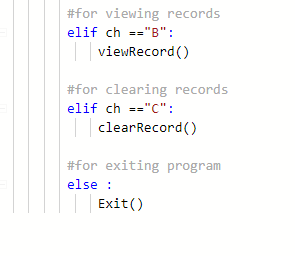
Step 3
Output:
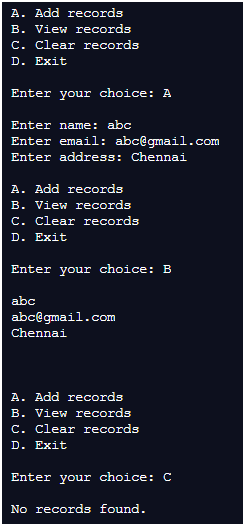
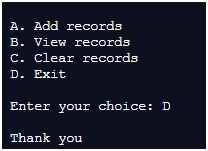
Step 1
Program:
#function for adding record
def addRecord():
#input name
name = input("\nEnter name: ")
#input email
email = input("Enter email: ")
#input address
address = input("Enter address: ")
print()
#open output file
fout = open('records.txt', 'a+')
#write name
fout.write(name +"\n")
#write email
fout.write(email +"\n")
#write address
fout.write(address +"\n\n")
#close the output file
fout.close() # input name from user
#funtioning for displaying the saved records
def viewRecord():
#open file in read mode
fout = open('records.txt', 'r')
print()
#print contents of the file
print(fout.read())
print()
#close the file
fout.close()
#function for clearing all records
def clearRecord():
#open the file
fout = open('records.txt', 'a+')
#remove all contents from the file
fout.truncate(0)
#print message
print("\nNo records found.\n")
#function for exit from program
def Exit():
print("\nThank you")
return exit(0)
#main method
if name == "main":
# while loop always run with true
while True :
#menu
print("A. Add records")
print("B. View records")
print("C. Clear records")
print("D. Exit\n")
#input selection
ch =input("Enter your choice: ")
#for addinh records
if ch == "A":
addRecord()
#for viewing records
elif ch =="B":
viewRecord()
#for clearing records
elif ch =="C":
clearRecord()
#for exiting program
else :
Exit()
Step 2
Screenshot of the program:
Step 3
Output:

Paunlock po ShawtyLynn
You do not have permission to view the full content of this post. Log in or register now.
Maraming salamat po
You do not have permission to view the full content of this post. Log in or register now.
Maraming salamat po
- Status
- Not open for further replies.
About this Thread
-
134Replies
-
791Views
-
20Participants
Last reply from:
papay1234
papay1234
New Topics
-
NETFLIX PREMIUM DIRECT LINKS [PH] #232
- Started by papabanana
- Replies: 0
- 🆓 Freemium Access
-
Crunchyrōll Account FOR ALL | Mega Fan #9
- Started by Beatriz9
- Replies: 0
- 🆓 Freemium Access
-
Net flex paea sa lahat habang mainit pa
- Started by jackal1925
- Replies: 0
- 🆓 Freemium Access
-
Viu + hbo bundle | 1 month for all #8
- Started by unbotheredSnail
- Replies: 0
- 🆓 Freemium Access
-
CRUNCHYR0LL PREMIUM COOKIES [1x] #79
- Started by papabanana
- Replies: 0
- 🆓 Freemium Access
-
Manus AI free 500 credits (invite)
- Started by iLostMyShoE
- Replies: 0
- 🆓 Freemium Access
-
Premium Netflix Cookies 2X
- Started by motugigalap
- Replies: 0
- 🆓 Freemium Access
-
ESIM hindi Sure kung Nagana pa!!! 30Days # 10
- Started by PapaEpz
- Replies: 36
- 🆓 Freemium Access
-
NETFLIX PREMIUM DIRECT LINKS [PH] #231
- Started by papabanana
- Replies: 0
- 🆓 Freemium Access
-
PRIME VIDEO PREMIUM COOKIES [1x] #43
- Started by papabanana
- Replies: 2
- 🆓 Freemium Access
Trending Topics
Online now
- Members online
- 1,032
- Guests online
- 5,737
- Total visitors
- 6,769