 PH
PHHello guys, sorry mejo natagalan naadik na ako magforex. Hehe. Anyway, in this final part of our forex thread series, I'll finally share to you how to setup our EA.
If kakabasa niyo pa lang eto para po sa kaalaman ng lahat meron tayo parts 1 to 3 as pre-requisite/basic knowledge kung naguguluhan ka kung anung meron dito sa part 4.
-->1st Thread. Installation and registration
-->2nd Thread. MT4 Trading Fundamental
-->3rd Thread. EA Requirement Introduction
UPDATE sa EA performance since April 19(nagstart ako ng EA) almost 2 months na.
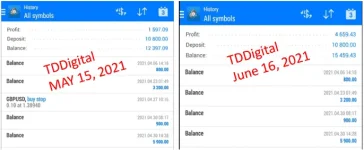
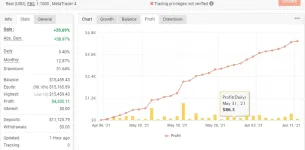
Sa 4th thread na eto, setup instructions sa mga gusto mag auto trade.
Expectations:
1. Fully automatic ang trading. EA na magtratrade sa inyo. After masetup account niyo, tulog na lang kayo nood habang kumikita.
2. Monday to Friday lang ang trading, walang weekend sa forex.
3. You can choose EA trading mode (%/monthly) ofcourse, higher the profit the higher the risk.
Disclaimer:
1. This is an investment. And if so, di natin maeeliminate ang risk. Only invest on what you can afford to lose. Scam ang investment na guaranteed ang kita.
2. Willing to subscribe monthly VPS na 350pesos/6.99usd per month. Kung may kakilala kang may gusto din pwede kayo maghati sa monthly (pag usapan niyo na lang - up to 4 accounts per VPS only maglalag VPS pag madami)
Requirements:
1. Investment cash - ikaw hahawak pera mo walang makakawithdraw na iba. Hindi mo yan isesend kahit kanino. itotopup mo lang yan sa broker mo as trading funds/capital, minimum of 500 pesos (Yes, five hundred ang minimum) Deposit your cash on FBS. Please note that your FBS account should be under my You do not have permission to view the full content of this post. Log in or register now. so I can monitor your account status growth.
In creating your trading account, use:
2. CP with MT4/FBS apps - dito mo monitor pera mo at if gusto mo withdraw go lang. (Nsa 1st thread details)
3. VPS - ONLY do this once accomplished mo na ang 1st at 2nd requirement. Avail mo ung pinakamurang plan nila. You do not have permission to view the full content of this post. Log in or register now..
Upon accomplishing item 3, you should receive an email like this.
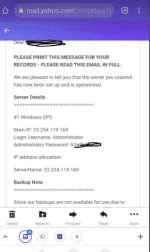
Pag meron ka na yang tatlong requirement, PM mo sa akin the following details:
1. FBS name - I can check if you register with my IB link.
2. MT4 ID
3. MT4 Password
4. MT4 server
requirements 2 to 4 gives the EA the right para magtrade sa account niyo. but not withdraw. you can find these here
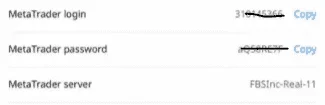
5. VPS IP
6. VPS Login Username
7. VPS Password
requirements 5 to 7 this is where we will install ang desktop MT4 niyo para at iattach ang EA sa account niyo for auto trading 24/5.
Comment nlng guys kung may nakalimutan man ako.
Sharing is caring. <3
If kakabasa niyo pa lang eto para po sa kaalaman ng lahat meron tayo parts 1 to 3 as pre-requisite/basic knowledge kung naguguluhan ka kung anung meron dito sa part 4.
-->1st Thread. Installation and registration
-->2nd Thread. MT4 Trading Fundamental
-->3rd Thread. EA Requirement Introduction
UPDATE sa EA performance since April 19(nagstart ako ng EA) almost 2 months na.
Sa 4th thread na eto, setup instructions sa mga gusto mag auto trade.
Expectations:
1. Fully automatic ang trading. EA na magtratrade sa inyo. After masetup account niyo, tulog na lang kayo nood habang kumikita.
2. Monday to Friday lang ang trading, walang weekend sa forex.
3. You can choose EA trading mode (%/monthly) ofcourse, higher the profit the higher the risk.
- Conservative - 13% gain per month
- Normal - 18% gain per month
- Risky - 25% gain per month
Disclaimer:
1. This is an investment. And if so, di natin maeeliminate ang risk. Only invest on what you can afford to lose. Scam ang investment na guaranteed ang kita.
2. Willing to subscribe monthly VPS na 350pesos/6.99usd per month. Kung may kakilala kang may gusto din pwede kayo maghati sa monthly (pag usapan niyo na lang - up to 4 accounts per VPS only maglalag VPS pag madami)
Requirements:
1. Investment cash - ikaw hahawak pera mo walang makakawithdraw na iba. Hindi mo yan isesend kahit kanino. itotopup mo lang yan sa broker mo as trading funds/capital, minimum of 500 pesos (Yes, five hundred ang minimum) Deposit your cash on FBS. Please note that your FBS account should be under my You do not have permission to view the full content of this post. Log in or register now. so I can monitor your account status growth.
In creating your trading account, use:
- Real/Cent Account
- MT4 platform (if di ka makagawa, gawa ka muna MT5 then add ka nlng ulit sa personal area ng another MT4 account after)
- 1:1000 leverage
3. VPS - ONLY do this once accomplished mo na ang 1st at 2nd requirement. Avail mo ung pinakamurang plan nila. You do not have permission to view the full content of this post. Log in or register now..
Upon accomplishing item 3, you should receive an email like this.
Pag meron ka na yang tatlong requirement, PM mo sa akin the following details:
1. FBS name - I can check if you register with my IB link.
2. MT4 ID
3. MT4 Password
4. MT4 server
requirements 2 to 4 gives the EA the right para magtrade sa account niyo. but not withdraw. you can find these here
5. VPS IP
6. VPS Login Username
7. VPS Password
requirements 5 to 7 this is where we will install ang desktop MT4 niyo para at iattach ang EA sa account niyo for auto trading 24/5.
Comment nlng guys kung may nakalimutan man ako.
Sharing is caring. <3
