 PH
PHKumusta? I hope y'all doing fine.
So this is the tutorial na natutunan ko sa mga masters ko and I want to share it for y'all because this is not mine, this is for us. So yeah Im gonna start.
All you have to do is.
1) Download VMOS Pro (you can google it)
Take note, minsan sa ibang browser di siya nag-DDL after you click this one. So and alternative mong gawin is to DL DuckduckGo or Firefox Browser.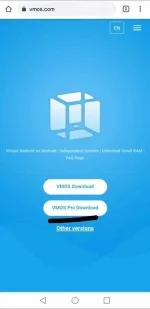
2)Select the + Button on the upper right corner and choose ROM 5.1
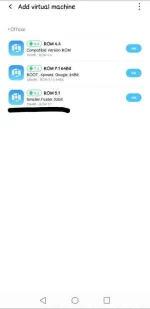
3)After you installation, enter to that ROM.
4) Go to VM Settings and enable the Google Services. (so that you can get an access to google play store)
5) Restart VMOS. Andon na google play.
6) Before you login your google account on VMOS, make sure you have a SIM or GCash payment (medyo dito siguro marami magtatanong paano yung trick na 'to). Dapat yung google account na ilologin mo sa google account ng VMOS ay may payment na kagaya neto. Kung wala ka nito maybe naka-dual sim ka so to enable the SIM billing all you have to do is deactivate yung isang sim. Then try to refresh, until magkaroon ng sim billing yung google play mo. (I hope ma-gets niyo 'tong step na' to)
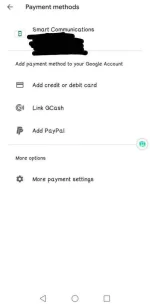
7) Almost done ka na, ang need mo nalang gawin is i-login yung gaccount mo sa gaccount ng VMOS.
8) Install 3xPr3ss VPN sa loob ng VMOS app.
9) So paano yung email sir? Easy lang, download instAddr sa playstore (labas ng VMOS) for temp mail.
10) Gawa ka ng temp mail using that, copy it then punta ka sa VMOS, open the VPN then sign up for 7 days trial, paste it.
11) After niyan, may free 7 days trial ka na ng VPN, so kapag na-expire siya clear data mo lang 3xPr3ss VPN sa VMOS then balik ka sa step 9 and 10.
Gusto ko yung 3xPr3ss VPN hindi dahil sa trick na 'to, nagustuhan ko siya kasi mas okay siya gamitin kesa ibang VPN like for example n3rd VPN, I experienced failure sa connectivity nila which is di ko naexperience so far sa 3xPr3ss.
So ayun lang guys, I hope nakatulong 'to sa inyo.
Segway ko lang din, pa-follow naman sa Lyka App tapos pa-click na din ng ibang mga pictures don, maliit na favor lang. Thank you.
So this is the tutorial na natutunan ko sa mga masters ko and I want to share it for y'all because this is not mine, this is for us. So yeah Im gonna start.
All you have to do is.
1) Download VMOS Pro (you can google it)
Take note, minsan sa ibang browser di siya nag-DDL after you click this one. So and alternative mong gawin is to DL DuckduckGo or Firefox Browser.
2)Select the + Button on the upper right corner and choose ROM 5.1
3)After you installation, enter to that ROM.
4) Go to VM Settings and enable the Google Services. (so that you can get an access to google play store)
5) Restart VMOS. Andon na google play.
6) Before you login your google account on VMOS, make sure you have a SIM or GCash payment (medyo dito siguro marami magtatanong paano yung trick na 'to). Dapat yung google account na ilologin mo sa google account ng VMOS ay may payment na kagaya neto. Kung wala ka nito maybe naka-dual sim ka so to enable the SIM billing all you have to do is deactivate yung isang sim. Then try to refresh, until magkaroon ng sim billing yung google play mo. (I hope ma-gets niyo 'tong step na' to)
7) Almost done ka na, ang need mo nalang gawin is i-login yung gaccount mo sa gaccount ng VMOS.
8) Install 3xPr3ss VPN sa loob ng VMOS app.
9) So paano yung email sir? Easy lang, download instAddr sa playstore (labas ng VMOS) for temp mail.
10) Gawa ka ng temp mail using that, copy it then punta ka sa VMOS, open the VPN then sign up for 7 days trial, paste it.
11) After niyan, may free 7 days trial ka na ng VPN, so kapag na-expire siya clear data mo lang 3xPr3ss VPN sa VMOS then balik ka sa step 9 and 10.
Gusto ko yung 3xPr3ss VPN hindi dahil sa trick na 'to, nagustuhan ko siya kasi mas okay siya gamitin kesa ibang VPN like for example n3rd VPN, I experienced failure sa connectivity nila which is di ko naexperience so far sa 3xPr3ss.
So ayun lang guys, I hope nakatulong 'to sa inyo.
Segway ko lang din, pa-follow naman sa Lyka App tapos pa-click na din ng ibang mga pictures don, maliit na favor lang. Thank you.

 Bm ko muna, Laking Tulong to sakin sa paggawa ng Premium account


