PH
PHProfessora Akira
☯️ SôulNinetãiL☯️
Here 's how to enable experimental features in miui camera
features:
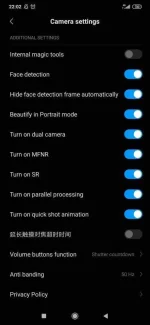
* the chinese character is feature increase the touch focus timeout
*Internal magic tools-
It is supposed to enable some internals tools to increase image quality.
These secret functions of the Xiaomi camera can be disabled if we wish so in a simple way; it is only necessary to delete the created folder.
What are the secret functions that we will activate?
*Activating the Xiaomi camera's secret functions
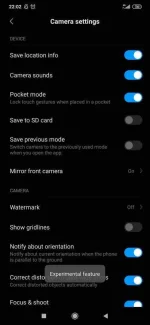
-you will have control over the beauty mode in the selfies. This is activated by default, so it is recommended to deactivate it since it usually achieves unrealistic results.
-We can change the type of auto exposure adjustment for both the rear and front cameras. We recommend to always put it in “centered” unless you have knowledge of photography, since changing it can greatly affect our photos.
-If we see that when taking a photo with HDR, the phone is delayed; we can deactivate the “MFNR” option so that it takes fewer photos to compose the HDR.
These are just some of the secret functions with which you can test and compare results to see which one gets better photos.
Source:mi.com/Tecno-blog
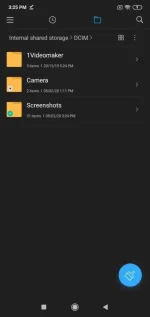
- Open the File Manager in your device.
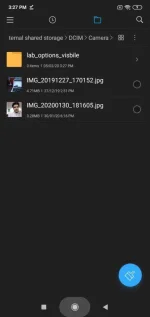
- Go to Internal Storage>DCIM>Camera.
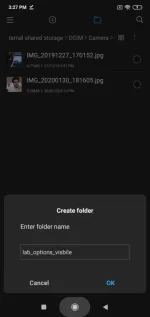
- Tap on the menu button and then tap on Create Folder.
- Name it “lab_options_visible“
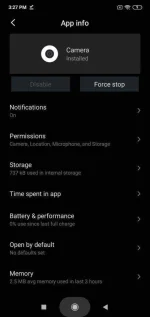
- Now, close the Camera App. To do that, long-press on the Camera app on homescreen and tap on App info. Now, Tap on Force Stop.
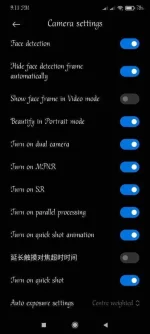
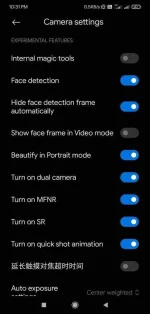
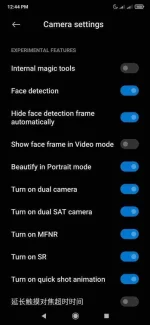
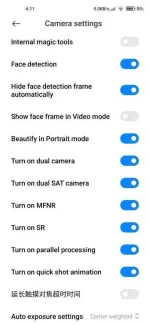
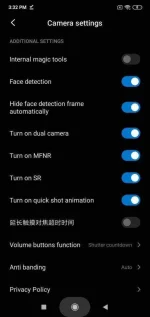
- Again, open the Camera App. Tap on the menu button — Settings. Here you will find new experimental features in a Xiaomi/Redmi phone.
features:
- Hide Face detection frame automatically: Turning this off would be a blessing in disguise for users who keep tapping on the screen to get the face detection frame
- Scene Detection (SR): Turning it off is helpful for users who are looking for a raw picture
- Internal magic tools : activates internal tools to improve the quality of photos and videos.
Face detection : the mobile camera can recognize the face and frame it in a box to improve the result. - *Hide face detection frame automatically : this option hides the box that appears when activating the previous option but keeps the improvements.
* Beautify in Portrait mode : Activate beauty mode in all camera modes.
* Turn on dual SAT camera –camera takes picture with dual camera and then combines them in one picture (every camera shoot's in her best optical range)
*Turn on MFNR : Multi-frame Noise Reduction (MFNR) technology is embedded in the image sensor to enhance pictures taken in super low light and minimize the noise, so you will never have to deal with dark, grainy photos again. - when activated, the device takes 6 consecutive shots which when superimposed and eliminate the noise from the photo.
*Turn on SR : automatic scene optimization - with this option the resolution of the image is enlarged as if the sensor of the mobile were larger.
* Turn on quick shot animation : activate the quick shot animation in the app.
* the chinese character is feature increase the touch focus timeout
*Internal magic tools-
It is supposed to enable some internals tools to increase image quality.
These secret functions of the Xiaomi camera can be disabled if we wish so in a simple way; it is only necessary to delete the created folder.
What are the secret functions that we will activate?
*Activating the Xiaomi camera's secret functions
-you will have control over the beauty mode in the selfies. This is activated by default, so it is recommended to deactivate it since it usually achieves unrealistic results.
-We can change the type of auto exposure adjustment for both the rear and front cameras. We recommend to always put it in “centered” unless you have knowledge of photography, since changing it can greatly affect our photos.
-If we see that when taking a photo with HDR, the phone is delayed; we can deactivate the “MFNR” option so that it takes fewer photos to compose the HDR.
These are just some of the secret functions with which you can test and compare results to see which one gets better photos.
Source:mi.com/Tecno-blog
Attachments
-
 9qDps9e.webp44.8 KB · Views: 207
 -
 Screenshot_2019-10-15-22-02-16-519_com.android.camera.webp36.9 KB · Views: 199
 -
 Screenshot_2019-10-15-22-02-25-375_com.android.camera (1).webp39.2 KB · Views: 161
 -
 Xiaomi-camera-app-with-experimental-features-485x1024.webp32.7 KB · Views: 176
 -
 Create-Folder-in-MIUI-File-Manager-485x1024.webp19 KB · Views: 170
 -
 DICM-In-Filemanager-485x1024.webp17.3 KB · Views: 174
 -
 camera-features-hidden-MIUI-11-485x1024.webp23.5 KB · Views: 157
 -
 Name-a-folder-MIUI-11--485x1024.webp20.1 KB · Views: 158
 -
 Force-Stop-App-Xiaomi-485x1024.webp26.6 KB · Views: 159
 -
 App-info-Xiaomi-homescreen-485x1024.webp47.8 KB · Views: 166