 PH
PH-
Welcome to PHCorner Forums! Sign up for free to unlock full access and exclusive privileges, including:
- Asking questions about computer and mobile issues
- Discovering internet tips for your mobile network and computer
You are using an out of date browser. It may not display this or other websites correctly.
You should upgrade or use an alternative browser.
You should upgrade or use an alternative browser.
🔒 Closed Windows 10 "Sign in to your account"
- Thread starter Swallowtail22
- Start date
- Status
- Not open for further replies.
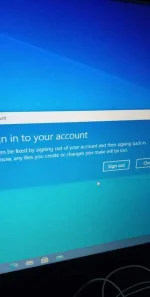
dapat may local admin account ka. i login mo dun.
naka temp profile ka kaya ganyan
pag login mo admin hanapin mo yun tamang profile ng kapatid, sa c:/users, i back mo files
tas sundin mo to sa regedit (per i delete mo yun buong profile sa regedit pag di gumana yun rename)
opened 'regedit' and navigate to the following path:
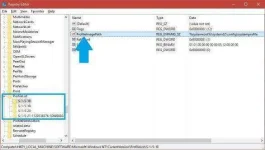
"KEY_LOCAL_MACHINE\SOFTWARE\Microsoft\Windows NT\CurrentVersion\ProfileList"
You will see a list of folders. Look for the ProfileImagePath and look for the user account that is having this issue. When you find it, just delete complete Folder associated with that profile. In this screenshot below, lets pretend that S-1-5-18 was associated with a user named jdoe. The profile path would show "C:\Users\jdoe." You just need to delete the S-1-5-18 because it was associated to that user profile path.
Try logging back in as the user and see if the message goes away. When I logged the user back in, it recreated the profile and instead of being a temporary profile, it saved it as a local profile. Hope this helps, otherwise, I have no idea.
naka temp profile ka kaya ganyan
pag login mo admin hanapin mo yun tamang profile ng kapatid, sa c:/users, i back mo files
tas sundin mo to sa regedit (per i delete mo yun buong profile sa regedit pag di gumana yun rename)
opened 'regedit' and navigate to the following path:
"KEY_LOCAL_MACHINE\SOFTWARE\Microsoft\Windows NT\CurrentVersion\ProfileList"
You will see a list of folders. Look for the ProfileImagePath and look for the user account that is having this issue. When you find it, just delete complete Folder associated with that profile. In this screenshot below, lets pretend that S-1-5-18 was associated with a user named jdoe. The profile path would show "C:\Users\jdoe." You just need to delete the S-1-5-18 because it was associated to that user profile path.
Try logging back in as the user and see if the message goes away. When I logged the user back in, it recreated the profile and instead of being a temporary profile, it saved it as a local profile. Hope this helps, otherwise, I have no idea.
- Status
- Not open for further replies.
Similar threads
About this Thread
-
2Replies
-
444Views
-
3Participants
Last reply from:
MgaAnghel
MgaAnghel
New Topics
-
Realtek audio missing in device manager
- Started by PHC-MERCURIAL
- Replies: 2
- ❓ Computer Discussion & Support
-
Suggest OS para sa budget pc yung lightweight.
- Started by YourR3ze
- Replies: 1
- ❓ Computer Discussion & Support
-
Microsoft copilot personal
- Started by WEIRJD
- Replies: 0
- ❓ Computer Discussion & Support
-
Lock profile or browser?
- Started by heyhey
- Replies: 7
- ❓ Computer Discussion & Support
-
Light/Gaming OS for 4 year old laptop
- Started by Genesis Storm
- Replies: 10
- ❓ Computer Discussion & Support
-
HWID SPOOFER HELP!
- Started by Balisain
- Replies: 0
- ❓ Computer Discussion & Support
-
LIGHTROOM APP PC
- Started by WHOOISDIYAAM
- Replies: 1
- ❓ Computer Discussion & Support
-
Active Directory tutorial
- Started by Allergies
- Replies: 1
- ❓ Computer Discussion & Support
-
Hide Yuzu or any emulator
- Started by izanagi07
- Replies: 1
- ❓ Computer Discussion & Support
-
Phc error in Desktop
- Started by dicode100
- Replies: 3
- ❓ Computer Discussion & Support
Trending Topics
Online now
- Members online
- 761
- Guests online
- 2,056
- Total visitors
- 2,817