🔒 Closed Pa Help po mga sir The disk is Write Protected (HDD)

Status
Not open for further replies.
hdd po sir bali cheapid galing yung laptop sabi ng friend ko nung una hindi po talaga malagyan din kahit folder lang

Tapos nung isang araw po binalik dun sa store then os daw at ni reformat nila pero same lang din po
 
try niyo po ito:
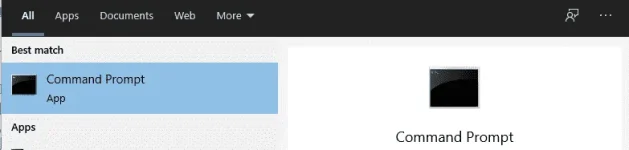
click start then type cmd, then right click po tapos run as administrator
1622450470879.webp


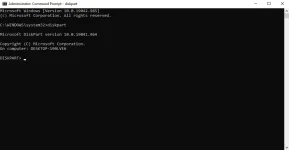
then type po diskpart
1622450523325.webp

Type "list disk" and press Enter
Type "select disk d," replacing the "d" with the drive letter you are working on. Press Enter.
Type "attributes disk clear readonly" and press Enter. After several seconds, Diskpart will inform you that read-only has been cleared.
Type "Exit" and press Enter to close the window.
 
External HDD po ba yan?
win + r. open run command.
type diskpart.
type list disk.
type select disk 2
attributes disk clear readonly.

or
type select disk 2
clean
format fs=ntfs quick

may limit po yung SSD kung ilang times lng sya pede rewrite bka na reach na po yung limit.
 
Status
Not open for further replies.

About this Thread

  • 13
    Replies
  • 370
    Views
  • 4
    Participants
Last reply from:
PHC-MAX

Trending Topics

Online now

Members online
1,103
Guests online
988
Total visitors
2,091

Forum statistics

Threads
2,274,722
Posts
28,957,832
Members
1,233,408
Latest member
0226Mjane
Back
Top