 PH
PHBug Host Request
Forum Contributor
Update  (05.30)
IPv6 fixed | APN settings for ML | + L2TP
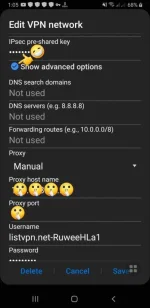
Yung ibang phone, bypass Y⊕ùTùbé and other apps lang ang APN tricks..
So ang solution ko is, gamit pa rin L2TP Vpn phone settings..
Then sa ADVANCE settings ni L2TP, doon ilalagay yung proxy settings.
But convert IPV6 (FFFF) to IP ADDRESS para mapa gana si APN.
Related threads:
Wifi proxy settings
https://phcorner.org/threads/smartbro-pocket-wifi-built-in-vpn-settings.1101122/#post-18412753
Android APN settings
https://phcorner.org/threads/apn-settings-ipv6-ml-wr-and-cod-beta.1099711/#post-18400506
L2TP settings
https://phcorner.org/threads/05-29-...2tp-phone-settings-vpn.1100716/#post-18409284
(05.30)IPv6 fixed | APN settings for ML | + L2TP
Yung ibang phone, bypass Y⊕ùTùbé and other apps lang ang APN tricks..
So ang solution ko is, gamit pa rin L2TP Vpn phone settings..
Then sa ADVANCE settings ni L2TP, doon ilalagay yung proxy settings.
But convert IPV6 (FFFF) to IP ADDRESS para mapa gana si APN.
Related threads:
Wifi proxy settings
https://phcorner.org/threads/smartbro-pocket-wifi-built-in-vpn-settings.1101122/#post-18412753
Android APN settings
https://phcorner.org/threads/apn-settings-ipv6-ml-wr-and-cod-beta.1099711/#post-18400506
L2TP settings
https://phcorner.org/threads/05-29-...2tp-phone-settings-vpn.1100716/#post-18409284