PH
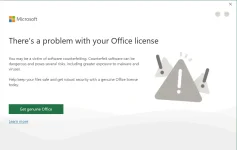
PHMga lods pa-SOS naman po. May nakakaalam po ba pano ayusin prompt error sa MS Office apps na "There's a problem with your Office License".
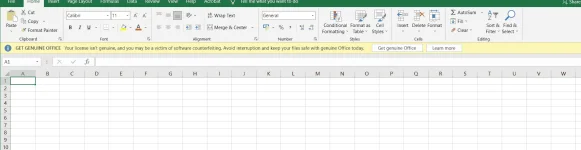
Sa una po eto yung error "Action Needed: Your license isn't genuine......"
So I asked the expert "Google" for advice and it gave me a YouTube tutorial, It worked! Action needed error was gone after disabling/unchecking "connected experience" in Privacy Settings thru option menu. But days later, yung pop up prompt naman na "There's a problem..." ang bumubungad sa akin every time I-open ko yung mga apps. Though working pa rin naman yung mga MS Office apps kaso nakakabother kasi na may laging bumubungad na error sayo. Feeling mo di secure yung pc mo.
REINSTALLING MS OFFICE WILL DO THE TRICK.
Sa una po eto yung error
"Action Needed: Your license isn't genuine......"So I asked the expert "Google" for advice and it gave me a YouTube tutorial, It worked! Action needed error was gone after disabling/unchecking "connected experience" in Privacy Settings thru option menu. But days later, yung pop up prompt naman na "There's a problem..." ang bumubungad sa akin every time I-open ko yung mga apps. Though working pa rin naman yung mga MS Office apps kaso nakakabother kasi na may laging bumubungad na error sayo. Feeling mo di secure yung pc mo.
REINSTALLING MS OFFICE WILL DO THE TRICK.
 . Pero di ko pa po triny magreinstall ng ms office kasi per comments po sa YT, nagpapakita pa rin yung prompt after magreinstall. Tsaka unlike before po kasi kapag expired na or nahuli na ingenuine yung license, usually ang nangyayari nagiging for viewing ng files na lang yung mga apps. Yung other features like mag-edit po ng document ayaw.